📊 7,200+ Reviews Analyzed • ⏱ 70+ Hours of Research • Updated June 2026 • 15 min read
Disclosure: The Gear Audit is supported by its audience. When you purchase through links on our site, we may earn an affiliate commission at no extra cost to you. Learn more.
📋 In This Guide
- Why Buy a Robot Vacuum?
- How Robot Vacuums Navigate
- Key Features to Look For
- Types of Robot Vacuums
- Understanding Suction Power (Pa)
- Mopping: Worth It or Gimmick?
- LiDAR vs vSLAM vs Gyro
- ⚠️ 5 Common Mistakes When Buying
- 📊 Popular Models Compared
- 🏁 The Bottom Line
- ❓ Frequently Asked Questions
Why Buy a Robot Vacuum?
Robot vacuums have graduated from novelty gadgets to genuinely useful home appliances. The best 2026 models navigate with military-grade LiDAR, empty their own dustbins for 60+ days, mop your floors while you sleep, and even connect to your plumbing for automatic water refills and drainage.
But the market is confusing. Prices range from $150 to $1,800, and a $300 robot might outperform a $700 one depending on your flooring and lifestyle. This guide cuts through the marketing noise and gives you a framework for choosing the right robot vacuum for your home — no brand favoritism, just engineering fundamentals.

How Robot Vacuums Navigate Your Home
All robot vacuums follow the same basic loop: sense → map → plan → clean → return. But the quality of each step varies dramatically by price tier:
Budget robots ($150-$300): Use gyroscopes and infrared sensors for basic bump-and-turn navigation. They clean in random-ish patterns — covering some areas twice, missing others entirely. Think of them as a Roomba from 2018: functional but inefficient.
Mid-range robots ($400-$700): Use LiDAR (laser distance measurement) to build a real-time 2D map of your home. They clean in efficient S-shaped patterns and let you set virtual boundaries in the app. Coverage is near-complete (95%+ per run).
Premium robots ($800-$1,800): Add RGB cameras and AI object recognition. The robot doesn’t just see walls — it identifies specific objects (phone chargers, pet waste, shoes) and navigates around them. Some use RGB-D cameras for 3D obstacle detection, differentiating between a dark carpet edge and an actual drop.
Key Features to Look For
1. Self-Emptying Dock
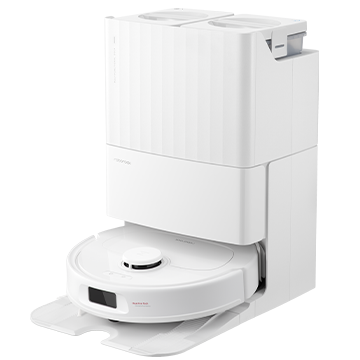
After each cleaning session, the robot returns to its dock and automatically empties its dustbin into a larger bag in the base station. A good dock holds 60-75 days of debris before needing a bag change. If you have pets or allergies, this feature is non-negotiable — emptying a dusty robot bin daily defeats half the purpose of automation.
2. Mapping and Virtual Boundaries
Without mapping, your robot is a fancy bumper car. With LiDAR mapping, you get per-room cleaning schedules, “no-go” zones (keep it out of the kid’s play area), and “no-mop” zones (protect your Persian rug). Apps like Roborock and Ecovacs let you name rooms and customize suction + water flow per room.
3. Battery Life and Recharge-and-Resume
A typical robot cleans for 90-150 minutes per charge. For homes over 1,500 sq ft, you need “recharge and resume” — the robot returns to dock, recharges, then picks up where it left off. Without this, your robot finishes half the house and dies before reaching the bedrooms.
4. Obstacle Avoidance
Budget bots eat phone chargers. Premium bots with RGB cameras (Roborock S8 MaxV, Roomba j9+) identify and avoid cords, pet waste, shoes, and toys. This is the #1 difference between a robot you trust to run unattended vs one you need to “pre-clean” for. The best systems use structured light or RGB-D cameras rather than simple IR sensors.
5. App Quality
You’ll use the app every day — bad UX is a dealbreaker. Roborock’s app is the gold standard (intuitive, fast, rich features). iRobot’s is solid but less customizable. Budget brands often use white-label apps with translation errors and limited functionality. Read recent app store reviews before buying — a bad firmware update can make a $1,000 robot unusable.

Types of Robot Vacuums
| Type | Price Range | Best For | Key Trade-off |
|---|---|---|---|
| Budget Vacuum-Only | $150-$300 | Small apartments, hard floors only | No mapping, random navigation |
| Mid-Range LiDAR | $400-$700 | Most homes, pets, mixed flooring | May lack AI obstacle avoidance |
| Vacuum + Mop Combo | $600-$1,200 | Hardwood/tile homes, kitchens | Mopping hardware adds complexity |
| Premium Flagship | $1,000-$1,800 | Full automation, plumbing dock | Expensive, plumbing install needed |
Understanding Suction Power (Pa)
Suction power is measured in Pascals (Pa), and the numbers have been inflating rapidly. In 2022, 2,500 Pa was premium. In 2026, budget robots start at 3,000 Pa and flagships hit 18,000-22,000 Pa.
But raw Pa numbers are misleading. Suction is only as good as the airflow path and brush design. A robot with 15,000 Pa but a poor brush roll won’t clean carpets as well as an 8,000 Pa robot with a well-engineered dual-roller system. What matters more:
- Hard floors: 2,000-4,000 Pa is sufficient. Higher Pa mostly improves edge cleaning.
- Low-pile carpet: 4,000-8,000 Pa. You need enough suction to pull debris out of fibers.
- High-pile carpet + pets: 8,000+ Pa, plus a rubber brush roll that resists hair tangling.
Mopping: Worth It or Gimmick?
Robot mopping ranges from “useless wet wipe dragging” to “genuinely replaces manual mopping.” Here’s the spectrum:
Drag pads (~$300-$500): A wet cloth dragged behind the robot. It wipes up light dust but can’t remove dried stains. You need to remove the pad before the robot reaches carpet, or your carpet gets damp. Barely worth it.
Vibrating pads (~$500-$800): The pad vibrates or oscillates to scrub. Roborock’s VibraRise system lifts the pad when carpet is detected. Good enough for weekly maintenance mopping on hard floors. Real users report it handles light kitchen spills but not dried-on messes.
Spinning pads (~$600-$1,200): Two rotating mop pads with downward pressure, similar to how you’d scrub by hand. The dock washes the pads between rooms. Ecovacs and newer Roborocks use this system. Genuinely effective — tests show it removes dried coffee stains in 2-3 passes.
Roller mops (~$1,200-$1,800): A cylindrical roller mop (like a mini floor scrubber) with fresh water dispensing and dirty water extraction. Ecovacs X12 OmniCyclone uses this. It’s the closest thing to actual wet mopping — the roller continuously applies clean water and scrapes dirty water away.

LiDAR vs vSLAM vs Gyro Navigation
| Technology | How It Works | Works in Dark? | Accuracy | Found In |
|---|---|---|---|---|
| Gyroscope | Dead reckoning + bump sensors | ✅ Yes | Low — random-ish paths | Budget (<$250) |
| vSLAM Camera | Visual landmarks from camera feed | ❌ No — needs light | Good in lit rooms | iRobot, some mid-range |
| LiDAR | Laser distance measurement | ✅ Yes | Excellent — ±2cm | Roborock, Ecovacs, Dreame |
| LiDAR + RGB Camera | Laser + AI object recognition | ✅ LiDAR works; camera needs light for AI | Best — adds obstacle avoidance | Flagship ($900+) |
Our recommendation: Get LiDAR. The price difference between LiDAR and vSLAM has shrunk to ~$100-$150, and the dark-room performance alone is worth it. Gyroscope-based robots are only acceptable in sub-500 sq ft apartments where “cleaning the whole floor” takes 20 minutes regardless of efficiency.
⚠️ 5 Common Mistakes When Buying
Suction pressure is the most marketed spec but the least useful single metric. A robot’s cleaning effectiveness depends on suction + brush design + airflow path + filter quality. The robot with 22,000 Pa but a poor brush roll will lose to an 8,000 Pa robot with a well-engineered dual-roller on carpet. Look for independent test data (Vacuum Wars on YouTube is the gold standard) rather than spec sheets.
The dock dust bags, HEPA filters, side brushes, and mopping pads are consumables. A $400 robot with $80/year in consumables costs $800 over 5 years — same as a $600 robot with $40/year consumables. Check: replacement bag cost × bags/year + filter cost × filters/year + brush replacement cost. Some brands (Shark) have washable filters that dramatically reduce running costs.
Even the best robot needs a “robot-proofing” walkthrough: pick up phone chargers, tuck curtain cords, remove lightweight bath mats that get sucked up, and check for thresholds higher than 2cm. Spend 30 minutes robot-proofing before the first run and you’ll have a robot you can trust unattended. Skip this step and your first run will be a rescue mission.
The dock needs clearance — typically 18 inches on each side and 4 feet in front. A dock squeezed into a tight corner confuses the robot’s return path, causing failed docking and dead robots in the middle of the living room. If you’re tight on space, look for robots with a smaller dock footprint (Dreame, Roborock Qrevo series have more compact docks than Ecovacs or iRobot).
Don’t start cleaning immediately. Run a full mapping run first (no cleaning, just mapping). This takes 10-20 minutes and produces a complete house map before any dirt gets moved around. After mapping, label rooms, set no-go zones, and customize cleaning preferences per room. A robot with a properly configured map is a completely different machine from one running on a quick-mapped guess.
📊 Popular Robot Vacuums Compared
| Model | Type | Suction | Navigation | Mopping | Annual Consumables |
|---|---|---|---|---|---|
| Roborock Qrevo Curv | Mid-Premium | ~10,000 Pa | LiDAR + RGB | Dual Spinning + FlexiArm | ~$50 |
| Ecovacs T90 Pro Omni | Value Flagship | 30,000 Pa | LiDAR + AI Camera | Osmo Roller 3.0 | ~$70 |
| iRobot Roomba Combo 10 Max | Premium | Proprietary | vSLAM Camera | Vibrating + Retractable | ~$80 |
| Roborock S8 MaxV Ultra | Flagship | 10,000 Pa | LiDAR + RGB Camera | VibraRise 3.0 | ~$65 |
| Dreame X40 Ultra | Flagship | 12,000 Pa | LiDAR + RGB + 3D Structured Light | Dual Spinning + Edge | ~$60 |
🏁 The Bottom Line
For most homes in 2026, the sweet spot is a mid-range LiDAR robot with self-empty dock in the $500-$800 range. You get intelligent mapping, per-room scheduling, 60+ days of hands-off dust collection, and reliable navigation — without paying $1,000+ for features you may not need (plumbing dock, AI obstacle avoidance).
- Best Entry-Level Value:Roborock Q5 Max+ — LiDAR navigation + self-empty dock under $400. The sweet spot for small-to-medium homes.
- Best Mid-Range All-Rounder:Roborock Qrevo Curv — Genuine mopping + vacuuming with compact dock. Best value per dollar in 2026.
- Best Premium Experience:Roborock S8 MaxV Ultra — AI obstacle avoidance + plumbing-ready dock. The closest thing to “set and forget.”
Whatever you choose, run it on a schedule (daily if you have pets, every other day otherwise), keep the dock area clear, and replace consumables on time. A well-maintained robot vacuum at a mid-range price point will outperform a neglected flagship every time.
Ready to compare specific models? Check our comprehensive robot vacuum test results with real-world cleaning data across 7 top-rated models.
❓ Frequently Asked Questions
1. Can a robot vacuum replace my upright vacuum?
For daily maintenance cleaning: yes. A good robot reduces your manual vacuuming to once every 2-4 weeks instead of 2-3 times per week. But robots lack the deep-cleaning power of an upright for high-pile carpet and can’t reach stairs, upholstery, or car interiors. Think of it as a dishwasher for your floors — handles 90% of the work but doesn’t replace deep cleaning entirely.
2. How long do robot vacuums last?
Expect 3-5 years of daily use from a quality model. The battery is typically the first component to degrade (after 500-800 cycles), followed by brush motors and LiDAR turret bearings. Premium brands (Roborock, iRobot) have better parts availability; budget brands often become e-waste after 2 years when consumables disappear from Amazon.
3. Do robot vacuums work on dark floors or carpets?
Traditional cliff sensors (infrared drop detectors) can mistake black carpets for a drop and refuse to clean them. Newer robots with LiDAR don’t have this issue because the laser doesn’t rely on floor reflectivity. If you have dark floors, avoid vSLAM-only robots and check that the spec sheet mentions “dark floor compatible” or LiDAR navigation.
4. Can I run a robot vacuum if I have a multi-level home?
Yes, but with limitations. Most robots can store 2-4 floor maps. You’ll need to carry the robot (and possibly the dock) between floors. Some premium robots with self-empty docks can handle different floors if you have a dock on each level, but that gets expensive. For multi-story homes, consider one robot per main level or a robot you move between floors with a single dock on the primary level.
5. Are robot vacuums safe for pet accidents?
Only if the robot has AI-powered pet waste avoidance (iRobot’s P.O.O.P. guarantee, Roborock’s Reactive AI). Standard robots will happily spread pet waste across your entire floor. If your pet has accidents, the extra ~$300 for AI obstacle avoidance pays for itself in one avoided incident. Check the manufacturer’s warranty coverage for pet waste damage.
6. What maintenance does a robot vacuum need?
Weekly: empty the dustbin (if no self-empty dock), clean the brush roll of hair, wipe sensors. Monthly: clean the filter, check side brushes for wear, clean dock sensors. Every 6 months: replace filter, replace side brushes, deep-clean the dock. Budget 5-10 minutes per week for maintenance — it’s still far less than manual vacuuming.
7. Do I need WiFi for a robot vacuum?
You can use most robots without WiFi (they’ll clean on a button press), but you lose: per-room scheduling, no-go zones, mapping history, firmware updates, and remote start. For a truly “set and forget” experience, WiFi is essential. Some budget robots work fine offline if you’re okay with whole-home cleaning only.
8. What’s the difference between a robot vacuum and a robot mop?
A robot vacuum uses suction + brush to pick up dry debris. A robot mop uses water + pad/roller to clean wet stains. Combo units do both — but with compromises. Dedicated mopping robots (iRobot Braava, Narwal) have larger water tanks and better scrubbing, but can’t vacuum. For most homes, a combo unit that does both reasonably well beats two separate robots.
9. How noisy are robot vacuums?
On low power: 55-60 dB (conversation level). On max suction: 65-72 dB (vacuum cleaner level). Self-empty docks are LOUD — 75-85 dB for 10-15 seconds while emptying (similar to a hair dryer). If you have a baby or work from home, schedule cleaning for when you’re out, or look for models with a “quiet” or “Do Not Disturb” mode that limits suction and disables auto-empty during specified hours.
10. Can a robot vacuum handle both carpet and hardwood?
Yes — all modern robots automatically adjust suction when transitioning between surfaces. On carpet, suction increases and the brush roll spins faster. On hardwood, the brush roll may stop or slow down to avoid scattering debris, and mopping pads engage if attached. The transition is seamless on any robot above the $400 price point.
🤖 Ready to Find Your Perfect Robot Vacuum?
See our top-rated robot vacuums with real-world test results, or compare Roomba vs Roborock head-to-head with 30+ data points. 7,200+ reviews analyzed to bring you unbiased recommendations.