USB Microphone Setup for Calls, Streaming and Podcasts
By The Gear Audit Team · Original specification research September 9, 2026.
The Short Answer
Build the setup around speaking distance, pickup direction, input level and monitoring before adding processing. Shure MV7+ is the flexible USB-C/XLR path, RØDE NT-USB+ is the desktop-ready USB path with zero-latency monitoring, and the original Razer Seiren Mini RZ19-03450 is the compact PC option controlled in software. The right choice depends on the connection and controls your workflow actually needs.
Choose a setup around your workflow
Use the Shure MV7+ guidance when one microphone must work directly with a device and through an audio interface.
Use the RØDE NT-USB+ path when an included stand, pop filter and headphone mix controls suit the station.
Use the original Razer Seiren Mini path when software level control and a detachable tilting stand are sufficient.
Build a repeatable setup
| Step | Action | What to listen for |
|---|---|---|
| Aim | Use the exact manual to identify the active end or side and point it toward the voice | A clear voice without compensating for incorrect aiming with excess gain |
| Position | Start with the maker’s distance guidance, then keep the distance consistent | Changes in level, plosives and room sound as you move |
| Set input level | Watch the recording meter during normal and louder speech | No clipping, with reserve for emphasis |
| Monitor | Use direct monitoring where available and avoid an unintended second software monitor | Whether an echo is in the monitoring path rather than the recording |
| Check the mount | Type and move the desk as you normally would | Impacts or vibration that require a different position or mount |
| Add processing | Compare a clean sample with only the processing you need | Whether noise reduction or compression damages words or changes tone |
Follow the exact microphone guide
Shure MV7+: choose the USB-C or XLR signal path first

Best for: A podcast or streaming setup that starts with direct USB-C recording but may later move to an audio interface or use USB and XLR at the same time.
Pros
- Two output paths support different rigs. USB-C connects directly to a compatible computer, phone or tablet, while passive XLR connects to a mixer or interface.
- Auto Level can simplify changing voice levels over USB. Shure says it adjusts gain in the moment, which is useful when a speaker does not hold one distance or volume.
- A 3.5 mm monitor output is built in. Latency-free headphone monitoring lets you check the microphone signal without routing it back through recording software.
Cons and trade-offs
- The USB processing does not carry into passive XLR. Shure says software settings do not affect the XLR output, so the interface or mixer must handle that path.
- A stand depends on the variant or bundle. The image’s arm is not evidence that a base MV7+ offer includes one; compare the exact package before assuming the desk mount is covered.
- Lightning iOS devices need another cable. Shure directs those buyers to a USB-C-to-Lightning accessory, which adds a compatibility and purchase check.
Use another setup if: You need a stand in every package or expect one software configuration to process both USB and passive XLR. RØDE is the clearer desktop-ready bundle, while Razer is simpler when PC software control is enough.
Our recommendation
Use the MV7+ guide when connection flexibility matters more than a one-box desk setup. Decide which output reaches the recording first, then set gain, monitoring and processing for that path instead of assuming the USB controls follow the XLR cable.
Price listing: Shure MV7+ — White, microphone only.
RØDE NT-USB+: build a monitored USB desk station
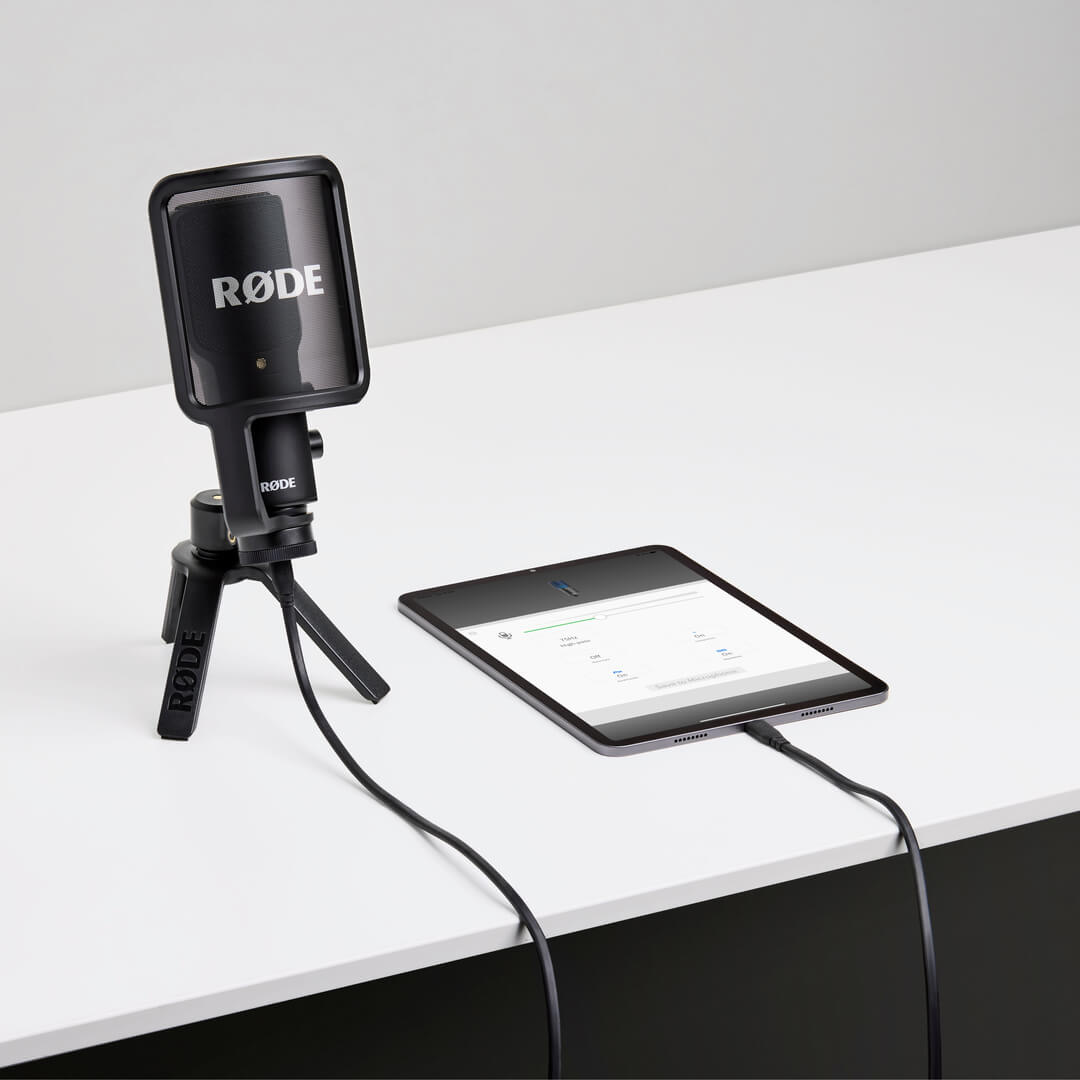
Best for: A single-speaker desk setup that needs direct headphone monitoring, a hardware monitor mix and the supplied desktop stand and pop filter.
Pros
- Zero-latency monitoring has dedicated controls. The headphone output, level and mix controls help separate the live mic signal from computer playback without a distracting software round trip.
- The starting mount and pop filter are included. The desktop stand, ring mount and detachable pop filter reduce the number of pieces needed for the first setup.
- Its class-compliant USB output covers several device types. RØDE lists computers, smartphones and tablets, so the mic can move between compatible USB hosts.
Cons and trade-offs
- It is a USB microphone rather than a USB/XLR bridge. Choose Shure if a future mixer or interface connection is already part of the plan.
- Lightning iOS requires a sold-separately cable. RØDE specifies an Apple-certified Lightning accessory such as the SC19, so the supplied USB cable is not the whole connection plan for those devices.
- APHEX processing depends on supported RØDE software. Confirm the app and device combination if those effects are part of your reason to choose it.
Use another setup if: You need XLR, already own a preferred arm and interface, or cannot confirm the required mobile cable and software. The included desktop pieces are most valuable when you will actually use them.
Our recommendation
Use NT-USB+ for a repeatable USB desk station where hearing the direct voice and computer mix matters. Start with the supplied stand, then move the mic only if a typing-and-desk-movement recording shows that the position needs to change.
Price listing: RØDE NT-USB+.
Razer Seiren Mini RZ19-03450: a compact, software-controlled PC setup

Best for: PC calls or streams where a small footprint and basic software input control matter more than onboard buttons, headphone monitoring or XLR.
Pros
- The detachable tilting stand suits a small desk. It gives the original RZ19-03450 a simple position adjustment without assuming a boom arm is included.
- A front-facing supercardioid pickup pattern. This suits a speaker facing the active side from a consistent position; Razer recommends starting about 8 inches (20 cm) away rather than speaking into the top.
- Synapse is not required. Input volume can be set in Windows or the recording, streaming or call app, which keeps the control path straightforward.
Cons and trade-offs
- There are no onboard controls. Level changes require the operating system or app, so quick hardware mute or gain adjustments are not available on the mic.
- The original model uses Micro-USB. Do not buy it expecting the USB-C connection found on newer similarly named products.
- Console support is not guaranteed. Razer describes the Seiren series as PC-designed, making this a poor choice when PlayStation, Xbox or Switch is the primary host.
Use another setup if: You need onboard mute or level controls, direct headphone monitoring, USB-C, XLR or dependable console support. The MV7+ and NT-USB+ address more complex monitoring and connection needs.
Our recommendation
Use this setup guidance only for the original Seiren Mini RZ19-03450. Aim the active side toward the speaker, start near Razer’s stated distance, set level in the actual call or recording path, and save that position so later sessions are repeatable.
Search Amazon for Razer Seiren Mini RZ19-03450
Adapt the workflow to the task
- Calls: check the meeting app’s automatic gain and noise suppression as well as the microphone settings. Ask a test participant to assess the receiving side when practical.
- Streaming: record a sample with normal game or desktop audio and check the voice balance. Separate tracks can make later adjustment easier where supported.
- Podcasts: keep mouth distance consistent and capture an unprocessed track when the software permits.
- Instruments: audition placement and room reflections separately; a voice preset does not establish suitability.
Save the working input level, app setting and microphone position so the next session starts from a repeatable baseline. Change one major variable at a time when troubleshooting.
Frequently asked questions
What should I adjust before adding noise reduction?
Check pickup direction, mouth distance and input level first. Record normal and louder speech, then listen for clipping, plosives and changes in room sound.
Why do I hear an echo in my headphones?
Check whether direct monitoring and software monitoring are both active. An unintended duplicate path can sound like an echo even when the recorded track is clean.
Do Shure MV7+ software settings apply over XLR?
No. Shure says software settings do not affect the passive XLR output. Configure the mixer or interface used by that signal path.
Does RØDE NT-USB+ include a stand and pop filter?
RØDE lists a desktop stand, ring mount and pop filter in the box. A Lightning iOS connection requires a separately sold Apple-certified cable.
Is this the Razer Seiren V3 Mini?
No. This guide references the original Seiren Mini RZ19-03450 with Micro-USB, a detachable tilting stand and no onboard controls.
Research method, primary sources and limitations
Amazon price check: Displayed prices come from Amazon’s product API for the named US listing, with a check time and a validity window under one hour. No numerical Amazon rating is shown because the current API responses did not supply usable review data. Pricing checks do not change the specification-research date.
Buying-advice update: September 13, 2026. Original specification research: September 9, 2026. We used exact manufacturer guides to check connections, pickup design, monitoring, controls, included accessories and compatibility. The setup workflow is editorial guidance; we did not measure microphone quality, noise rejection, latency or room acoustics.
Price cards show a direct product link when a qualifying current Amazon offer is available. Other buttons are labelled as model searches. Confirm the exact model, connector, mount, cable, condition, seller and warranty. See our microphone shortlist and research methodology.
Primary sources: Shure MV7+ guide; RØDE NT-USB+ product page; Razer Seiren Mini RZ19-03450 support page.
CERTAIN CONTENT THAT APPEARS ON THIS SITE COMES FROM AMAZON. THIS CONTENT IS PROVIDED “AS IS” AND IS SUBJECT TO CHANGE OR REMOVAL AT ANY TIME.
Affiliate disclosure
As an Amazon Associate, The Gear Audit earns from qualifying purchases. We may earn an affiliate commission when you buy through our links, at no extra cost to you. Read our full affiliate disclosure.