Noise-Canceling Headphones by Device and Connection
By The Gear Audit Team · Original specification research September 9, 2026; manufacturer-source and buying-advice check September 20, 2026.
Quick answer: list every source before choosing ANC
For each phone, computer, game console and travel screen, write down Bluetooth, USB-C or analog output and whether calls must work. Sony WH-1000XM5 Black, Bose QuietComfort Ultra Headphones (2nd Gen) Black and Apple AirPods Max 2 Midnight provide three concrete examples below. A connector or codec on one side does not establish support at the other.
Check cable and adapter, and whether audio works when the headphone battery is empty.
Confirm the product supports USB audio rather than charging alone, plus microphone behavior.
Check codec and app features on both source and headset, including software versions.
Map the devices you actually use
| Source | Question | Next check |
|---|---|---|
| Android phone | Which optional Bluetooth codec and app functions are supported? | Compare the exact phone and headphone support documents. |
| iPhone, iPad or Mac | Which features require a particular OS, compatible content or account? | Separate basic Bluetooth from ecosystem features. |
| Work computer | Is Bluetooth or companion-app installation permitted? Does USB audio and microphone input work? | Ask IT about permitted paths and verify headset’s USB behavior. |
| Seatback or analog source | Which connector and adapter, and will audio play with empty battery? | Check passive operation explicitly. |
| Game console | Are output and chat mic supported on the exact console? | Read both manufacturers’ connection guides; do not infer low latency. |
Keep Bluetooth, USB and analog separate
Bluetooth audio may be basic SBC/AAC or an optional codec when both endpoints agree. Sony lists LDAC, but a source without LDAC cannot activate it. USB-C can be charging only, digital audio, or both. Sony’s XM5 cannot play music during charging; second-generation Bose can play USB audio while charging; Apple Max 2 supports lossless and ultra-low-latency audio over a compatible USB-C cable/source. Analog headphones may need power for ANC even when the cable carries passive sound.
Multipoint, automatic ecosystem switching and stereo audio are separate functions. Verify the exact device combinations and call behavior, including whether work policy allows the app that exposes settings.
Run the checklist with three models
Sony WH-1000XM5 Black: analog fallback and source-dependent LDAC

Who it suits: An analog-screen traveler with a compatible cable/adapter, or a listener whose source supports LDAC. Sony documents passive audio with power off, but ANC needs battery; cable connection disables Bluetooth and moves controls/call mic to the source.
Pros
- Passive analog playback offers an empty-battery fallback.
- LDAC is an additional option with a compatible source.
- The detachable cable covers a suitable 3.5 mm source without wireless pairing.
Cons and trade-offs
- Music is unavailable during USB charging.
- Passive cable audio cannot provide unpowered ANC.
- Wired calls and controls no longer behave like Bluetooth headset calls.
Choose something else if: USB charge-and-listen at a computer is the primary use.
Our recommendation
Choose XM5 when analog backup answers a real device on your list. Test the exact adapter and source, then assess ANC and fit separately.
Price listing: Sony WH-1000XM5 — Black.
Bose QuietComfort Ultra Headphones (2nd Gen) Black: USB audio at a desk
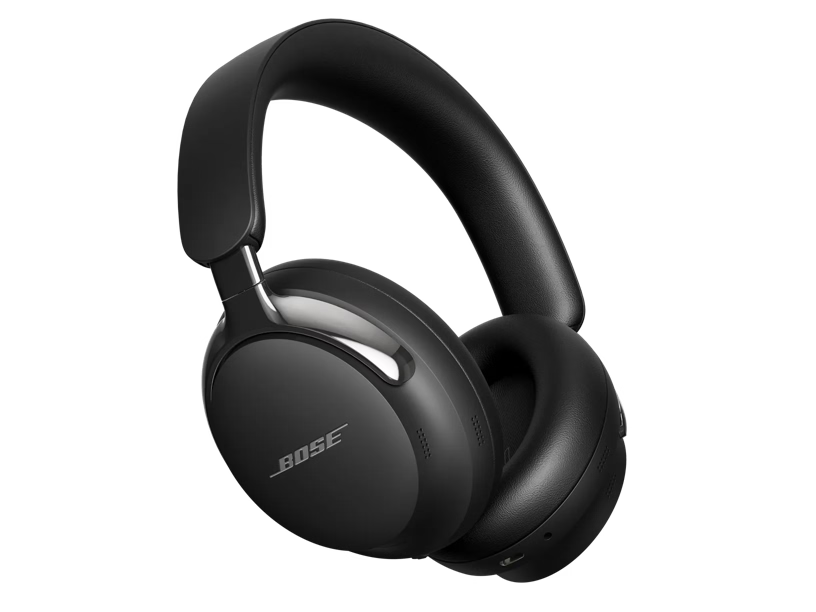
Who it suits: A compatible computer user who needs digital USB audio while charging and may also use its supplied analog cable. Bose lists 16-bit 44.1/48 kHz for USB, plus Quiet/Aware/Immersive modes.
Pros
- USB audio and charging together support a long desk session.
- An analog cable offers another compatible source route.
- Listening modes can change as surroundings or content change.
Cons and trade-offs
- The USB format specification is not a 24-bit/96 kHz path.
- Immersive Audio has a shorter published runtime than Quiet/Aware.
- Its lack of IP rating makes wet exercise a different buying problem.
Choose something else if: Empty-battery passive analog listening is the deciding requirement.
Our recommendation
Choose the exact 2nd Gen for a compatible USB desk setup, then verify microphone and app behavior in your actual meeting software.
Price listing: Bose QuietComfort Ultra Headphones (2nd Gen) — Black.
Apple AirPods Max 2 Midnight: Apple features and USB-C audio
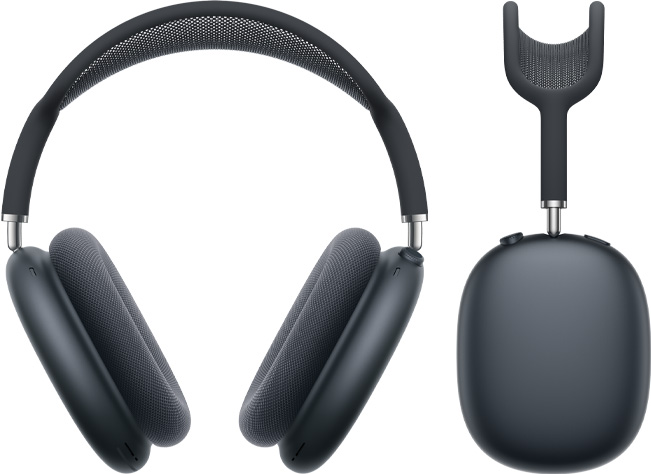
Who it suits: An Apple-device owner who will use supported Personalized Spatial Audio or ecosystem controls, and wants a documented USB-C lossless path with compatible content and devices. Apple says basic Bluetooth works with non-Apple devices, but functionality may be limited.
Pros
- Personalized Spatial Audio with head tracking has a defined Apple-device path.
- USB-C lossless and low-latency audio is documented with compatible equipment.
- The Digital Crown provides physical volume and playback/call actions.
Cons and trade-offs
- Apple lists 386.2 g including cushions; try the fit if weight matters.
- Up to 20 hours with ANC is conditional and requires a charging plan.
- Non-Apple Bluetooth use may lose platform-dependent functions; check each feature’s requirements.
Choose something else if: Android or Windows is the main setup and Apple-specific features will not be used.
Our recommendation
Choose Max 2 only when a named Apple feature or USB-C workflow on your device list makes it worthwhile. Basic Bluetooth compatibility alone does not settle the choice.
Price listing: Apple AirPods Max 2 — Midnight.
Test the entire routine, not just pairing
In a permitted return window, switch music to a call and back, connect the intended USB or analog cable, test a battery-low scenario and check how the far-end person hears your microphone. Try glasses and a typical listening session. Sound preference, ANC strength, latency and fit cannot be inferred from the connection table. The Sony versus Bose comparison gives the two-model wired detail.
Connection questions
Does USB-C always mean headphone audio?
No. Verify the exact headphone and source function. Sony XM5 charges over USB but stops music during charging; Bose 2nd Gen supports USB audio while charging.
Will an Android phone use Apple-only features?
Apple supports basic Bluetooth on non-Apple devices but says functionality may be limited. Check each desired feature and OS requirement.
Does LDAC appear automatically with Sony?
No. Sony’s headphone support must be matched by the source device and selected settings.
Amazon prices: Cards show the named US configuration and an eligible current new USD offer when available, with its check time. Unavailable or expired offers use a labelled search link. Confirm the model, included parts and final checkout price. Numerical Amazon ratings are omitted when usable review data is unavailable.
Research method, sources and limitations
This is an instructional device-and-connection checklist, using exact-model manufacturer documentation and official product photos. Capability statements are manufacturers’; scenario recommendations are editorial judgments. We did not test ANC, sound, microphones, comfort, latency, battery, consoles or enterprise policies. Check the exact software and hardware on both ends of every connection.
Original specification research: September 9, 2026. Source and buying-advice check: September 20, 2026. Unsupported legacy tests, scores, review totals and prices are omitted.
Primary sources: Sony XM5 specifications, Sony analog guide, Sony charging guide, Bose 2nd Gen page, Bose guide, Apple Max 2 specifications and Apple USB-C setup support. Read our methodology.
CERTAIN CONTENT THAT APPEARS ON THIS SITE COMES FROM AMAZON. THIS CONTENT IS PROVIDED “AS IS” AND IS SUBJECT TO CHANGE OR REMOVAL AT ANY TIME.
Affiliate disclosure
As an Amazon Associate, The Gear Audit earns from qualifying purchases. We may earn an affiliate commission when you buy through our links, at no extra cost to you. Read our full affiliate disclosure.