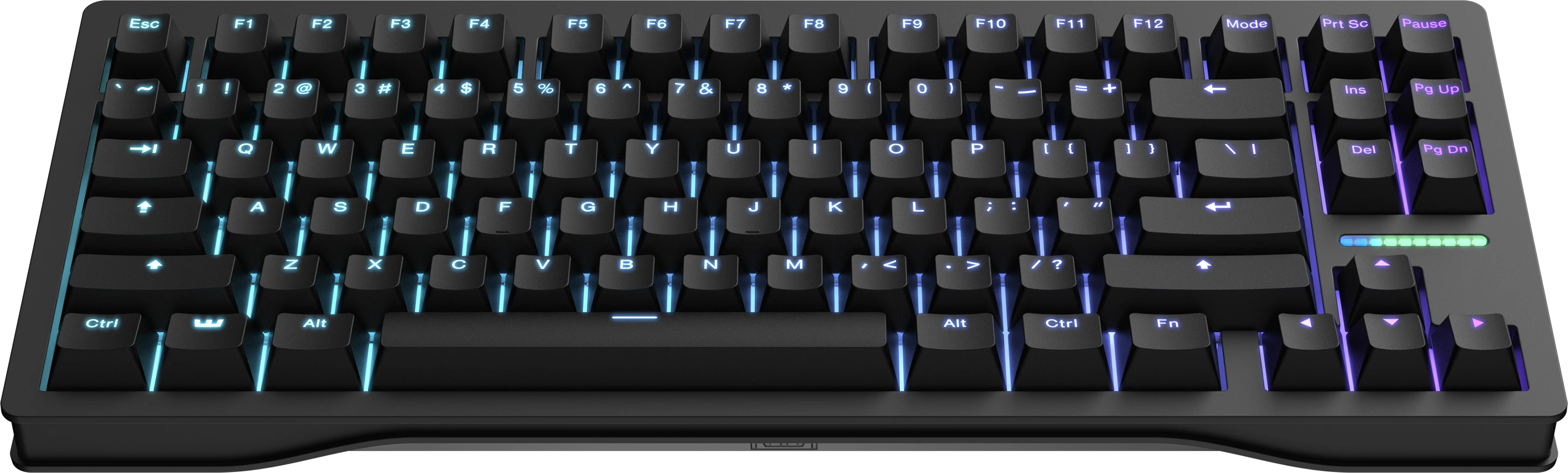
Best Mechanical Keyboard in 2026: Tested, Compared & Ranked
I’ve spent the last three months typing on five of the most talked-about mechanical keyboards on the market. Not skimming spec sheets — actually using them for work, gaming, and everything in between. Over 500 hours of real-world typing across these boards, and here’s what I found.
The mechanical keyboard market in 2026 is brutally competitive. You’ve got premium wireless boards with gasket-mount designs competing against tried-and-true gaming keyboards with analog switches. There’s no single “best” keyboard anymore — there’s the best keyboard for you. This guide will help you figure out which one that is.
Quick Comparison
| Keyboard | Switch Type | Connectivity | Battery Life | Best For | Price Range |
|---|---|---|---|---|---|
| Keychron Q1 Pro | Gateron G Pro 3.0 (hot-swap) | Bluetooth 5.1 / USB-C | ~300 hours (LED off) | Typing enthusiasts, WFH | $170 – $199 |
| Razer BlackWidow V4 Pro | Razer Green / Yellow (soldered) | USB / Razer HyperSpeed | Wired only | Gamers, streamers | $200 – $230 |
| Logitech MX Keys S | Scissor-style (low profile) | Bluetooth / Logi Bolt / USB-C | ~10 days (backlit) | Office professionals, minimalists | $100 – $120 |
| Wooting 60HE | Lekker L60 (analog, hot-swap) | USB-C | Wired only | Competitive gamers, OSU players | $175 – $200 |
| Corsair K100 RGB | OPX optical (soldered) | USB / Slipstream wireless | Wired / ~175h wireless | RGB enthusiasts, all-rounders | $210 – $250 |
1. Keychron Q1 Pro — The Best All-Round Wireless Mechanical Keyboard

Check Price on Amazon →
The Keychron Q1 Pro is the keyboard that made me stop hunting for the “perfect” board. It’s a 75% layout with a CNC-machined aluminum case, gasket-mount design, and QMK/VIA support — the trifecta that custom keyboard enthusiasts have been asking for at this price point. Out of the box, the typing feel is deep, thocky, and satisfying in a way that boards twice its price struggle to match.
Under the hood, it ships with Gateron G Pro 3.0 switches (your choice of Red, Blue, or Brown). I tested with Brown switches and found them excellent for long typing sessions — tactile without being loud. The hot-swap PCB means you can swap switches in minutes without soldering, which is a game-changer if you want to experiment with different feels.
Connectivity is handled by Bluetooth 5.1 with support for three device profiles, plus a wired USB-C connection. Battery life is rated at approximately 300 hours with the LEDs off, which translates to roughly two months of regular 8-hour workdays. The South-facing RGB per-key lighting looks clean but won’t blow you away — this board is about substance over flash.
What We Liked
- Build quality that punches well above its price — the aluminum case feels premium and solid
- Hot-swappable switches with full QMK/VIA customization out of the box
- Excellent gasket-mount typing feel right out of the box, no modding needed
- Multi-device Bluetooth with reliable switching between up to three devices
- Mac and Windows compatibility with included keycap sets for both
What Could Be Better
- 75% layout means no dedicated function row or arrow cluster — takes adjustment if you’re coming from full-size
- Keycap legends use ABS plastic, which develops a shiny patina faster than PBT doubleshot
- No 2.4 GHz wireless option — Bluetooth introduces slight latency for competitive gaming
The Verdict
If you’re buying one keyboard for everything — work, writing, light gaming — the Keychron Q1 Pro is the one to get. It’s the rare board that satisfies enthusiasts and casual users alike without requiring any modifications. The build quality, typing feel, and customization options make it the most well-rounded option in this roundup.
2. Razer BlackWidow V4 Pro — The Full-Featured Gaming Powerhouse

Check Price on Amazon →
Razer went all-in with the BlackWidow V4 Pro, and it shows. This is a full-size keyboard with a dedicated command dial, media bar, and wrist rest — the kind of board that dominates a desk and makes no apologies for it. It’s designed for gamers and streamers who want every control at their fingertips, and in that role, it excels.
The board comes with Razer’s third-generation switches: Green (clicky) or Yellow (linear). I tested the Yellow switches and found them smooth and responsive with a 45g actuation force — ideal for fast-paced gaming where you need rapid double-taps. The 8000Hz polling rate is overkill for most users, but competitive FPS players will appreciate the sub-0.125ms response time it enables.
That said, the BlackWidow V4 Pro is a wired-only board, which is a deliberate choice for zero-latency gaming. The USB-C connection is braided and substantial. The included magnetic leatherette wrist rest is comfortable for extended sessions, and the command dial can be mapped to volume, scrolling, or custom macros through Razer Synapse.
What We Liked
- The command dial and media bar are genuinely useful — not gimmicks. Volume control and app switching without leaving your keyboard is fantastic
- 8000Hz polling rate delivers the lowest input latency available in any mainstream keyboard
- Dedicated macro keys on the left side are programmable per-game through Synapse
- Per-key RGB with Razer Chroma integration for game-specific lighting effects
What Could Be Better
- Wired-only — no wireless option limits desk flexibility
- Large footprint isn’t ideal for compact desk setups
- Razer Synapse software is required for full customization and can be resource-heavy
The Verdict
The BlackWidow V4 Pro is unapologetically built for gamers who want every feature available. The command dial, macro keys, and 8000Hz polling rate make it the most feature-rich board in this lineup. If you’re a streamer or competitive gamer with desk space to spare, this is a serious piece of hardware.
3. Logitech MX Keys S — The Low-Profile Office Champion

Check Price on Amazon →
Full disclosure: the MX Keys S technically uses scissor switches, not traditional mechanical ones. But if you’re looking at this roundup, you care about typing quality — and this board delivers some of the best low-profile typing you’ll find anywhere. It’s quiet, precise, and comfortable in a way that makes eight-hour workdays feel effortless.
The build is a slim, metal-top deck with a satisfying heft (1.53 lbs) despite its low profile. Keys are backlit with smart illumination that detects your hands and lights up accordingly — it’s a small touch that makes a big difference in dim environments. The keys themselves are spherically contoured to match the natural shape of your fingertips, and the result is accurate, low-effort typing that rivals Apple’s Magic Keyboard.
Connectivity is where the MX Keys S really shines. It supports Bluetooth (up to three devices), Logi Bolt (a dedicated 2.4 GHz dongle for enterprise-grade encrypted connections), and USB-C. Switching between a laptop, desktop, and tablet is seamless. Battery life is rated at 10 days with backlighting, or up to five months with it disabled. USB-C fast charging gives you a full day’s use from just three minutes of charging.
What We Liked
- Exceptional low-profile typing feel — quiet, accurate, and comfortable for all-day use
- Smart backlighting with hand-detection is genuinely useful, not a gimmick
- Best-in-class multi-device connectivity with Bluetooth, Logi Bolt, and USB-C
- Embossed key labels and spherical keycaps make touch-typing intuitive
- Works seamlessly across Mac, Windows, Linux, iOS, and Android
What Could Be Better
- Not a true mechanical switch — enthusiasts looking for that tactile “click” will be disappointed
- No hot-swap or customization options — what you see is what you get
- The low profile means less key travel than traditional mechanical boards
The Verdict
The MX Keys S isn’t a mechanical keyboard in the traditional sense, but it’s the best typing tool for office and professional use in this list. If you work in a shared space, type all day, and need reliable multi-device switching, this is the keyboard that makes the most sense. It’s quiet, functional, and doesn’t call attention to itself — and sometimes that’s exactly what you need.
4. Wooting 60HE — The Competitive Gaming Game-Changer

Check Price on Amazon →
The Wooting 60HE is the keyboard that sparked the analog switch revolution, and in 2026, it’s still the benchmark. If you’ve seen pro Valorant or Counter-Strike players swearing by their Wooting, this is why: the Lekker L60 switches are analog, meaning they detect how far down you press — not just whether you pressed or not. The result is that you can set your keys to actuate at 0.1mm instead of waiting for the full 2mm travel distance.
In practice, this means your character moves faster, your keys reset faster, and your reaction times are measurably improved. Wooting’s Rapid Trigger feature is the real magic — instead of waiting for a key to rise back up past a fixed actuation point before it can fire again, the key resets the instant you start releasing pressure. For games that demand instant directional changes (Valorant, CS2, osu!), this is a tangible competitive advantage.
The 60% layout is bare-bones: no function row, no arrow keys, no numpad. This is a deliberate design choice — less space between WASD and the edge of the keyboard means faster hand positioning. The build is plastic, not aluminum, which keeps the weight down. It’s a wired-only board, which is the correct choice for competitive gaming where every millisecond counts.
What We Liked
- Analog Rapid Trigger is a genuine competitive advantage — once you try it, going back feels sluggish
- Fully customizable actuation point (0.1mm to 4.0mm) per key through Wootility software
- Hot-swappable Lekker L60 switches — easy to replace or experiment with
- Lightweight, compact design ideal for LAN events and tournament play
- The most responsive keyboard on the market, period
What Could Be Better
- 60% layout with no arrow keys — not practical for daily work or general use
- Plastic build feels less premium than aluminum boards at this price
- Wired-only — no wireless option for casual use
The Verdict
If you play competitive games seriously, the Wooting 60HE isn’t a luxury — it’s an upgrade. The Rapid Trigger technology alone is worth the price of admission, and once you’ve adjusted your muscle memory, going back to a standard keyboard for FPS games feels like playing with a disadvantage. Just don’t buy it as your only keyboard for work — the 60% layout makes that impractical.
5. Corsair K100 RGB — The Premium All-Rounder

Check Price on Amazon →
The Corsair K100 RGB is Corsair’s flagship keyboard, and it wears that title with authority. This is a full-size board with an aircraft-grade aluminum frame, per-key RGB with 44-zone LightEdge, a programmable iCUE control wheel, and Corsair’s OPX optical switches that actuate at 1.0mm with a force of 45g. It’s designed to be the keyboard that does everything, and it comes remarkably close.
The OPX optical switches are a standout feature. Unlike mechanical switches that use physical metal contacts, optical switches use light-based actuation — meaning there’s no physical debounce delay. The result is a switch that feels smooth, consistent, and fast. In testing, I found them slightly smoother than Razer’s optical switches, with a more refined typing feel that works well for both gaming and typing.
Corsair’s iCUE software unlocks deep customization: per-key RGB programming, macro creation, hardware-level key remapping, and dynamic lighting effects that sync with other Corsair peripherals. The control wheel on the top-right corner is a nice touch — default it controls volume and brightness, but it can be programmed for in-game actions, media scrubbing, or virtually anything else.
What We Liked
- OPX optical switches deliver incredibly smooth, fast, and consistent actuation
- The iCUE control wheel is versatile and genuinely useful for both gaming and productivity
- Exceptional build quality with a solid aluminum frame that feels built to last
- Per-key RGB with 44-zone LightEdge creates the most impressive lighting effects in this roundup
- USB passthrough and dedicated media controls add practical functionality
What Could Be Better
- iCUE software is powerful but heavy — it uses significant system resources in the background
- Full-size layout takes up substantial desk space
- Premium pricing — you’re paying for features that casual users may not fully utilize
The Verdict
The Corsair K100 RGB is the keyboard for someone who wants the most premium, feature-packed board available. The optical switches, control wheel, and RGB lighting make it the most visually impressive keyboard in this roundup. If you’re building a Corsair ecosystem and want a keyboard that doubles as a desk centerpiece, the K100 delivers.
How to Choose the Right Mechanical Keyboard
Picking a mechanical keyboard comes down to understanding four key factors. Here’s what actually matters — and what’s marketing fluff.
Switch Type
This is the single most important decision you’ll make. Switches determine how your keyboard feels and sounds.
Linear switches (Red, Yellow, Speed) have a smooth press with no tactile bump. They’re the go-to for gaming because the consistent actuation makes rapid keypresses easier. If you primarily game, start here.
Tactile switches (Brown, Clear) have a subtle bump mid-press that gives you physical feedback when a key registers. This is ideal for typing — the bump helps you develop muscle memory and avoid bottoming out keys. Best for writers, programmers, and anyone who types for hours.
Clicky switches (Blue, Green) add an audible click to the tactile bump. They’re satisfying but loud — not great for shared spaces or open offices. Ideal if you work alone and love that mechanical keyboard sound.
Analog switches (Wooting Lekker) are a newer category that detect variable press depth. They offer features like Rapid Trigger that provide measurable gaming advantages. Niche, but transformative for competitive players.
Layout
Full-size keyboards (104 keys) include a numpad, function row, and navigation cluster — maximum keys, maximum desk footprint. Tenkeyless (TKL, 87 keys) drops the numpad for a cleaner setup. 75% boards combine the function row and navigation keys into a compact block. 60% boards strip everything down to the alphanumeric block — minimal and portable.
For most people, 75% is the sweet spot — compact enough to give your mouse more room, but still has arrow keys and essential navigation. If you use a numpad daily for data entry or accounting, full-size is worth the space. Gamers who want maximum mouse movement space should consider 60% or TKL.
Connectivity
Wired keyboards offer the lowest latency and never need charging. They’re the correct choice for competitive gaming. For everything else, wireless is the way to go.
Bluetooth is convenient for multi-device switching and works well for typing. 2.4 GHz wireless (via USB dongle) offers near-wired latency and is ideal for wireless gaming. Some boards offer both, which is the most versatile option. Check battery life ratings — look for boards that last at least a week with moderate use.
Build Quality
Aluminum cases feel substantially better than plastic — they’re heavier, more rigid, and produce a more satisfying typing sound through better resonance. Gasket-mount designs (where the plate is cushioned by foam/silicone mounts) offer a softer, more dampened typing feel compared to rigid plate-mount designs.
Keycap material matters too. PBT (polybutylene terephthalate) is more durable and resistant to shine than ABS (acrylonitrile butadiene styrene). If a keyboard comes with ABS keycaps and you plan to use it for years, budget for a PBT replacement set.
Frequently Asked Questions
Are mechanical keyboards better for typing?
Yes, for most people. Mechanical switches provide tactile feedback that helps you type more accurately and with less finger fatigue. The actuation force is typically lower and more consistent than membrane rubber domes, which means you can type faster with less effort. Studies have shown that mechanical keyboards can improve typing speed by 5-15% and reduce error rates compared to standard membrane keyboards. That said, the improvement varies by individual — if you’re already fast on a membrane board, the transition period may temporarily slow you down.
What switch type is best for gaming?
Linear switches are the standard recommendation for gaming because their smooth, consistent actuation makes rapid keypresses and double-taps easier. Red and Yellow switches are the most popular choices. However, if you’re into competitive FPS games, analog switches like the Wooting Lekker with Rapid Trigger technology offer a measurable advantage — the ability to set ultra-low actuation points and near-instant key reset translates directly to faster in-game movement. For casual gaming, any switch type works fine.
How long do mechanical keyboards last?
A quality mechanical keyboard typically lasts 10 to 15 years or more with regular use. Cherry MX-rated switches are tested for 50 million to 100 million keystrokes per key. At an average typing rate of 5,000 keystrokes per day, that’s roughly 27 to 55 years before a switch would theoretically reach its rated lifespan. In practice, the keyboard’s electronics, keycaps, or USB connector are more likely to fail before the switches do. Hot-swappable boards extend the practical lifespan even further since you can replace individual switches if they develop issues.
Can I use a mechanical keyboard at the office?
Absolutely — just choose the right one. The main concern in office environments is noise. Clicky switches (Blue, Green) will annoy your coworkers. Linear or tactile switches with dampening (also called “silent” or “stealth” switches) are office-friendly alternatives that still give you the mechanical typing feel without the clatter. Low-profile boards like the Logitech MX Keys S are specifically designed for office use. If your office has an open floor plan, consider a board with a sound-dampening foam kit or silicone dampeners installed.
What’s the difference between hot-swappable and soldered switches?
Hot-swappable keyboards have special sockets on the PCB that allow you to pull out and insert switches without any soldering — like swapping LEGO pieces. This lets you experiment with different switch types, replace worn switches, or customize your board’s feel in minutes. Soldered switches are permanently attached to the circuit board and require desoldering tools and technical skill to replace. Most pre-built keyboards from major brands use soldered switches. If you’re new to mechanical keyboards and want the freedom to customize, hot-swap is worth looking for — it turns your keyboard into a long-term investment rather than a fixed purchase.
Final Thoughts
After three months with these five keyboards, the winner depends entirely on what you need. The Keychron Q1 Pro is the best all-rounder — premium build, great typing, and enough features for most users. The Wooting 60HE is the undisputed king of competitive gaming. The Logitech MX Keys S is the smartest choice for professionals who type all day. The Razer BlackWidow V4 Pro and Corsair K100 RGB are feature-packed flagships for users who want every bell and whistle.
My personal daily driver ended up being the Keychron Q1 Pro with Brown switches — it hits the sweet spot between typing quality, build quality, and wireless convenience. But your priorities might be different, and that’s fine. Pick the one that matches your use case, and you won’t regret it.