Ring Lights vs LED Panels in 2026: Choose the Right Shape
Quick answer
Choose NEEWER RL-18 when you actually want a ring and its circular catchlight. For a desk studio with adjustable white light, the Elgato Key Light Air MK.2 panel is more flexible; for a compact monitor-top call setup, choose Logitech Litra Glow. These are different light shapes and mounting approaches, not a ranked brightness test.
A ring puts the camera near the center for frontal light and circular catchlights. A panel can sit off-axis for more directional shaping. Decide on shot, mount and power before brightness.
Compare the configurations
| Model | Role | Choose another when… |
|---|---|---|
| NEEWER RL-18, SKU 66600024 | Actual 18-inch ring-light kit | you need a compact desk setup or electronic warm-to-cool control without swapping filters. |
| Elgato Key Light Air MK.2 | Brighter adjustable desk panel | you specifically want a circular catchlight or need a compact monitor-top light. |
| Logitech Litra Glow | Compact monitor-top panel | you need the RL-18 circular catchlight, a camera inside the light, or a larger movable panel. |
NEEWER RL-18, SKU 66600024: Actual 18-inch ring-light kit
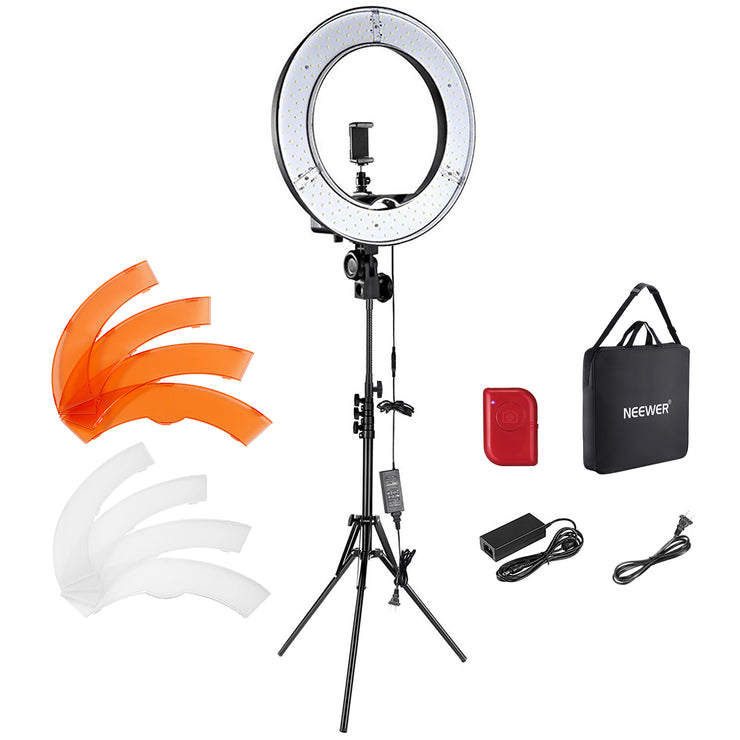
NEEWER specifies a 55W, 18-inch RL-18 ring with 5600K LEDs, dimming, and interchangeable orange and white filters. The SKU 66600024 kit includes a 61-inch stand, phone holder, adapter and carrying bag. This is a mains-powered ring, not the manufacturer’s similarly named newer RL-18 version or a battery light. Centering a phone or camera can produce the familiar circular catchlight, but the stand needs floor space and the filters are a less fluid way to change color than a bi-color dial.
Pros
- An actual ring geometry puts the lens or phone near the center for frontal face lighting and a circular catchlight.
- The documented kit includes stand, phone holder, filters and bag rather than leaving those core setup items to separate purchase.
Cons and trade-offs
- Its 5600K source changes warmth through physical orange/white filters; there is no continuously variable electronic color-temperature control.
- The 18-inch ring, 61-inch stand and power lead take more floor and storage space than a monitor-top light.
Best for: Makeup, portraits, or direct-to-camera video when you specifically want a ring catchlight.
Choose another if: you need a compact desk setup or electronic warm-to-cool control without swapping filters.
Our recommendation
Pick this exact RL-18 kit if the ring shape is the point of the purchase. Verify SKU 66600024 and its included stand; other RL-18 variants have different kit contents.
Search Amazon for NEEWER RL-18, SKU 66600024
Elgato Key Light Air MK.2: Brighter adjustable desk panel

The current Key Light Air MK.2 is a rectangular 319 × 207mm edge-lit panel, not a ring. Elgato lists 2900–7000K adjustment, touch controls, and up to 2100 lumens only with a 30W-or-higher USB-C PD source. A typical lower-power computer USB-C port may yield around 400 lumens. The mount-included SKU has an edge clamp and a 60–88cm desk pole, while the light-only variant omits it. Elgato’s quick-start guide says a power adapter is not in the box, even though one may be offered in some direct-store promotions.
Pros
- The panel can sit above or beside the camera for broad face lighting without occupying the lens center.
- Onboard touch controls, 2900–7000K adjustment and USB/Wi-Fi app options give more setup control than a filter-based ring.
Cons and trade-offs
- The 2100-lumen maximum requires a suitable 30W-or-higher PD supply; the included cable alone does not ensure that output.
- An edge clamp and 60–88cm pole require a compatible desk edge and space behind or beside the screen.
Best for: A semi-permanent desk studio that needs adjustable white light and a clamp mount.
Choose another if: you specifically want a circular catchlight or need a compact monitor-top light.
Our recommendation
Choose the mount-included MK.2 for flexible desktop framing. Budget a compatible 30W PD supply if its maximum brightness matters, and do not confuse it with the older 1400-lumen Key Light Air.
Logitech Litra Glow: Compact monitor-top panel
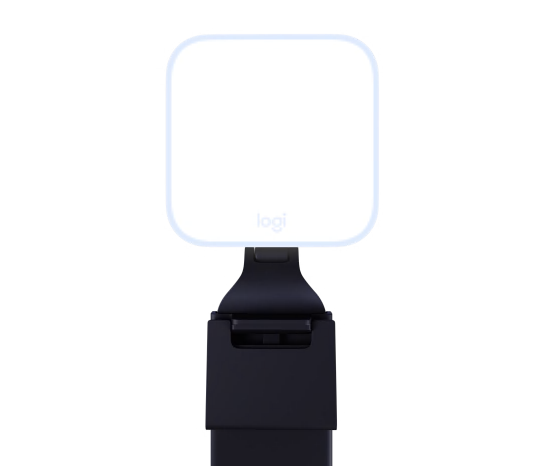
Litra Glow is a small, soft, rectangular Logitech panel intended for a screen-top webcam position. It mounts to a monitor and uses USB power, with brightness and color-temperature adjustments from controls on the light or Logitech G HUB. Its small emitting area and close placement fit a video-call desk, not a full standing portrait setup. Logitech’s TrueSoft and comfort claims are manufacturer descriptions; we did not measure diffusion, color accuracy or eye comfort. The image shows the product’s front with its adjustable mount.
Pros
- Monitor-top mounting frees the desk surface and keeps a light near the webcam for calls.
- Physical control plus G HUB adjustments allow quick brightness and color changes without a floor stand.
Cons and trade-offs
- The compact emitting surface has less placement and coverage flexibility for wide shots or subjects away from a desktop monitor.
- USB power and a screen-top mount tie it to a nearby computer or suitable power source; it is not a free-standing studio kit.
Best for: Daily video calls and a compact webcam setup.
Choose another if: you need the RL-18 circular catchlight, a camera inside the light, or a larger movable panel.
Our recommendation
Choose Litra Glow for the simplest monitor-based setup. Check monitor clearance and power routing rather than comparing its panel directly with an 18-inch ring.
Buying guide
- Start with the camera position. Put a ring around the lens only when frontal illumination and circular catchlights fit the shot. A panel beside the camera can add direction; a small panel above a webcam suits a close face at a desk.
- Measure the available mount space. The RL-18 needs a floor stand; Key Light Air MK.2 needs a desk edge and 60–88cm pole; Litra Glow needs room at the monitor. Check camera sightlines, lens shadows and cable routes.
- Separate color controls from filters. RL-18 is a 5600K light with supplied filters. Elgato adjusts 2900–7000K electronically; Logitech provides adjustable color in its own controls. Match the light to the room and camera white balance.
- Check power at the chosen brightness. Elgato’s 2100-lumen claim needs 30W-or-higher PD power, which is not in the basic box. RL-18 requires mains. Litra Glow uses USB. A generic cable or port is not proof of full output.
- Review the entire kit. Confirm NEEWER SKU 66600024 with stand, Elgato MK.2 with mount rather than light-only, and the Logitech monitor-mount clearance. For camera choice see our webcam guide; creators using interchangeable-lens cameras can compare mounts and framing in our mirrorless-camera guide.
FAQ
Is Key Light Air MK.2 a ring light?
No. It is a rectangular edge-lit panel. The RL-18 is the circular ring in this comparison.
Does the RL-18 have adjustable color temperature?
The specified kit has 5600K LEDs and white/orange filters; it does not provide a broad electronic warm-to-cool dial.
Will any USB-C port give the Elgato 2100 lumens?
No. Elgato says maximum brightness requires a PD source rated at least 30W, while lower-power ports reduce available output.
Can I compare the three by lumens alone?
No. The number does not capture distance, beam pattern, diffusion, mounting angle or the camera image. Set the lights up for the actual framing and evaluate the result.
Sources and method
We checked the exact manufacturer product pages and visually inspected each official product photo. Their output, color and comfort statements are maker claims; no original hands-on photometric or durability test records exist. Read our research methodology.
- NEEWER RL-18, SKU 66600024 manufacturer documentation
- Elgato Key Light Air MK.2 manufacturer documentation
- Logitech Litra Glow manufacturer documentation
As an Amazon Associate, The Gear Audit earns from qualifying purchases. We may earn an affiliate commission when you buy through our links, at no extra cost to you. See our affiliate disclosure.