Compact Standing Desks: Plan a 48 × 24-Inch Workspace
Quick answer
Start with a 48 × 24-inch equipment template, then check seated and standing heights, base and chair clearance, cable travel and mount compatibility. The Vari Essential Electric Standing Desk 48×24, SKU 401512 in Hazel Wood/White, is a documented example for this plan. Its specifications do not establish how stable or comfortable it will feel in your room.
A narrow wall can fit a compact top while the actual work surface still feels crowded. A useful desk decision combines the desktop, the base footprint and the movement of the person using it. This guide uses one exact Vari configuration to make that check concrete; it is not a blanket ranking of compact desks.
Documented configuration: Vari Essential Electric Standing Desk 48×24
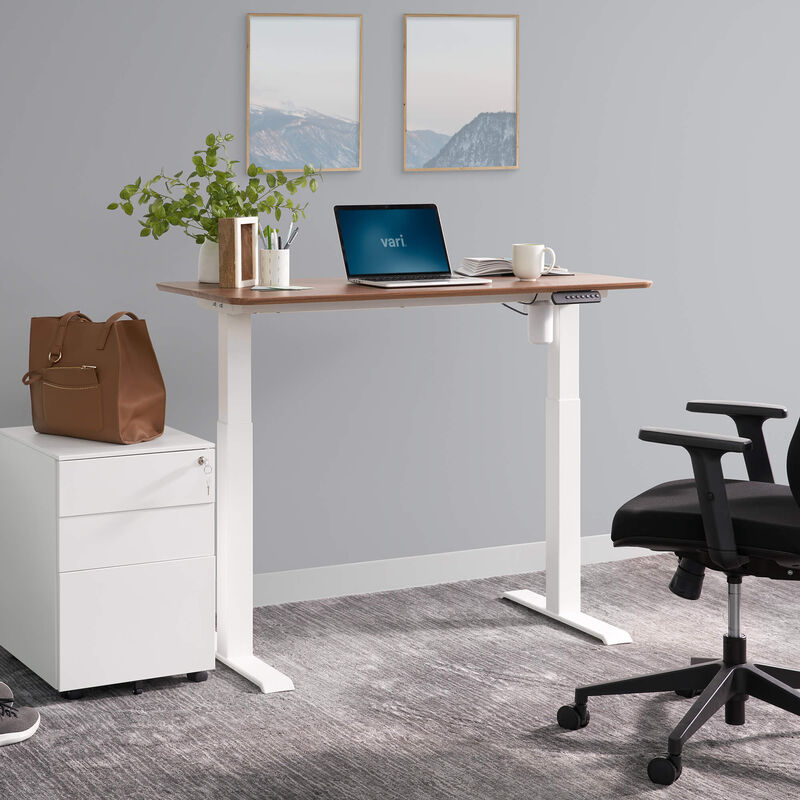
Vari’s current US page identifies the selected Hazel Wood/White finish as SKU 401512. It lists a two-piece laminate top, two-stage electric lift from 27.5 to 47.2 inches, capacity up to 150 lb, 0.75-inch top thickness and four programmable heights. It explicitly says the desk accepts Vari electric-desk casters but not its Cable Management Tray. Those are manufacturer statements, not our measurements or stability tests.
| Maker specification | Planning implication |
|---|---|
| 48 × 24-inch desktop | Lay out the actual monitor, keyboard, mouse and documents before ordering. |
| 27.5–47.2-inch desktop height | Check both seated and standing keyboard positions on the same measurement basis. |
| 150 lb stated capacity | Add every item that rises with the desk; check mount instructions separately. |
| Two-piece laminate top | Confirm the seam and permitted clamp positions for any monitor arm. |
| Four memory settings | Useful only after the height range fits the intended user and chair. |
Pros
- The 48 × 24-inch top gives a concrete small-room template without assuming a much wider desktop.
- Memory presets and the documented height range let the user store measured seated and standing positions.
Cons and trade-offs
- The 24-inch depth can be tight for a large monitor stand plus keyboard and documents; measure your actual equipment.
- Vari states its Cable Management Tray does not fit this model, so plan a different approved cable route.
Best for: One person with a compact computer setup whose height and room measurements fit this exact configuration.
Choose another if: your template needs more depth, your monitor arm has no verified clamp position, or the required working height falls outside the range.
Make a surface template and a room plan
- Lay out the equipment at full size. Mark 48 × 24 inches on paper or an existing table. Put the monitor base, keyboard, mouse pad, laptop, notebook and drink where they would actually sit. Leave a usable mouse sweep and room to open the notebook; a monitor arm may free surface area only if the top accepts its clamp.
- Mark the whole desk on the floor. The tabletop dimensions do not include every foot or chair movement. Use Vari’s dimensional drawings for the base, then check door swing, drawers, chair withdrawal and a walking route. Recheck with the desk raised because the equipment and cable loop move.
- Measure the monitor distance. Depth matters as much as width. If the screen would be uncomfortably close on its own stand, verify a compatible arm or choose a deeper top. Do not infer arm compatibility from a generic arm weight rating.
- Inspect the route into the room. Verify delivery access, assembly space and the weight of the parts you will handle. The two-piece top changes assembly logistics but should not be treated as proof of easy solo assembly.
For a broader checklist of dimensions and workstation setup, see our standing-desk measurement guide. Pair the desk plan with the chair’s own arm and seat dimensions; our desk-chair guide covers that separate decision.
Check working height and cable movement
Measure the keyboard position you need while seated, then while standing. If the keyboard sits on the desk, its keys will be above the published desktop height. A tray changes that relationship again; this specific Vari desk does not accept the named Vari Cable Management Tray, and that statement is about cable storage, not a keyboard tray. Compare the assembled desk range to the surface height you need, not to your body height alone.
At the seated setting, check whether chair arms or knees hit the underside. At the standing setting, check screen eye line and whether a laptop stand changes it. Move through the entire height range while tracing power and video cables to the wall, floor-mounted computer and fixed peripherals. Follow the desk’s assembly and accessory instructions for routing to avoid a taut connection, pinch point or loose loop in the chair path.
Our recommendation
Our recommendation
Use SKU 401512 as a measured fit check. Put this Vari configuration on your shortlist when the 48 × 24-inch template holds your daily tools, the required heights fit 27.5–47.2 inches and the base, chair and cable route clear your room. Choose a different size or mechanism when any of those checks fails. Motor life, wobble, noise and comfort have not been measured here.
Compare the exact finish, bundle, seller and return terms.
FAQ
Does a 48-inch top fit two monitors?
It depends on monitor and stand widths, not the nominal desk width alone. Make a full-size template, then verify an approved dual-arm mounting point if you plan to use one.
Is the Vari Cable Management Tray compatible?
No. Vari’s page explicitly says this model is not compatible with that tray. Check other cable-management options against the manufacturer’s instructions.
Does 150 lb mean any monitor arm is safe?
No. The desk’s load rating does not establish local clamp strength or a permitted edge position. Check both desk and arm instructions.
How do I choose a standing height?
Measure your comfortable keyboard surface position while standing and ensure the assembled desk can reach it with the keyboard or tray arrangement you plan to use.
Sources and method
We checked Vari’s US product page for Essential Electric Standing Desk 48×24, selected SKU 401512 and used its specifications for the planning example. Layout and fit guidance is our editorial analysis. No hands-on stability, motor or durability testing was performed. Read our research methodology.
As an Amazon Associate, The Gear Audit earns from qualifying purchases. We may earn an affiliate commission when you buy through our links, at no extra cost to you. See our affiliate disclosure.