Monitor Arm Mounting and Desk-Fit Checklist
By The Gear Audit Team · Manufacturer specification check September 27, 2026.
Quick answer
A monitor arm purchase begins with each screen’s stand-free weight and VESA pattern, then the desk’s material, edge geometry and underside space. A screen diagonal or photo of a clamp cannot establish fit. Older Ergotron LX part 45-218-195 provides a documented example of different clamp and grommet requirements, but its older drawing must not be treated as current instructions for a different part number.
Record the monitor before choosing an arm
Find the monitor’s weight without its factory stand, mounting-hole pattern and outer dimensions. Screen diagonal alone does not prove fit. A deep case or recessed mounting area can affect hardware and movement even when the nominal screen size appears suitable.
Check both minimum and maximum loads for each arm, plus any total system limit. Include additional adapters or accessories as the maker instructs. Do not substitute shipping weight, use a combined maximum for a single heavier screen or assume every arm in one product family supports the same range.
Inspect the desktop above and below
| Check | Record | Decision |
|---|---|---|
| Material and construction | The desk maker’s mounting guidance, material and any hollow or reinforced areas | Thickness alone does not make glass, hollow-core or another surface suitable for clamping. Obtain documented support for the attachment. |
| Edge thickness | Thickness at the actual contact area, including lips or bevels | Compare with the exact clamp’s range and contact requirements. |
| Underside space | Rails, drawers, cable trays and the clear area inward from the edge | Check space for the complete clamp and tightening mechanism against its drawing. |
| Grommet route | Hole diameter, surface thickness and position | Confirm that the included or optional hardware is approved for those dimensions and the desk construction. |
| Arm movement | Intended screen positions, wall distance and nearby shelves | Allow for the arm’s folded and extended geometry, not just the display width. |
| Cables | Power, display and USB routes through the movement range | Follow routing instructions and leave suitable slack without creating snagging loops. |
Why the attachment option matters
An older Ergotron-authored sheet for black LX Dual Side-by-Side 45-218-195 describes both a clamp and grommet mount, with different dimensions for the attachment routes. This is a legacy example of why the exact part number and package matter; it does not establish current availability or fit for a newly listed LX arm. Read the Ergotron-authored legacy product sheet as historical documentation. Compare any new purchase with Ergotron’s current multi-monitor catalog and the instructions for the exact part offered.
An existing hole is useful only after its size, position and supporting material have been checked. Similarly, buying a reinforcement plate does not by itself establish that a desk unsuitable for a clamp becomes suitable. Use the desk and arm manufacturers’ guidance for the complete mounting arrangement.
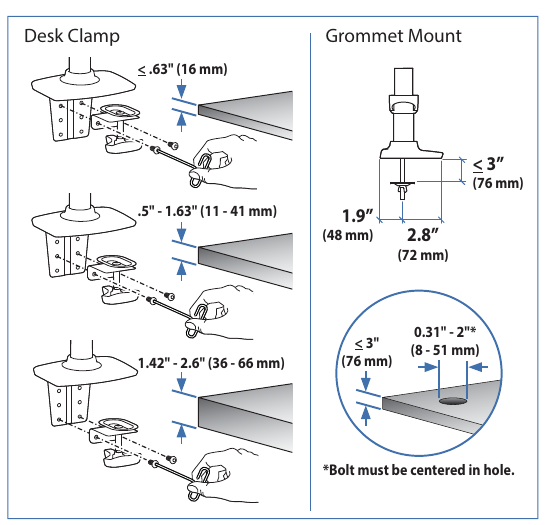
Clamp mounting route
Best for: A suitable desk with an approved, reachable edge and adequate underside clearance.
Pros
- The attachment can use a desk edge rather than an existing through-hole.
- A clamp leaves an existing cable grommet free for cable routing when the chosen edge is suitable.
Cons and trade-offs
- The desk material and complete clamp contact geometry must both be approved for the exact arm.
- A beveled edge, lip, rail or drawer can interfere with contact plates or tightening screw even if top thickness fits.
Choose another if: Your desk maker forbids clamping or the contact area is obstructed.
Our recommendation
Match the current arm’s clamp drawing to the edge thickness, lip, underside rail and desk-maker instructions.
Grommet mounting route
Best for: A desk with an approved hole, location and supporting material.
Pros
- A through-hole route can work where an edge clamp has insufficient contact space.
- A correctly placed through-hole can position the pole inward from a crowded desk edge if the desk maker approves it.
Cons and trade-offs
- The hole diameter and top thickness must fall within the specific supplied grommet hardware’s limits.
- An existing cable hole may have the wrong diameter, position or supporting material for the arm’s hardware.
Choose another if: You cannot verify the desk construction or the exact hole dimensions.
Our recommendation
Measure the actual hole and structural support, then confirm the current arm’s grommet kit and instructions before ordering.
Make a fit record before checkout
- Write down the exact arm part, attachment, per-screen load range, total limit and required mounting pattern.
- Record each display’s stand-free weight, external dimensions and hardware requirements from its own documentation.
- Photograph the desktop edge and underside with a ruler. Include the nearest obstruction and the proposed cable route.
- Use paper templates to check the screen positions and reach. This is a space plan, not a load test or an installation approval.
- Confirm the package includes the attachment you intend to use, and read the assembly and adjustment instructions before installing it.
After these checks, compare two exact configurations in our Ergotron dual-monitor arm comparison. For moving workstations, also use the standing-desk measurement checklist.
Search Amazon US for Ergotron LX dual arms. This search is not a verified listing; check the exact current part and its manufacturer instructions.
Common questions
Can a reinforcement plate make any desktop safe for a clamp?
No. It cannot override a desk maker’s restrictions on glass, hollow or otherwise unsuitable construction.
Can I add the two monitor weights and compare only with a total rating?
No. Each arm may have its own range. Check each screen and the combined limit where specified.
Does matching VESA holes guarantee fit?
No. Weight, recess depth, screws, physical clearance and the desk attachment must also match.
Primary sources and legacy-model limitation
Ergotron’s older 45-218-195 product sheet and label-placement guide establish the legacy example, while current catalog pages show that LX is a family of differently numbered arms. They do not establish current stock for the old SKU. The fit workflow is editorial guidance; we did not install or load-test any arm or desk.
Primary sources
- Ergotron-authored legacy product sheet
- Ergotron’s current multi-monitor catalog
- Ergotron label-placement guide naming 45-218-195
Affiliate disclosure
As an Amazon Associate, The Gear Audit earns from qualifying purchases. We may earn an affiliate commission when you buy through our links, at no extra cost to you. Read our full affiliate disclosure.