Ergotron LX Dual Side-by-Side vs LX Pro Dual Stacking
By The Gear Audit Team · Original specification research September 9, 2026; manufacturer-document and fit check September 27, 2026.
Quick answer: start with screen layout and the desk
Choose the older Ergotron LX Dual Side-by-Side 45-218-195 when your two displays belong in one horizontal row and its included clamp or grommet attachment fits your desk. Choose LX Pro Dual Stacking 45-690-292 when you want the option to place one monitor above the other, your cases fit the stacking geometry and its two-piece clamp can attach. Both require every monitor to meet its own arm’s load range as well as the pair’s total. Neither name alone guarantees clearance behind a wall, under a desk or between displays.
Published black LX configuration: 7–20 lb per screen, 40 lb combined, with clamp and grommet hardware in the original product sheet.
Matte-black LX Pro configuration: 4–22 lb per screen, 8–44 lb combined, with a 12-inch pole and included two-piece clamp.
Published specifications that decide fit
| Check | LX Side-by-Side 45-218-195, black | LX Pro Stacking 45-690-292, matte black |
|---|---|---|
| Monitor arrangement | Two separate arms built for a side-by-side row | Two arms on a 12-inch pole for vertical stacking; other arrangements require a geometry check |
| Load | 7–20 lb per monitor; 40 lb maximum combined | 4–22 lb per monitor; 8–44 lb total |
| Included desk attachment | Desk-edge clamp and grommet mount | Two-piece desk-edge clamp for this exact part; grommet is a different part number |
| Desk thickness and hole | Clamp edge up to 2.6 in; grommet hole 5/16–2 in wide through a surface up to 3 in thick | Clamp edge 0.4–2.4 in thick |
| Extra display limit | Manufacturer sheet says display depth over 2.5 in may reduce capacity | Outside height up to 14.7 in for stacking; depth over 3.6 in may reduce capacity |
| VESA patterns | 75 × 75 mm and 100 × 100 mm | 75 × 75 mm and 100 × 100 mm |
Weight is measured without each factory stand, but any adapter or accessory still has to be accounted for under Ergotron’s instructions. A pair below its combined limit can still fail the individual arm limit. Screen diagonal is only an approximation: case height, depth and mounting-point position govern whether the chosen layout actually fits.
LX Dual Side-by-Side 45-218-195: a horizontal pair with a grommet option
Best for: Two supported monitors that will stay side by side, especially when a suitable desk grommet is more practical than clamping the rear edge.
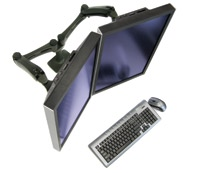
The original Ergotron sheet identifies 45-218-195 as black and includes two LCD arms, two extensions, a desk clamp and a grommet mount. That gives a buyer two documented mounting routes for this exact package. The clamp attaches at an edge up to 2.6 inches thick; the grommet route needs a 5/16–2-inch hole and a surface no thicker than 3 inches. Neither specification certifies an unsupported hollow desktop or an obstructed underside. The sheet lists 7–20 lb for each display, up to 40 lb together, and warns that display depth over 2.5 inches can reduce capacity. This is an older manufacturer-authored sheet and a legacy part: verify the supplied contents and terms of any current retail listing.
Pros
- Included clamp and grommet hardware create two desk-attachment paths. A compatible existing hole can work when the back edge is hard to reach.
- Two separate LX arms give a dedicated side-by-side arrangement. The original assembly is aimed at independently positioning two screens in a horizontal row.
- The published 40 lb total supports two suitably weighted displays. Each must still remain within the individual 7–20 lb range.
Cons and trade-offs
- The 7 lb per-screen minimum excludes some light displays. The LX Pro’s 4 lb minimum covers a wider low-weight range.
- Its original configuration is a horizontal pair. A buyer seeking one screen over another should use a documented stacking configuration instead of assuming a tall-pole conversion.
- Thick cases can reduce load capacity. Ergotron flags displays deeper than 2.5 inches, so a heavy, deep monitor needs a closer manufacturer fit check.
Choose something else if: You need vertical stacking, either display falls outside 7–20 lb, or neither the documented clamp nor grommet route suits the desk.
Our recommendation
Choose exact black part 45-218-195 only after measuring both screens and confirming that the offered legacy package contains the mount hardware described in the original sheet. Its grommet option is a meaningful advantage for an appropriate desk; it is not a substitute for checking desktop structure.
Sources: Ergotron-authored product sheet, archived PDF and Ergotron ID-label guide naming 45-218-195. Buying judgment is editorial.
Search exact 45-218-195 on Amazon US
LX Pro Dual Stacking 45-690-292: plan the vertical pair
Best for: Two compatible displays that need a one-above-the-other arrangement on a desk edge that can take the included two-piece clamp.
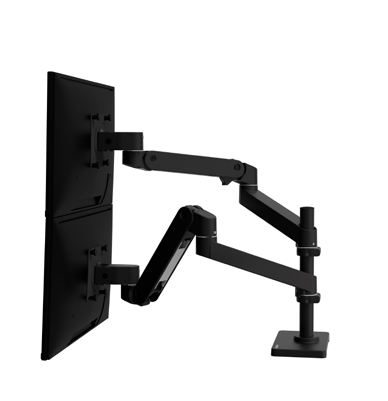
Ergotron’s current LX Pro document lists 45-690-292 as the matte-black standard-clamp Dual Stacking kit, with two arms, two extensions, two monitor pivots and a 12-inch pole. The manufacturer states 4–22 lb per monitor and 8–44 lb total. It also says the outside height of a display should be no more than 14.7 inches to facilitate stacking; a deep case over 3.6 inches may lower capacity. The clamp needs a desktop edge between 0.4 and 2.4 inches thick. Ergotron publishes a separate matte-black grommet part, 45-710-292; do not infer that its mount is included with the clamp SKU.
Pros
- Vertical stacking is the documented configuration. Its 12-inch pole and two-arm kit address an above-and-below screen layout directly.
- The 4 lb minimum and 22 lb per-arm maximum span more light and heavy monitor weights. The exact combination must still fit the 8–44 lb total and depth condition.
- The tension indicator and rotation stop address installation and nearby surfaces. Ergotron describes the indicator as a reference when balancing repeated arms and the stop as a way to limit side-to-side motion.
Cons and trade-offs
- Stacking depends on case height, not just diagonal. A tall bezel or unusual VESA location can make a nominally supported screen awkward or incompatible.
- The exact clamp SKU has no included grommet mount. A desk that requires through-hole mounting needs the separately numbered configuration and a fresh parts check.
- Its clamp has a 2.4-inch upper edge-thickness limit. A thick desktop or underside rail can rule out this attachment even when both monitors fit.
Choose something else if: Your two screens are meant to stay in one row and an included grommet mount matters, or either monitor exceeds the stacking case-height or load conditions.
Our recommendation
Choose exact clamp part 45-690-292 for a measured vertical pair. Verify each display’s outside height, depth and VESA position, then draw the pole and arm sweep against the wall and desk before ordering. Treat any alternate LX Pro finish or grommet SKU as a separate offer.
Sources: Ergotron LX Pro Dual Stacking black product specifications and Ergotron LX Pro Dual Arms PDF. Recommendations are editorial.
Make a full fit record, not a diagonal-size guess
Write down each display’s stand-free weight, external width, height, depth, VESA hole spacing and the position of its VESA plate. Account for any adapter under Ergotron’s loading rules. Then map the desk-edge thickness, structure, any grommet opening, underside rail or cable tray, wall gap, and the screens’ full travel. A thick display can lower effective capacity even when its scale weight is under the headline limit. Use our monitor-arm mounting checklist to collect those measurements.
For a stacking plan, use full-size paper outlines of the outside monitor cases. Put the VESA centers at their actual offsets and check overlap, eye-level placement and cable slack through intended movement. For a horizontal row, check the screens’ combined width and the arm sweep to the sides and rear. These are planning steps, not hands-on results for either arm.
Checks before placing an order
- Pick the intended geometry. A horizontal row and a vertical stack create different height and reach constraints.
- Check each load separately. Compare both stand-free weights with the applicable per-arm range and the pair total; account for accessories.
- Measure the desk mount. Record edge thickness, hole size if relevant, underside obstructions and desktop structure.
- Match the exact part. 45-218-195 is the older black LX side-by-side kit; 45-690-292 is the matte-black LX Pro stacking clamp kit. 45-710-292 is a different grommet configuration.
- Read the actual retail listing. The LX Pro offer card uses a verified 45-690-292 identifier and shows a current price when a matching offer is available. The older LX button opens a model search. Confirm included parts and seller terms before buying.
Dual-monitor arm FAQ
Can two screens total less than 40 lb and still be too heavy?
Yes. On the older LX, each screen must also stay within 7–20 lb. On LX Pro Stacking, each must fit 4–22 lb and the pair 8–44 lb, subject to depth and mounting guidance.
Does 45-690-292 include a grommet mount?
Ergotron identifies it as the matte-black standard-clamp configuration. The matte-black grommet configuration has a different part number, 45-710-292.
Is a 27-inch display guaranteed to stack?
No. Ergotron calls diagonal screen sizes approximate. It says outside display height should be no more than 14.7 inches to facilitate stacking, and the case depth and VESA location also matter.
Can a desk of the right thickness still be incompatible?
Yes. Rails, drawers, cable trays, desktop construction, wall proximity and the clamp’s required underside access can prevent safe installation. Check the exact installation drawing for the chosen part.
Research method, sources and limits
We rechecked the September 9 comparison against Ergotron-authored product material and the live LX Pro listing on September 27, 2026. The older LX exact part is documented in an original Ergotron PDF now hosted by an archival reseller and in Ergotron’s own ID-label guide; we do not infer current stock or official discontinuation status from that archive. Specifications are manufacturer claims and the buying recommendations are editorial judgments. We did not install either arm or test smoothness, stability, long-term movement, durability, comfort or desk strength. The separate LX Pro offer card shows a current price only when a matching offer is available; the legacy LX link is a model search.
Primary sources: Ergotron 45-218 original product sheet, archival host, Ergotron identifier guide, current LX Pro 45-690 product page and LX Pro Dual Arms PDF. Read our methodology.
Affiliate disclosure
As an Amazon Associate, The Gear Audit earns from qualifying purchases. We may earn an affiliate commission when you buy through our links, at no extra cost to you. Read our full affiliate disclosure.