Best Compact Mechanical Keyboards (2026): Keychron K2 Pro vs HHKB Professional Hybrid Type-S
By The Gear Audit Team · Specification research September 10, 2026; buying-advice layout update September 13, 2026.
Quick answer: familiar 75% controls or the distinctive HHKB layout?
Choose the Keychron K2 Pro if you want a compact keyboard that keeps a function row and arrow keys, works over Bluetooth or USB-C, and supports QMK-based remapping. Choose the HHKB Professional Hybrid Type-S only if you specifically want its 60-key arrangement, silent Topre switch system, and four-device Bluetooth pairing. The HHKB saves more space, but that benefit comes with a larger layout adjustment and a different customization path.
The 75% layout retains dedicated arrows and a function row. Check the selected version carefully because Keychron says its Black Fully Assembled configuration is not hot-swappable.
The 60-key design, silent Topre switches, and up to four Bluetooth pairings suit buyers who already understand the HHKB key arrangement and want to use it deliberately.
Compare the documented differences
| Published attribute | Keychron K2 Pro | HHKB Professional Hybrid Type-S |
|---|---|---|
| Layout | 75% layout with a function row and dedicated arrow keys. | 60-key HHKB layout; more functions are reached through the board’s layer and key arrangement. |
| Connection | Bluetooth 5.1 for up to three devices or USB-C wired. | Bluetooth for up to four devices or USB-C wired. |
| Switch system | Keychron K Pro conventional mechanical switches. Hot-swap availability depends on the configuration. | Silent Topre electrostatic-capacitive switches; the manufacturer lists 45 g actuation for the traditional Hybrid Type-S. |
| Customization | QMK and Keychron Launcher support for remapping and macros. | DIP-switch settings and the HHKB Professional Keymap Tool. The current download page lists Windows 10/11 and macOS 12 or later; remapping requires a USB connection. |
| Main purchase check | Layout, backlight, switch, keycap and hot-swap selection; Keychron says the Black Fully Assembled version is not hot-swappable. | Key legends/layout, current keymap-tool support and willingness to adapt to the HHKB arrangement. |
Keychron K2 Pro: compact without giving up dedicated arrows
Best for: A home or office desk where reduced width matters, but a visible function row and arrow cluster still belong in the daily workflow.

Keychron presents the K2 Pro as a 75% wireless mechanical keyboard. It can pair with up to three devices through Bluetooth 5.1 or connect over USB-C, and the product documentation includes macOS and Windows keycaps. The retained function row and arrows reduce the number of everyday commands that must move to a layer, which makes this the less disruptive compact option for many spreadsheet, browser, and writing setups.
The family name does not settle the socket configuration. Keychron lists hot-swappable fully assembled and barebone choices, while explicitly stating that the Black Fully Assembled version is not hot-swappable. Anyone buying the board to change switches later should verify the color, backlight, switch, and socket selection on the exact listing.
Pros
- The 75% layout preserves frequently used dedicated controls. A function row and arrows remain visible, so buyers coming from a laptop or full-size keyboard can save desk width without moving those commands onto a layer.
- Three-device Bluetooth supports a mixed desk. Keychron documents pairing with up to three devices, which can reduce cable swapping between compatible computers or tablets.
- QMK and Launcher expand key assignment options. Remapping and macros can adapt the compact layout to a specific workflow instead of forcing every user to accept the factory map.
Cons and trade-offs
- Hot-swap support is configuration-dependent. Ordering by the K2 Pro name alone can produce a board that does not support the switch-changing plan you expected.
- It does not preserve a numpad or separated navigation block. Buyers who enter numbers heavily or rely on a full navigation cluster may save space at the cost of more layer use or a separate numpad.
- Bluetooth is the documented wireless path. A buyer who specifically needs a 2.4 GHz receiver should choose a model that lists one rather than treating every wireless keyboard as equivalent.
Choose something else if: You specifically want the smaller HHKB arrangement and silent Topre system, or you require a full-size numpad. The HHKB is the more specialized compact choice; neither model supplies the full-size layout.
Our recommendation
We recommend the K2 Pro for most buyers deciding between these two because its 75% layout keeps more familiar keys available and its Bluetooth/USB-C connection fits a typical multi-device desk. Buy it only after confirming the exact hot-swap and switch configuration.
Source: Keychron K2 Pro product specifications. The recommendation is editorial interpretation of documented features.
Search Amazon US for Keychron K2 Pro listings
HHKB Professional Hybrid Type-S: a compact layout with its own logic
Best for: Buyers who already want the HHKB key arrangement, value a very small footprint, and prefer its silent Topre switch system to a conventional MX-style mechanical platform.
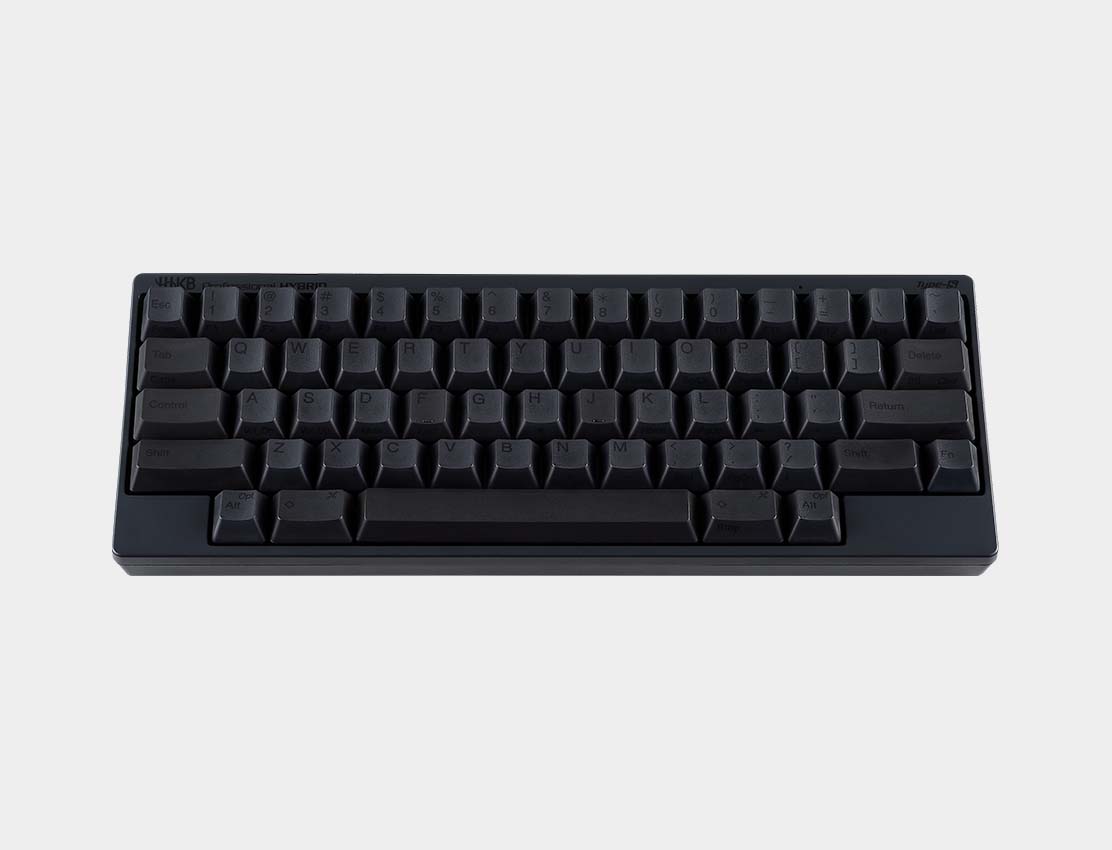
HHKB documents a 60-key layout, Bluetooth connections for up to four devices, USB-C wired operation, PBT keycaps, DIP-switch settings, and three height choices for the Professional Hybrid Type-S. Its traditional Hybrid Type-S uses silent Topre electrostatic-capacitive switches with a manufacturer-listed 45 g actuation force. These are defining choices rather than small upgrades over the K2 Pro.
The reduced key count changes how the board is used. Commands that have dedicated keys on a 75% board move into the HHKB layout and its layers. PFU’s current HHKB Professional Keymap Tool download page lists Windows 10/11 and macOS 12 or later. Customization requires a USB connection rather than Bluetooth, and the listed firmware requirements should be checked before setup.
Pros
- The 60-key body leaves more room around the keyboard. That can help a narrow desk or a setup where mouse space matters, provided the user is comfortable accessing more commands through the layout.
- Four-device Bluetooth is documented. The extra pairing slot can help a desk shared by several compatible computers or mobile devices.
- The switch system is clearly differentiated. Silent Topre switches make this a purposeful alternative for someone seeking that mechanism rather than another variation of a conventional hot-swap board.
Cons and trade-offs
- The layout requires a deliberate adjustment. Fewer dedicated keys can slow a workflow that depends on a conventional function row, arrow cluster, or navigation block until the user learns the HHKB arrangement.
- It is not a conventional MX hot-swap platform. Buyers who want to sample common mechanical switches should use a compatible conventional board instead.
- Remapping requires a USB connection. The current keymap tool supports listed Windows and macOS versions, but changes cannot be made over Bluetooth; check the firmware requirement before setup.
Choose something else if: You want a compact board that behaves more like a familiar laptop or desktop keyboard. The K2 Pro keeps dedicated arrows and a function row and offers a conventional mechanical switch route.
Our recommendation
We recommend the HHKB Professional Hybrid Type-S for buyers who can name the HHKB layout and Topre system as the reason for the purchase. Its small size alone is not enough reason to accept the changed key arrangement. Plan to connect it by USB when using the supported Windows or macOS keymap tool.
Sources: HHKB Professional Hybrid Type-S specifications and HHKB keymap-tool downloads. The recommendation is editorial interpretation of documented features.
Price listing: HHKB Professional Hybrid Type-S — Charcoal.
How to choose between these compact approaches
- List the dedicated keys you use every day. If arrows and function keys need to stay visible, the K2 Pro is the clearer fit. If layers are already comfortable, the HHKB’s smaller layout becomes more realistic.
- Choose the switch ecosystem before the case size. K2 Pro uses conventional mechanical switches with configuration-dependent hot swap. HHKB uses Topre and should be bought for that system.
- Count the devices and check their ports. Both support Bluetooth and USB-C; Keychron lists three Bluetooth devices and HHKB lists four.
- Verify the exact sold variant. Layout legends, switch selection, socket type, color and software support can materially change the purchase.
Compact mechanical keyboard FAQ
Is a 60% keyboard always better for a small desk?
No. It saves more width, but the practical cost is greater layer use and fewer dedicated keys. A 75% board may be the better compact compromise when arrows and a function row are used frequently.
Is every Keychron K2 Pro hot-swappable?
No. Keychron lists different configurations and says the Black Fully Assembled version is not hot-swappable. Confirm the exact selection before buying switches for it.
Can HHKB pair with more devices?
HHKB documents Bluetooth pairing with up to four devices, compared with up to three on the K2 Pro. That difference matters only if all of those pairings are useful in the intended setup.
Are Topre switches interchangeable with conventional mechanical switches?
No. The HHKB’s Topre system and the K2 Pro’s conventional mechanical platform are different ecosystems. Choose the switch system before comparing accessories or replacement switches.
How should I check the buying links?
Read the button or card label: a search can mix layouts and configurations, while an exact-offer card applies only to its named variant and current availability. Confirm the model, layout, switch, hot-swap configuration, condition, seller, included accessories, and final checkout price.
Amazon price check: Cards use the named US variant and show a qualifying current USD offer with its check time. Prices expire within one hour; unavailable offers fall back to a labelled Amazon search. Confirm the exact variant, condition, accessories and final checkout price. No numerical Amazon rating is shown because the API did not return usable review data. Price checks do not change the specification-research date.
Research method, primary sources and limitations
We compared the exact manufacturer descriptions for the Keychron K2 Pro and HHKB Professional Hybrid Type-S, focusing on layout, connection, switch system, customization, and variant checks. The buying advice is our editorial interpretation of those documented differences.
We did not test switch feel, sound, latency, wireless reliability, battery life, software behavior, or long-term durability. Manufacturer specifications do not establish an overall performance winner, and model options can change.
Correction: The previous version presented testing, ratings, review analysis, price, latency, and performance claims without retained supporting records. Those claims have been removed.
Buying-advice layout update: September 13, 2026. Original specification research: September 10, 2026.
Primary sources: Keychron K2 Pro; HHKB Professional Hybrid Type-S; HHKB keymap-tool downloads. Read our research methodology and Computer Peripherals guides.
CERTAIN CONTENT THAT APPEARS ON THIS SITE COMES FROM AMAZON. THIS CONTENT IS PROVIDED “AS IS” AND IS SUBJECT TO CHANGE OR REMOVAL AT ANY TIME.
Affiliate disclosure
As an Amazon Associate, The Gear Audit earns from qualifying purchases. We may earn an affiliate commission when you buy through our links, at no extra cost to you. Read our full affiliate disclosure.