Powered USB Hubs Compared: Plugable USBC-HUB7BC vs Sabrent HB-B7C3
By The Gear Audit Team · Manufacturer documentation checked September 27, 2026.
Quick answer: data-and-charge ports or separate charging ports?
Plugable USBC-HUB7BC places USB 3.0 data and BC 1.2 charging on all seven USB-A ports. Sabrent HB-B7C3 separates seven USB 3.0 data ports from three dedicated charging-only positions. Both use an external 60W supply and one shared computer connection. Choose by the number of peripherals that must communicate with the host; neither is a video dock or a documented USB-C PD laptop charger.
Compare the published differences
| Published feature | Plugable USBC-HUB7BC | Sabrent HB-B7C3 |
|---|---|---|
| Port layout | Seven front USB-A ports for data and charging | Seven USB 3.0 data ports plus three dedicated smart-charging ports |
| Data claim | USB 3.0, up to 5Gbps; one 5Gbps USB-A or USB-C host connection | Seven USB 3.0 ports, up to 5Gbps; Sabrent says simultaneous devices divide bandwidth |
| Charging claim | BC 1.2 at up to 1.5A / 7.5W on each USB-A port; included 60W (12V/5A) supply | Three smart-charging ports auto-optimize up to 2.4A each; 60W output and included 12V/5A adapter |
| Host connection | Included USB-B-to-USB-A cable with USB-C adapter; manufacturer lists Windows, macOS, and Linux | Included USB 3.0 cable; manufacturer says it can connect peripherals to a system over one cable |
| Published dimensions / weight | 1 × 5 × 3 in.; 5 oz. | 5.7 × 1.9 × 0.94 in.; 10.6 oz. |
Sources: Plugable’s USBC-HUB7BC product page and Sabrent’s HB-B7C3 product page. “Up to” speed and charging figures are not a controlled head-to-head result.
Plugable USBC-HUB7BC: seven combined data-and-charging ports
Best for: Seven or fewer USB-A peripherals that need data and may also need BC 1.2 charging, connected to a USB-A or USB-C host.
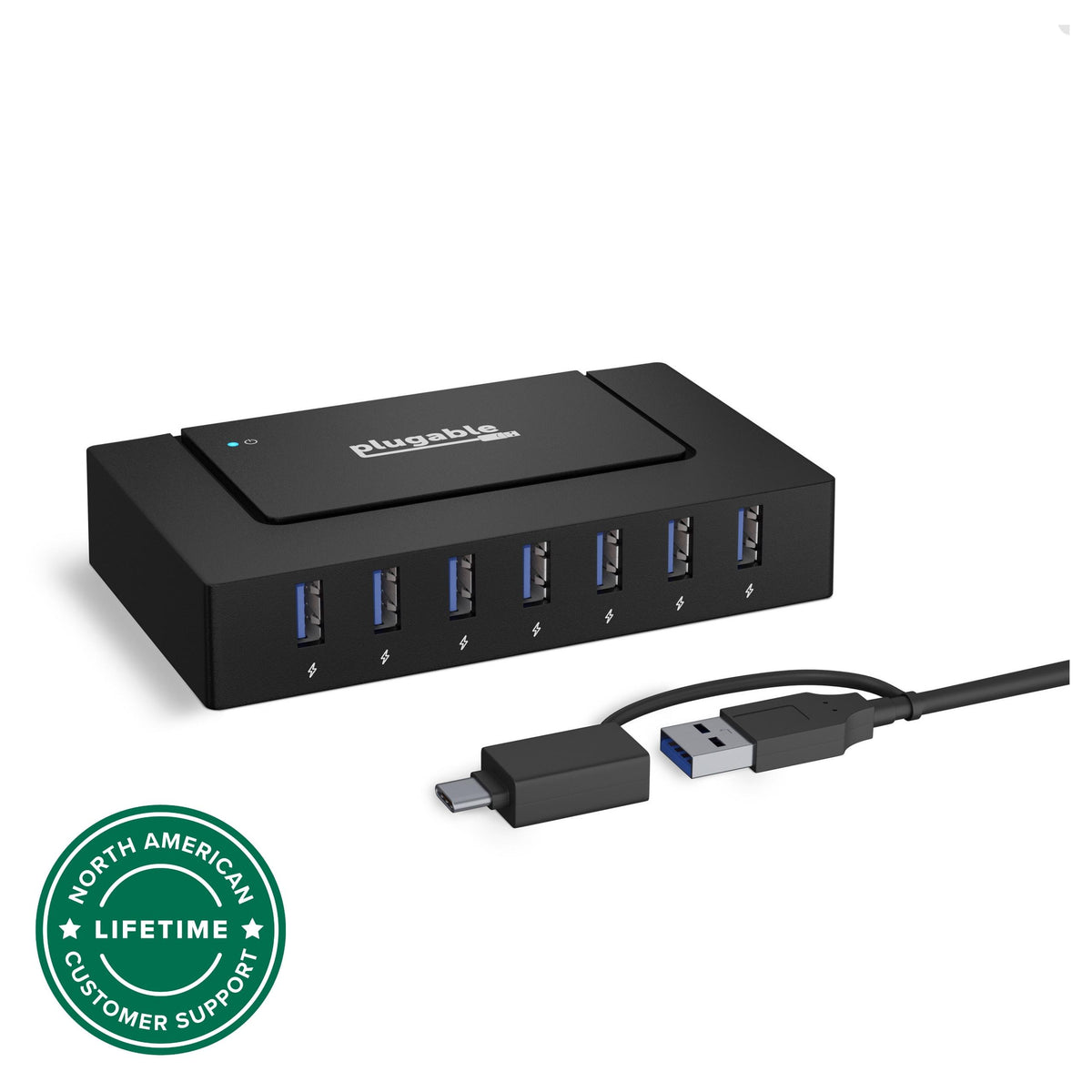
Choose it for: a desk where the same seven USB-A ports need to carry peripheral data and provide the manufacturer’s BC 1.2 charging support. Its included cable connects to either a USB-A or USB-C host, which is useful when the computer connection is the deciding constraint.
Published strengths: Plugable lists up to 5Gbps USB 3.0 data and BC 1.2 charging at up to 1.5A / 7.5W on every front USB-A port. The box includes a 60W, 12V/5A power adapter and a 1m USB-B-to-USB-A host cable with a USB-C adapter. Plugable lists support for Windows, macOS, and Linux.
Trade-offs to check: the hub has one 5Gbps host link, so attached data devices share that route; each port is not an independent 5Gbps connection. The manufacturer also warns against some older USB 3.0 host controllers and notes possible 2.4GHz wireless interference near USB 3.0 equipment. Charging behavior remains device-dependent.
Search Amazon US for the Plugable USBC-HUB7BC
Pros
- All seven device ports have a documented data path and BC 1.2 charging support; no port must be reserved solely for charging.
- The included host cable and USB-C adapter serve both USB-A and USB-C computers.
- Its 60W external adapter supports a populated desk better than relying entirely on computer bus power.
Cons and trade-offs
- One upstream 5Gbps USB link is shared by active data devices.
- Seven physical ports limit the number of devices; Sabrent has three additional charging-only positions.
- BC 1.2 USB-A charging is different from USB-C PD laptop charging.
Choose another if: You need more than seven simultaneous physical connections, dedicated charging-only bays, video output or laptop PD.
Our recommendation
Choose Plugable when the important distinction is that any of its seven device ports can carry data and charge. Verify the exact USBC-HUB7BC label, as the older USB3-HUB7BC has a different host package.
Sabrent HB-B7C3: seven data ports plus three charging-only ports
Best for: A desk with several USB data peripherals and three devices that only need charging.
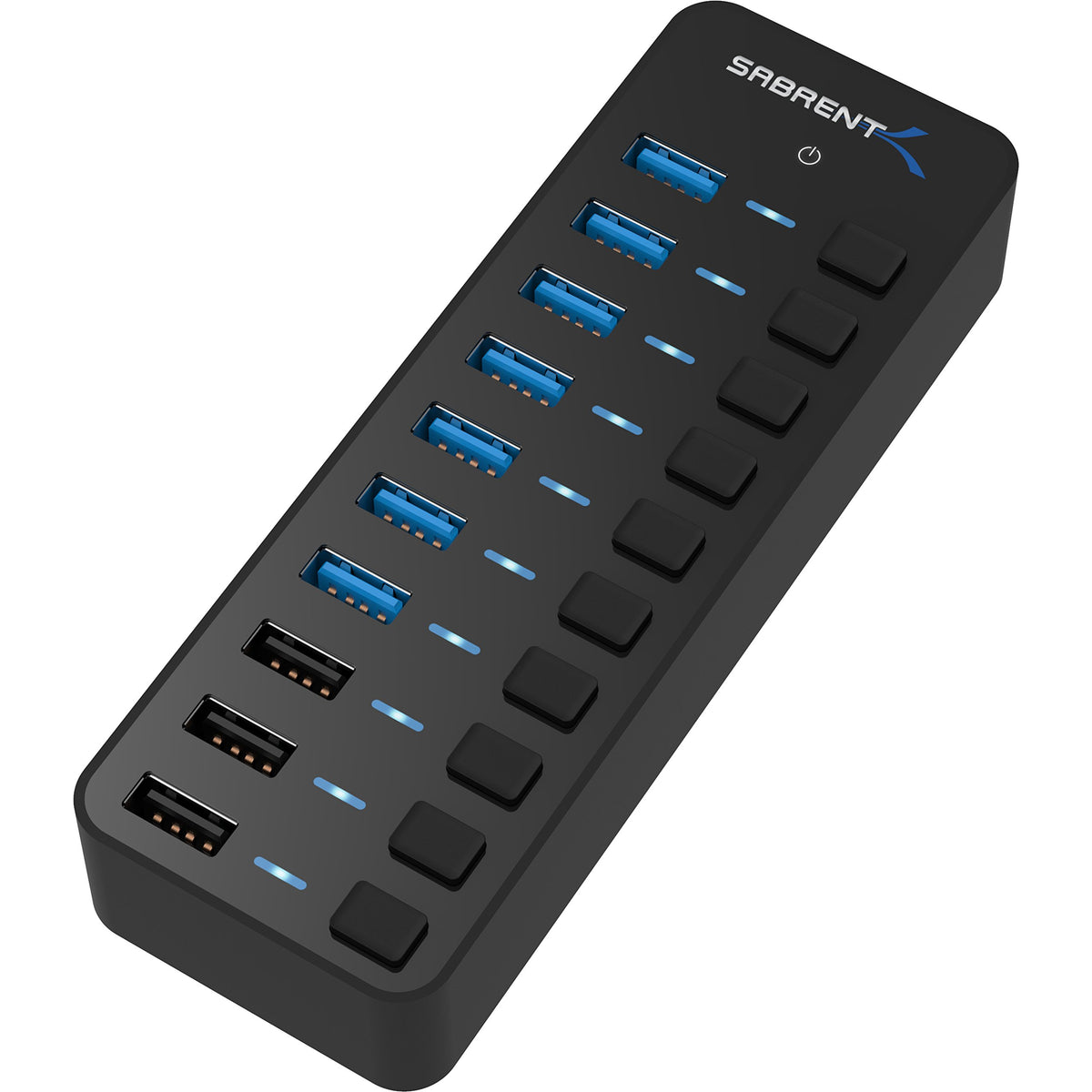
Choose it for: a desk that benefits from a deliberate split between seven USB 3.0 data connections and three charging-only positions. The published blue LEDs indicate each port’s power status, which can help when you want to see which ports are active.
Published strengths: Sabrent lists seven data ports at up to 5Gbps, three smart-charging ports that auto-optimize current up to 2.4A each, and 60W output. It includes a 12V/5A adapter and USB 3.0 cable. Its FAQ says the normal USB 3.0 ports can supply up to 900mA, while the dedicated charging ports are the ones listed up to 2.4A.
Trade-offs to check: the three smart-charging ports are separate from the seven data ports, so they are not a substitute for data connections. Sabrent says bandwidth is divided when several devices are connected, which can affect transfer speeds. Confirm that the included host cable and your computer’s port suit the desk before buying.
Search Amazon US for the Sabrent HB-B7C3
Pros
- Seven data ports plus three charging-only ports cover a larger physical device count than Plugable’s seven.
- Dedicated charging positions keep their purpose clear when organizing a mixed peripheral desk.
- Power-status LEDs help identify which ports are active at a glance.
Cons and trade-offs
- The three extra charging ports cannot replace missing data ports.
- Multiple drives still share the single upstream USB bandwidth.
- The included host cable and external power brick add desk cable clutter.
Choose another if: Every connected device needs data, a USB-C host adapter is essential, or you need monitor and laptop-power docking.
Our recommendation
Choose Sabrent for a deliberately split desk: seven data devices plus up to three charging-only devices. Draw a port map first so those extra three positions are genuinely useful.
What a powered USB hub does—and does not—solve
An external power adapter can make a hub more suitable for a populated peripheral-and-charging desk than relying only on the computer’s USB power. It does not make every connected device charge at its personal maximum simultaneously, and it does not remove the shared bandwidth of one upstream USB link.
- Check whether every item needs data, charging, or both. This is the main layout difference between these two models.
- For external drives, plan around shared bandwidth and keep backups before moving important files.
- Neither product page documents video output or USB-C Power Delivery to charge a laptop. For monitors plus laptop charging through one cable, use a dock designed for those functions.
- Confirm the exact model, supplied power adapter, seller, and support terms when shopping. Links labelled Search Amazon are model searches and may return other variants.
For a permanent monitor-and-laptop-charging setup, see our desktop dock comparison.
Powered USB hub questions
Can all seven Plugable ports transfer data and charge a device?
Plugable lists seven USB-A ports with USB 3.0 data and BC 1.2 charging at up to 1.5A / 7.5W per port. The actual charging result depends on the attached device and its charging protocol.
Why does the Sabrent have ten visible ports but only seven data ports?
Sabrent separates seven USB 3.0 data ports from three smart-charging ports. Its product page describes the latter as charging ports up to 2.4A each; do not plan on using them for peripheral data.
Will either hub give every drive 5Gbps at the same time?
No such result is established here. Both products connect through one upstream USB link, and Sabrent explicitly says multiple devices divide bandwidth. Treat the published “up to 5Gbps” figure as a per-connection maximum under suitable conditions, not a guaranteed simultaneous total for every port.
Can either hub replace a USB-C docking station?
Not when you need monitor output or documented laptop Power Delivery. Those functions are not listed for either exact hub in the product documentation used here.
Research method, sources, and limitations
We checked the manufacturer product pages on September 27, 2026 for the exact USBC-HUB7BC and HB-B7C3 model numbers, their port layouts, included power supplies and cables, physical details, compatibility notes, and the manufacturer-hosted product photographs. The buying guidance is our interpretation of those documented layout differences. We did not test speed, charging, reliability, host compatibility, wireless interference, or external-drive behavior. Manufacturer performance and charging figures remain manufacturer claims.
Primary sources: Plugable USBC-HUB7BC product page and technical specifications; Sabrent HB-B7C3 product page, specifications, FAQ, and manual link. Read our methodology for the limits of this research-based comparison.
Amazon price cards, when available, apply only to the named model and configuration. Check the displayed update time, seller, condition and included items. Search links may return other variants. Customer star ratings are not shown when verified API data is unavailable.
Affiliate disclosure
As an Amazon Associate, The Gear Audit earns from qualifying purchases. We may earn an affiliate commission when you buy through our links, at no extra cost to you. Read our full affiliate disclosure.