UPLIFT V2 vs FlexiSpot E7 Pro: Standing Desk Frame Specifications
Quick answer: compare completed desk fit, not load numbers
The legacy UPLIFT V2 2-leg document lists a 25.3–50.9-inch height range with a one-inch top; FlexiSpot’s current US E7 Pro Line page lists 25.0–50.6 inches, but does not establish the same top-thickness basis. UPLIFT calls 355 lb a lifting capacity while FlexiSpot calls 440 lb a maximum static load. Those figures cannot establish which desk lifts more. Start with your required keyboard height, chosen top size and the exact frame configuration. If buying now, verify that the V2 listing actually supplies the legacy frame described in the older PDF.
Specifications and their measurement limits
| Specification | UPLIFT V2 2-leg, legacy PDF | FlexiSpot E7 Pro, US product page |
|---|---|---|
| Height | 25.3–50.9 inches, including a 1-inch desktop | 25.0–50.6 inches, labelled adjustable height; matching top-thickness basis not established here |
| Load | 355 lb lifting capacity; cited PDF does not define whether the desktop counts toward it | 440 lb maximum static load |
| Motors | Two motors | Dual motor |
| Frame width | 41.3–72.2 inches | 43.3–74.8 inches |
| Documented top width | Fits UPLIFT’s 42–80-inch desktop sizes | Applicable desktop width 47.2–80 inches |
The load figures do not establish a lifting-capacity winner. One is labelled a lifting limit and the other a static load limit. They have not been matched for load basis or operating conditions. Likewise, the two height entries should not be treated as equivalent completed desktop ranges without checking the selected top.
UPLIFT V2 2-leg: legacy configuration with a defined top basis
Best for: A buyer who can verify that an offered V2 frame matches the legacy two-leg document and whose chosen top falls within its documented system.
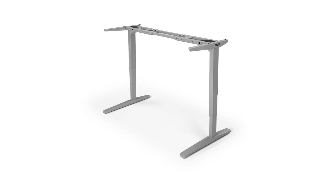
UPLIFT’s CO-FRMA-2 Rev 2.0 compares the standard V2 with V2-Commercial. The standard V2 has a 25.3–50.9-inch completed height range when fitted with a one-inch top, a 41.3–72.2-inch adjustable frame width and a stated fit for UPLIFT tops from 42 to 80 inches. That is useful for a narrow top decision, but the PDF has no visible publication date and does not prove that every current listing with “V2” uses the same parts. The standard frame is also distinct from the V2-Commercial’s lower crossbar and different height range.
Pros
- The legacy height range explicitly states its one-inch desktop basis.
- The document gives a 42-inch minimum named UPLIFT desktop size for this frame system.
- Width adjustment and the standard versus Commercial distinction are documented.
Cons and trade-offs
- The legacy PDF cannot establish present stock, package contents or terms.
- Its 355 lb lifting figure does not define whether desktop mass is included in the comparison basis.
- A similar V2-Commercial or newer frame is not interchangeable for height or fit planning.
Choose another if: The seller cannot identify the exact frame or supply a current manual matching the offered package.
Our recommendation
Use the V2’s legacy data as a screening tool, then request documentation for the actual SKU before paying. Treat the completed height range as valid only for the specified one-inch top basis.
Search UPLIFT V2 two-leg desks on Amazon US
FlexiSpot E7 Pro Line: current US configurator details
Best for: A buyer building around a 47.2–80-inch top who can check the selected E7 Pro frame, top and keypad in FlexiSpot’s current offer.
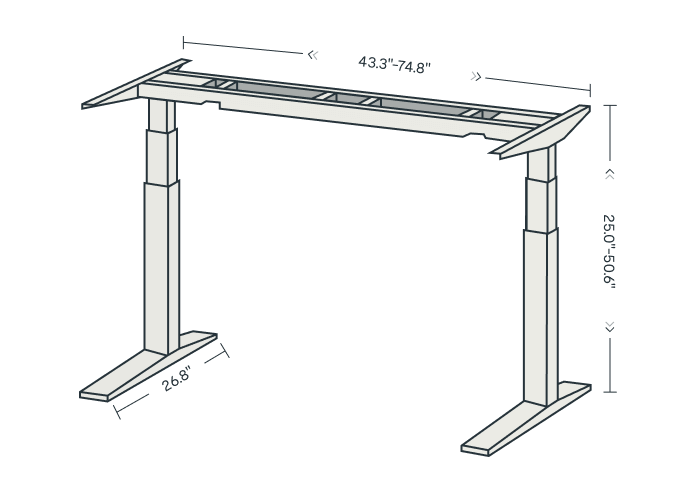
FlexiSpot’s US page lists dual motors, 43.3–74.8 inches of frame-width adjustment, a 47.2–80-inch applicable desktop width and 25.0–50.6 inches adjustable height. It calls 440 lb a maximum static load. That wording matters: static support is not the same measurement as lifting a loaded desk through its travel. The page describes a Premium Keypad with memory, LED touch screen, child lock and USB charging, but the selected bundle must be checked for inclusion.
Pros
- The current US page makes desktop-width fit and frame width easy to check.
- It documents a Premium Keypad with memory and child-lock functions.
- Its published 43.3–74.8-inch frame-width adjustment accommodates several top widths, subject to the selected configuration.
Cons and trade-offs
- The 440 lb number is labeled static; do not use it as a moving-load guarantee.
- Its height figure lacks a matched one-inch-top basis in the cited comparison.
- Keypad, top material and cable accessories vary with the selected offer.
Choose another if: The selected top cannot reach your measured seated keyboard height, or the seller cannot state the applicable moving-load limit.
Our recommendation
For a current purchase, E7 Pro offers a live configuration page and manual. Check the actual completed desk height and moving-load definition before treating its larger static number as an advantage.
Search FlexiSpot E7 Pro desks on Amazon US
Use desktop size to narrow the configuration
The documented top-width ranges offer a practical check for a narrow room. A top size supported in one manufacturer’s system may fall outside the other’s listed range. That does not mean every third-party top within either numerical interval is compatible: thickness, depth, material and attachment points still need to match the frame instructions.
Lay out the actual equipment on a surface-sized template. Include the monitor stand or approved arm, keyboard, mouse and documents. Separately check the desk feet, room passage and chair movement; the top rectangle does not describe all the space needed.
Translate keyboard position into desktop height
First plan the keyboard position required while seated and standing. If it sits on the desktop, subtract its height above the top to obtain the required surface position. For a keyboard tray, account for the tray’s offset and keyboard thickness. Compare those required desktop surface heights with the selected configuration’s completed range.
Do not substitute another frame revision for the documented V2. A similarly named listing can use different legs, top thickness or controls. Obtain the documentation for what will actually be supplied before relying on a minimum height.
Check the moving load and controls
List everything that rises: the top, displays, arms, computer and attached accessories. Ask how the manufacturer defines the lifting rating for your exact configuration. A published static limit should not be used as the moving limit unless the manufacturer explicitly establishes that relationship.
FlexiSpot’s cited Premium Keypad lists memory presets, an LED touch screen, a child lock and a USB charging port. Confirm that keypad is included in the selected package. Controller functions are secondary to a height range and mounting arrangement that fit.
A practical checkout record
- Measure seated and standing keyboard-surface heights with your actual chair and shoes. Add the chosen top thickness using the maker’s measurement convention.
- Confirm the exact frame model and revision, top width, depth, material and mounting pattern. A top that fits a numerical width range may still lack approved attachment points.
- Add the weight of every item that moves: desktop, monitors, arms, computer, tray, drawers and accessories. Ask the seller for a moving-load specification for that configuration.
- Check feet, chair access, door swings, wall distance, outlets and cable slack throughout travel, not just at seated height.
- Compare the full offer: keypad, cable tray, top, hardware, delivery, warranty eligibility and current return terms. The buttons above are model searches, not verified ASINs or offers.
Our standing-desk measurement checklist provides a place to record room and user dimensions before deciding.
Standing-desk frame questions
Does 440 lb static mean E7 Pro can lift more than V2?
No. FlexiSpot labels that figure static while UPLIFT labels 355 lb lifting. Without a matched moving-load basis, the numbers cannot rank lift capacity.
Are the published height ranges directly comparable?
No. UPLIFT explicitly includes a one-inch desktop in its legacy range; the cited E7 Pro page does not establish an equivalent top-thickness basis. Compare the completed selected desks.
Is V2-Commercial the same as standard V2?
No. UPLIFT’s PDF distinguishes their construction and height ranges. Match the exact frame before applying its measurements.
Can I mount any third-party desktop within the listed width range?
A width match is only one check. Depth, thickness, material, screw placement and structural support must satisfy the chosen frame instructions.
Research method, sources and limits
We reviewed UPLIFT’s legacy V2 versus V2-Commercial 2-leg PDF, CO-FRMA-2 Rev 2.0, UPLIFT’s V2 frame identification images and FlexiSpot US E7 Pro Line specifications on September 27, 2026. Dimensions and ratings are manufacturer claims; our Best for and recommendations are editorial judgments. The V2 source is legacy and does not establish current availability. We did not assemble either desk or test motion, stability, noise, durability or lifting capacity. Read our methodology.
Affiliate disclosure
As an Amazon Associate, The Gear Audit earns from qualifying purchases. We may earn an affiliate commission when you buy through our links, at no extra cost to you. Read our full affiliate disclosure.