Brother PT-D610BT vs. DYMO LetraTag 200B: Choose Your Label Workflow
By The Gear Audit Team · Specification research September 9, 2026; buying-advice structure and manufacturer source check September 13, 2026.
Quick answer: shared office station or compact phone-based labeler?
Choose the Brother PT-D610BT for a shared desk, stockroom or asset-label workflow where people may create labels from its keyboard, a computer or a phone, and where 24 mm tape, computer-created graphics and an automatic cutter are useful. Choose the DYMO LetraTag 200B, Item 2179979, for lighter-duty home or small-office organization when every label will be designed on a compatible phone or tablet and 12 mm paper, plastic or textile tape is enough. Our default recommendation for mixed office work is the Brother; the DYMO is the more focused, compact choice for mobile-first household labeling.
The built-in QWERTY keyboard covers quick labels, while P-touch Editor and iPrint&Label add computer and mobile creation. The included AC adapter suits a fixed desk station.
The 120 × 120 × 45 mm printer uses the LetraTag Connect app and 12 mm LetraTag tapes, making it easier to carry between household storage projects.
Two label makers for different levels of control
| Buying question | Brother PT-D610BT | DYMO LetraTag 200B, Item 2179979 |
|---|---|---|
| Where do you design? | Built-in QWERTY keyboard and color display; P-touch Editor on a computer; iPrint&Label on iOS or Android | LetraTag Connect app on a compatible phone or tablet; no on-device label-composing interface is documented |
| Connection | Bluetooth 5.0 and USB 2.0 Micro-B | Bluetooth Low Energy; the user guide describes mobile operation within about 10 m |
| Media | Brother TZe and HGe compatibility; TZe widths from 3.5 to 24 mm | 12 mm DYMO LetraTag paper, plastic and textile tapes |
| Published output limits | Up to 18 mm print height on 24 mm tape; computer/mobile routes add QR codes and graphics | Up to two lines at a manufacturer-stated 160 dpi and 7 mm/sec |
| Cutter | Built-in automatic cutter | Manual cutter button |
| Power | Included AC adapter or six AA batteries, not included | Four AA alkaline batteries, not included |
| Physical format | About 202 × 87 × 199 mm and 990 g without batteries or tape | 120 × 120 × 45 mm; current product page does not state weight |
| Best match | Shared offices, inventory, asset tags and mixed quick/advanced label creation | Home storage, files, craft supplies and clothing labels designed from one mobile device |
The Brother’s wider media and extra controls matter when a label must carry more structure than a short storage name. The DYMO’s advantage is a much simpler physical tool: its body provides power and cutting controls while the phone app handles composition. Decide whether that dependence on a phone is a convenience or a bottleneck for the people who will actually print.
Brother PT-D610BT: the flexible shared-workspace choice
Best for: A shared office, service counter or stockroom that needs quick labels at the machine as well as computer-designed barcodes, QR codes, images or repeated templates on tape up to 24 mm wide.
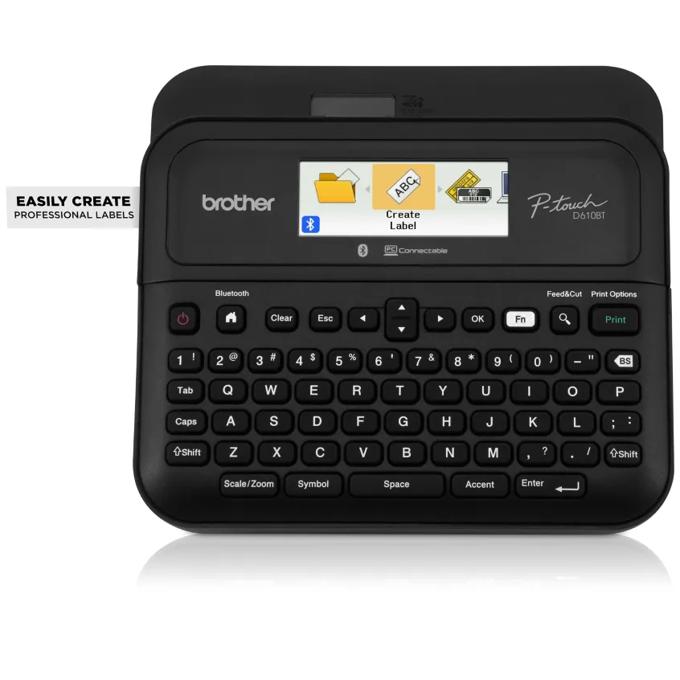
Brother gives this model three distinct creation routes. The built-in keyboard and color display cover an immediate label without another device. P-touch Editor on a computer and iPrint&Label on a mobile device add broader design libraries and connected printing. That flexibility is useful when several people share one printer but do not all create the same type of label.
The hardware also fits repeat office work: Brother documents an automatic cutter, a maximum 18 mm print height on 24 mm tape, storage for up to 99 label files, and both AC-adapter and battery power. The US package includes the adapter, a USB cable and a 24 mm black-on-white laminated TZe sample tape. Those inclusions make it more ready for a fixed desk than a battery-only purchase.
Pros
- Labels can start at the keyboard, a computer or a mobile device. One person can print a quick shelf name from the machine while another prepares a recurring asset label in software, so the printer is less dependent on one person’s phone.
- The 24 mm media ceiling leaves more room for structured labels. Brother specifies up to 18 mm of print height, and its connected routes support barcodes, QR codes, images and graphics. That is a better fit for inventory or equipment identification than a 12 mm, two-line system.
- The automatic cutter and included AC adapter support repeated desk use. The printer can stay powered at a workstation and cut each label without the manual cutter step required by the DYMO.
Cons and trade-offs
- It takes substantially more room in a bag or small drawer. Brother lists the body at roughly 202 × 87 × 199 mm and 990 g before batteries and tape, while the DYMO body is 120 × 120 × 45 mm.
- Cordless operation requires six AA batteries. The batteries are not included. The supplied AC adapter avoids that expense at a desk, but mobile use means carrying a larger device and two more cells than the four-AA DYMO.
- Some advanced output depends on choosing the correct design route. Brother’s feature table places QR-code creation in P-touch Editor and iPrint&Label rather than stand-alone mode. A buyer who needs QR labels should plan to use a computer or phone, not assume every connected feature is available from the keyboard.
Choose something else if: You only need short pantry, drawer, file or clothing labels and always have one compatible mobile device available. In that case, the Brother’s larger body, wider tape system and multiple design routes add capability you may not use; the LetraTag 200B is easier to move from room to room.
Our recommendation
We recommend the PT-D610BT for most shared-office comparisons because its keyboard keeps basic printing available without an app, while computer and mobile tools cover more elaborate designs. The 24 mm tape support and automatic cutter are meaningful when labels include identifiers, barcodes or repeated layouts. Confirm the exact TZe or HGe cartridge for the surface and width you need; the wider machine does not make every tape suitable for every environment.
Sources: Brother PT-D610BT product page, Brother PT-D610BT user-guide specifications and Brother PT-D610BT brochure. Recommendations are editorial interpretations of documented features.
Price listing: Brother PT-D610BT.
DYMO LetraTag 200B: the compact mobile-first choice
Best for: A person labeling pantry containers, drawers, files, craft storage or clothing who prefers designing on a phone or tablet and needs only 12 mm labels.

The LetraTag 200B moves nearly all label composition to the LetraTag Connect app. DYMO says the app can design, preview, print and save labels, while Bluetooth Low Energy connects the mobile device to the printer. The user guide then makes the physical sequence clear: select or design a label in the app, print it, and press the cutter button on the printer.
Its narrower system is aimed at compact organization. DYMO lists 12 mm LetraTag media in paper, clear and opaque plastic, and textile forms; the printer can produce up to two lines. The exact Item 2179979 page specifies Android 10 or later and iOS 13 or later, but app availability and compatibility should still be checked on the device that will control the printer.
Pros
- The compact body is easier to carry between small labeling jobs. At 120 × 120 × 45 mm, it is a more plausible drawer or project-bag tool than the larger Brother desktop unit.
- The app keeps design, preview and saved labels in one interface. For one phone-first user, that can be more direct than deciding among a keyboard, desktop software and a mobile app.
- The 12 mm tape family covers several household materials. Paper suits many dry indoor organization jobs, plastic provides another surface option, and textile tape supports clothing-related labels within DYMO’s instructions.
Cons and trade-offs
- A compatible mobile device is part of every printing session. The printer has no documented keyboard or screen for composing a label. The user guide also instructs users to enable Bluetooth and Location Services, so phone settings and app access can stop the workflow.
- The 12 mm, two-line format is more restrictive. It suits short organization labels, but the Brother offers up to 24 mm tape and a larger print area for asset identifiers, graphics or more structured layouts.
- Power and cutting remain manual chores. Four AA alkaline batteries are required and are not included, and each printed label is cut with the device’s cutter button. That matters more during a long run of file or inventory labels.
Choose something else if: More than one person needs reliable access, labels may require QR codes or wider layouts, or you want to type and print when no compatible phone is available. The Brother’s keyboard, computer path, wider tape and automatic cutter better match those conditions.
Our recommendation
We recommend the LetraTag 200B when compact size and a phone-led workflow are benefits rather than compromises. It is the more coherent choice for one person making short home, file or craft labels in several rooms. We would not choose it as the default shared-office station: a phone is required for composition, the 12 mm format limits layout space, and the manual cutter adds a step to repeated jobs.
Sources: DYMO LetraTag 200B Item 2179979 product page and DYMO LetraTag 200B user guide. Recommendations are editorial interpretations of documented features.
Price listing: DYMO LetraTag 200B — Black, item 2179979.
How to choose a label workflow
- List who will create labels. A single phone owner can work well with the DYMO. A shared office benefits from the Brother’s keyboard plus computer and mobile routes, because access does not depend on one device.
- Mock up the longest real label. Count the text, identifier, symbol and barcode or QR code. Choose 12 mm LetraTag only if the two-line layout is enough; consider the Brother when up to 24 mm tape and an 18 mm maximum print height provide needed space.
- Match the cartridge to the surface. Paper, plastic, textile, laminated, flexible-ID and extra-strength tapes solve different jobs. Buy from the compatible DYMO LT or Brother TZe/HGe family and follow the tape maker’s application limits.
- Plan power and batch size. The Brother includes an AC adapter and an automatic cutter for a permanent desk. The DYMO is smaller but needs four AA batteries and a manual cut after each label.
- Verify the controlling device before purchase. Check the current app, operating-system support and permissions on the exact phone or computer. Software availability can change after the original specification research date.
For four-inch parcel labels, see our shipping-label printer comparison. Both products here use narrow cartridge tape and serve a different job from a shipping-label printer.
Label-maker FAQ
Can the Brother PT-D610BT print without a phone or computer?
Yes. Brother documents a built-in QWERTY keyboard, color preview display, templates, symbols and stand-alone barcode printing. QR codes are listed through P-touch Editor and iPrint&Label, so use a connected design route for that requirement.
Can the DYMO LetraTag 200B create a label without the app?
The cited DYMO product page and user guide document label creation through LetraTag Connect on a phone or tablet. The hardware controls shown in the guide are for power and cutting, not composing a label. Check the current app on the exact device before buying.
Are Brother TZe and DYMO LetraTag tapes interchangeable?
No cross-compatibility is documented. The Brother uses its specified TZe/HGe system, while DYMO instructs users to install DYMO LT cassettes. Choose the label maker only after confirming the available width, material and adhesive for your job.
Do either of these label makers need ink?
DYMO explicitly describes ink- and toner-free printing. Brother identifies the PT-D610BT as a thermal-transfer device used with TZe/HGe tape cassettes. In both cases the replacement cartridge system, rather than a separate ink cartridge, is the recurring supply to plan.
Which is better for labels outdoors?
Brother markets genuine TZe laminated tapes as water-, fade- and chemical-resistant and suitable for indoor or outdoor uses, but the exact cartridge still matters. The DYMO guide warns against exposing its labels to extreme heat or sunlight. We did not test adhesion, fading, water exposure or chemical resistance, so select media by the manufacturer’s stated application rather than assuming every tape in a family performs the same way.
Amazon prices: Cards show the named US configuration and an eligible current new USD offer when available, with its check time. Prices expire within one hour; unavailable offers use a labelled search link. Confirm the model, pack size, included parts and final checkout price. Numerical Amazon ratings are omitted when usable review data is unavailable.
Research method, primary sources and limitations
We compared current US manufacturer information for the exact Brother P-touch PT-D610BT and black DYMO LetraTag 200B, Item 2179979. We evaluated label-creation routes, connection, tape families and widths, published print limits, cutter operation, power, physical format and included items. We did not print labels, measure speed or resolution, assess app reliability, compare tape cost, or test adhesion, water resistance, sunlight exposure, chemical resistance, cutter life or durability. Manufacturer performance and resistance statements remain manufacturer claims; recommendations are editorial judgments based on the documented workflow differences.
Buying-advice update: September 13, 2026. Original specification research: September 9, 2026. The later update expanded the comparison and rechecked primary manufacturer sources without changing the original research date.
Primary sources: Brother PT-D610BT product page; Brother user-guide specifications; Brother PT-D610BT brochure; DYMO LetraTag 200B Item 2179979 product page; DYMO LetraTag 200B user guide. Read our research methodology, shipping-label printer comparison and Home Office guides.
CERTAIN CONTENT THAT APPEARS ON THIS SITE COMES FROM AMAZON. THIS CONTENT IS PROVIDED “AS IS” AND IS SUBJECT TO CHANGE OR REMOVAL AT ANY TIME.
Affiliate disclosure
As an Amazon Associate, The Gear Audit earns from qualifying purchases. We may earn an affiliate commission when you buy through our links, at no extra cost to you. Read our full affiliate disclosure.