Thunderbolt Docks Compared: CalDigit TS4 vs Dell WD22TB4
By The Gear Audit Team · Specification research September 10, 2026; manufacturer source and image check September 13, 2026.
Quick answer: expansion for a Thunderbolt workstation or Dell-focused charging and display outputs?
Choose the CalDigit TS4 for a verified Thunderbolt workstation that will use its card readers, 2.5GbE and larger set of 10Gb/s USB-A and USB-C ports. Choose the Dell WD22TB4 for a supported Dell laptop that can use Dell’s up-to-130-W power path, or when two DisplayPort outputs and HDMI fit the monitor layout. Both provide two downstream Thunderbolt 4 ports with a Thunderbolt host; a USB-C-only host reduces important features, so verify the computer before buying.
The dual UHS-II readers, 2.5GbE, five 10Gb/s USB-A ports and three 10Gb/s USB-C ports suit a media or production desk built around a real Thunderbolt host.
Dell’s 130 W claim and built-in DisplayPort/HDMI outputs are useful when the exact laptop and planned display combination appear in Dell’s support path.
Compare the documented host, power and display limits
| Published attribute | CalDigit TS4 | Dell WD22TB4 |
|---|---|---|
| Host and downstream connections | One Thunderbolt 4/USB4 host port; two downstream Thunderbolt 4 ports at 40Gb/s; three USB-C at 10Gb/s; five USB-A at 10Gb/s; DisplayPort 1.4; SD and microSD UHS-II; 2.5GbE; audio | Two downstream Thunderbolt 4 ports with a Thunderbolt 4 host; two DisplayPort 1.4, HDMI 2.0, USB-C DisplayPort 1.4 Alt Mode, three USB-A, USB-C and Gigabit Ethernet |
| Host charging | Up to 98 W through the host port; 230 W supply included | Up to 130 W for supported Dell systems or 90 W for non-Dell systems with its 180 W adapter |
| Published display boundary | CalDigit lists host-dependent modes; its manual limits USB-C PCs to one display | Dell lists up to four external displays, conditional on computer, graphics, EDID and port combination |
| USB-C-host consequence | Reduced functionality; 2.5GbE is supported only with Thunderbolt hosts | Rear Thunderbolt ports operate as USB-C on non-Thunderbolt systems |
| Routing constraint | Mac and PC display support varies by host model and OS | HDMI and USB-C DisplayPort output cannot supply two monitors simultaneously |
CalDigit TS4: broad expansion for a Thunderbolt host
Best for: A Thunderbolt/USB4 production desk that needs fast wired networking, card ingestion and multiple downstream Thunderbolt or USB devices.

The TS4 is the more expansion-focused option. CalDigit lists two downstream Thunderbolt 4 ports, five 10Gb/s USB-A ports, three 10Gb/s USB-C ports, dual UHS-II card readers and 2.5GbE. Those features make sense for storage, cameras and network-heavy work, but a plain USB-C host loses important capability: CalDigit limits that path to one display and reserves 2.5GbE support for Thunderbolt hosts.
Pros
- Eight 10Gb/s USB ports support a peripheral-heavy workstation. Five USB-A and three USB-C ports provide more direct USB expansion for storage and accessories.
- SD and microSD UHS-II readers suit photo and video ingestion. A desk that regularly handles both card formats may avoid separate readers.
- 2.5GbE goes beyond the Dell dock’s Gigabit Ethernet. It can fit a faster local network when the host uses Thunderbolt and the rest of the network supports the higher link rate.
Cons and trade-offs
- A USB-C PC is limited to one display. Buyers expecting a two-monitor setup from a non-Thunderbolt host should choose a different route.
- 2.5GbE depends on a Thunderbolt host. A USB-C-only laptop cannot use that headline network feature according to CalDigit’s compatibility material.
- Mac display count depends on the exact computer. Base M-series models can impose their own external-display limits regardless of the dock’s physical ports.
Choose something else if: A supported Dell system needs the manufacturer’s 130 W path, or the desk is easiest to wire through two DisplayPort outputs and HDMI. The WD22TB4 is built more directly around that use.
Our recommendation
We recommend the TS4 when the host is confirmed as Thunderbolt and the desk will use its readers, 2.5GbE or larger set of 10Gb/s USB ports. Do not choose it from port count alone: map each display and verify the exact computer’s display support. Choose Dell when supported-Dell power or fixed video outputs solve the primary need.
Sources: CalDigit US TS4 specifications and CalDigit TS4 compatibility information. The recommendation is editorial interpretation of documented features.
Price listing: CalDigit TS4 — US, Space Gray.
Dell WD22TB4: supported-Dell power and built-in video outputs
Best for: A supported Dell laptop that can use up to 130 W, or a desk whose verified display plan matches Dell’s two DisplayPort and HDMI/USB-C routing.
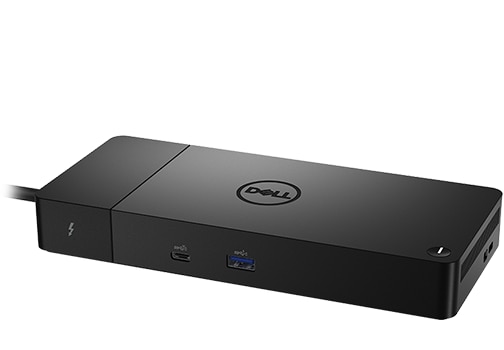
The WD22TB4 is strongest inside a supported Dell laptop setup. Dell lists up to 130 W for supported Dell systems and 90 W for non-Dell systems, plus two DisplayPort outputs, HDMI and USB-C DisplayPort Alt Mode. Its display count depends on the computer and port combination, and HDMI shares a route with the USB-C display output.
Pros
- Supported Dell laptops can use the higher 130 W power path. That can replace a separate charger when the exact system appears in Dell’s supported configuration.
- Two DisplayPort outputs simplify many office monitor layouts. Displays with standard DisplayPort inputs can connect directly without downstream Thunderbolt adapters.
- The modular host-cable block supports Dell’s dock design. Dell documents a 0.8 m cable and a replaceable module, which can suit a fixed corporate desk.
Cons and trade-offs
- Non-Dell systems receive up to 90 W rather than 130 W. A higher-demand non-Dell laptop may still need its supplied charger.
- Rear Thunderbolt ports lose Thunderbolt behavior on a non-Thunderbolt host. They operate as USB-C, reducing the value of choosing the TB4 module.
- HDMI and USB-C DisplayPort output share a routing limit. They cannot drive two monitors simultaneously, so the display plan must use a supported port combination.
Choose something else if: Card readers, 2.5GbE or a larger set of 10Gb/s USB-A and USB-C ports are central to the workflow. The TS4 documents those expansion features.
Our recommendation
We recommend the WD22TB4 for a supported Dell laptop after confirming its power level and exact display combination in Dell’s tables. For a non-Dell host, judge it at the documented 90 W level and verify Thunderbolt support. Choose the TS4 when media ingestion, faster Ethernet or downstream TB expansion matters more.
Sources: Dell WD22TB4 product specifications and Dell display routing table. The recommendation is editorial interpretation of documented features.
Price listing: Dell WD22TB4 — Black.
Map the host, displays and power before ordering
- Identify the host connection. Confirm Thunderbolt, USB4 or USB-C DisplayPort Alt Mode and the computer’s power-acceptance limit.
- Draw the display route port by port. Include resolution, refresh, cable type and the host GPU/OS limit. Dell’s HDMI and USB-C display outputs cannot form a simultaneous pair.
- Compare charging with the supplied adapter. TS4 lists up to 98 W; WD22TB4 lists 130 W for supported Dell systems and 90 W otherwise.
- Count workflow ports rather than total ports. Card readers and 2.5GbE favor TS4; direct DisplayPort outputs and supported-Dell power favor WD22TB4.
- Add a separate KVM if two-computer control is required. A dock does not automatically switch one keyboard, mouse and display between hosts. See our KVM connection checklist.
Thunderbolt dock FAQ
What display modes does CalDigit publish for the TS4?
CalDigit lists up to 8K for a compatible Thunderbolt Windows computer; up to two 4K 60 Hz displays for listed Intel Mac, Windows and ChromeOS combinations; and up to two 6K 60 Hz displays for M1 Pro and M1 Max. Its compatibility material limits base M1 and M2 Macs to one external display, while its manual limits USB-C PCs to one. For a 2024 base-M3 MacBook Air, Apple documents a second external display with the lid closed; other Macs require their own current Apple display-support table. Every mode remains conditional on the exact host, GPU, operating system, dock route, cables and displays.
Is 130 W available to every laptop?
No. Dell reserves the up-to-130-W path for supported Dell systems and lists 90 W for non-Dell systems. Confirm the exact laptop and adapter requirement.
Does TS4 provide 2.5GbE on USB-C hosts?
CalDigit’s compatibility material limits 2.5GbE support to Thunderbolt hosts. A USB-C-only computer should not be chosen around that feature.
Amazon price check: Cards use the named US variant and show a qualifying current USD offer with its check time. Prices expire within one hour; unavailable offers fall back to a labelled Amazon search. Confirm the exact variant, condition, accessories and final checkout price. No numerical Amazon rating is shown because the API did not return usable review data. Price checks do not change the specification-research date.
Research method, primary sources and limitations
We compared exact-model manufacturer documentation for port counts, link rates, host requirements, power and display routing. We did not measure transfer speed, charging, networking, display modes, thermal behavior or long-term reliability. The recommendations are our editorial interpretation of documented setup consequences.
Buying-advice update: September 13, 2026. Original specification research: September 10, 2026. The later update reorganized the article and rechecked source and exact-model image provenance.
Primary sources: CalDigit US TS4, compatibility information and display guidance; Apple M3 display support; Dell WD22TB4 specifications and display table. Read our research methodology and monitor connection guide.
CERTAIN CONTENT THAT APPEARS ON THIS SITE COMES FROM AMAZON. THIS CONTENT IS PROVIDED “AS IS” AND IS SUBJECT TO CHANGE OR REMOVAL AT ANY TIME.
Affiliate disclosure
As an Amazon Associate, The Gear Audit earns from qualifying purchases. We may earn an affiliate commission when you buy through our links, at no extra cost to you. Read our full affiliate disclosure.