KVM Switches Compared (2026): Match Your Monitors and Computers
Manufacturer documentation checked September 27, 2026. This guide compares published configurations. We did not measure switching delay, gaming latency, signal stability or reliability.
Quick answer: draw the video route first
Choose a KVM by the number of computers and displays you need to connect, then check the exact video modes and input connections. Our research shortlist covers five different setups rather than naming one universal winner. A switch for a VGA workstation is not an alternative to a dual-4K HDMI model, even if both share a keyboard and mouse.
For four computers and two HDMI displays, investigate TESmart HKS402-P23. For two HDMI computers and two displays, compare CKLau-922HUA-M. UGREEN SKU 25960 is a candidate for one USB-C video-capable computer and one HDMI computer sharing a display. IOGEAR GCS62HU and StarTech SV231USB serve lower-resolution HDMI and legacy VGA setups respectively. These are suitability judgments based on the sources below, not performance rankings.
Compare the documented configurations
| Exact model | Computers / displays | Documented video support | Main check before buying |
|---|---|---|---|
| IOGEAR GCS62HU | 2 / 1 | HDMI, up to 1920×1200 at 60Hz | Not a 4K switch |
| TESmart HKS402-P23, previously HKS0402A2U | 4 / 2 | HDMI, up to 3840×2160 at 60Hz | Two HDMI outputs per computer |
| CKLau-922HUA-M | 2 / 2 | HDMI, up to 4096×2160 at 60Hz, 4:4:4 | Match the -M suffix; this is not a USB-C dock |
| UGREEN SKU 25960 | 2 / 1 | USB-C and HDMI inputs, up to 4K at 60Hz | USB-C source needs DisplayPort Alt Mode |
| StarTech SV231USB | 2 / 1 | VGA, up to 1920×1440 | Match legacy VGA connections |
These are manufacturer limits, not results reproduced by The Gear Audit. Confirm the complete computer, adapter, cable, switch, and monitor combination before ordering.
IOGEAR GCS62HU: a lower-resolution HDMI desk
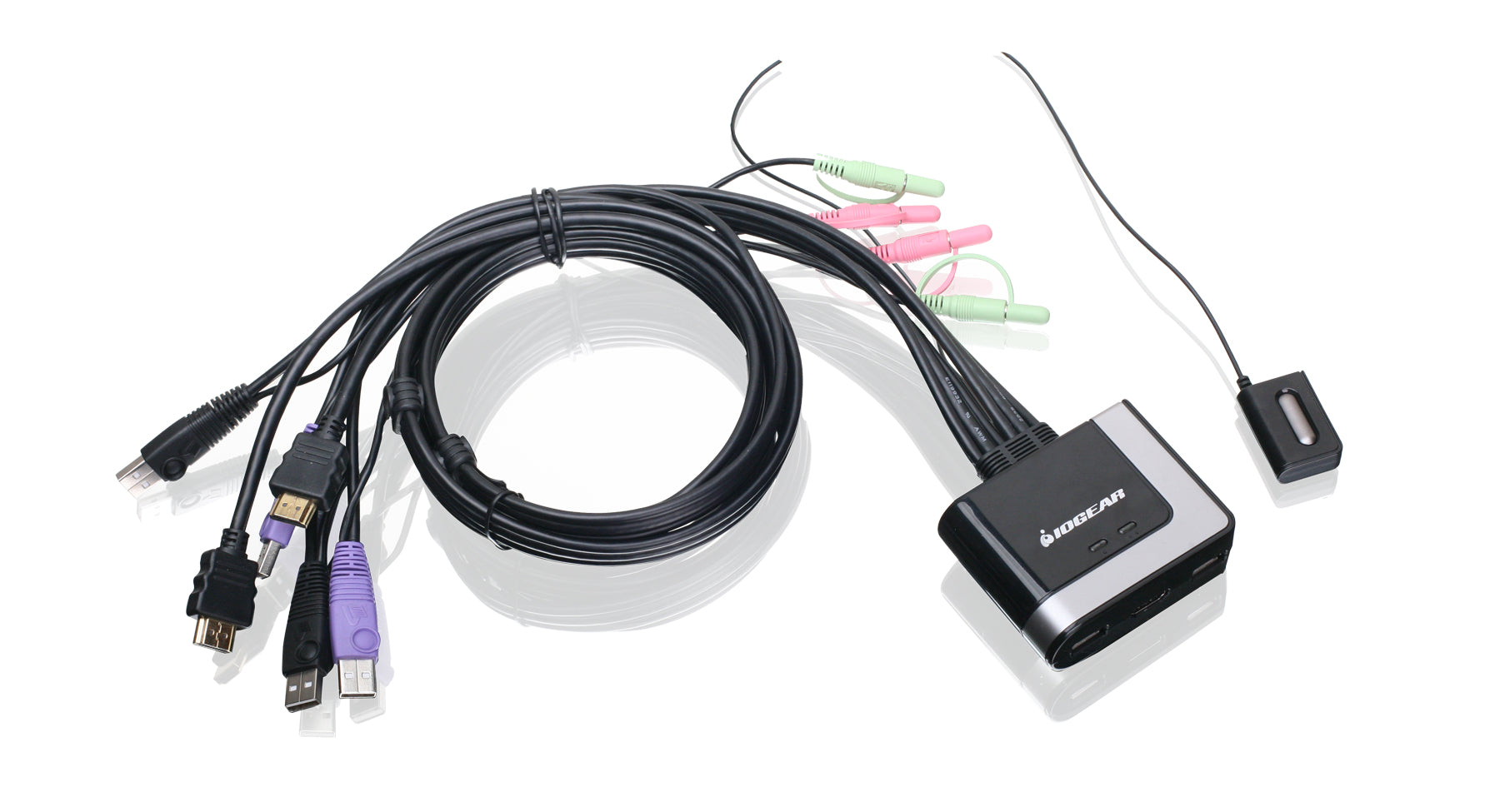
Best for: A two-computer, one-monitor HDMI desk that does not require 4K output.
IOGEAR lists USB 2.0, integrated four-foot KVM cables, a remote switch, and hotkey or mouse switching. Its specifications include speaker and microphone connectors. The practical attraction is integrated cabling for a simple two-computer setup; the important limitation is its video ceiling. Skip this model if your requirement is 4K at 60Hz.
Source: IOGEAR GCS62HU specifications. Browse GCS62HU listings on Amazon.
Pros
Integrated cables and remote switching reduce separate KVM-cable shopping; USB 2.0 is adequate for a basic keyboard and mouse.
Cons and trade-offs
The published 1920 × 1200 at 60Hz ceiling excludes 4K monitors at native resolution; fixed four-foot cables constrain computer placement.
Choose another if: A 4K display is a requirement or either computer sits beyond the integrated cable reach.
Our recommendation
Choose this only for a genuinely lower-resolution HDMI workstation where fixed-cable simplicity is useful.
TESmart HKS402-P23: four computers and two HDMI displays
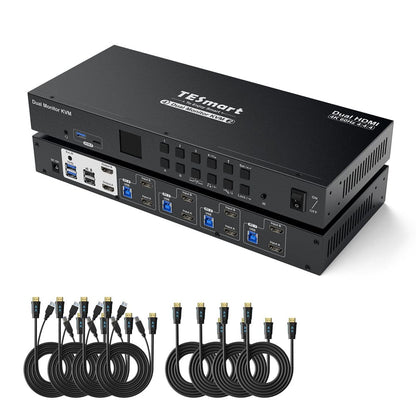
Best for: Four computers that each have two usable HDMI outputs and need two shared displays.
TESmart identifies HKS402-P23 as the former HKS0402A2U. Its FAQ lists four HDMI-plus-USB KVM cables and four additional HDMI cables in the package; display-side cables or adapters may still be needed. Each computer needs two HDMI outputs and a USB connection. EDID emulation is documented for display mode 1, so do not assume identical behavior in every mode.
This is a configuration to consider when you actually need four computer inputs. For a two-computer desk, compare the cost and wiring against a smaller switch. We have not verified switching time or storage-transfer throughput.
Source: TESmart model FAQ. Browse HKS402-P23 listings on Amazon.
Pros
Four-computer, two-display wiring is documented; the former HKS0402A2U name is linked by TESmart; supplied computer-side cables reduce additional parts.
Cons and trade-offs
Each computer must provide two HDMI feeds plus USB; this creates significant cable routing; the cited EDID behavior applies to one documented display mode.
Choose another if: Only two computers need sharing, or a laptop cannot supply two independent HDMI outputs.
Our recommendation
Use TESmart when all four computer positions and both displays will actually be used; verify the display-side cables in the selected offer.
CKLau-922HUA-M: two HDMI computers with matrix options

Best for: Two HDMI computers and two displays, especially when matrix viewing is useful.
CKLau documents dual-display and matrix modes, EDID support, and switching by hotkey, mouse, button, wired remote, or infrared remote. The matrix option lets the two displays show different computers. This can suit a desk that needs both machines visible, subject to checking the desired mode in the manual.
The exact suffix matters: this comparison concerns 922HUA-M. It does not establish USB-C video input or 100W laptop charging for an unspecified “922HUA.” Do not buy another variant on the assumption that these features are interchangeable.
Source: CKLau-922HUA-M product documentation. Browse 922HUA-M listings on Amazon.
Pros
Matrix and dual-display modes provide distinct layouts; several switching controls are documented.
Cons and trade-offs
It requires the exact -M suffix; no USB-C input or laptop charging is established for this model.
Choose another if: Your laptop has only USB-C video without a verified conversion path or you need USB-C PD charging.
Our recommendation
Choose the exact -M model only after sketching whether both displays show one computer or different computers in the intended mode.
UGREEN SKU 25960: mixed USB-C and HDMI inputs
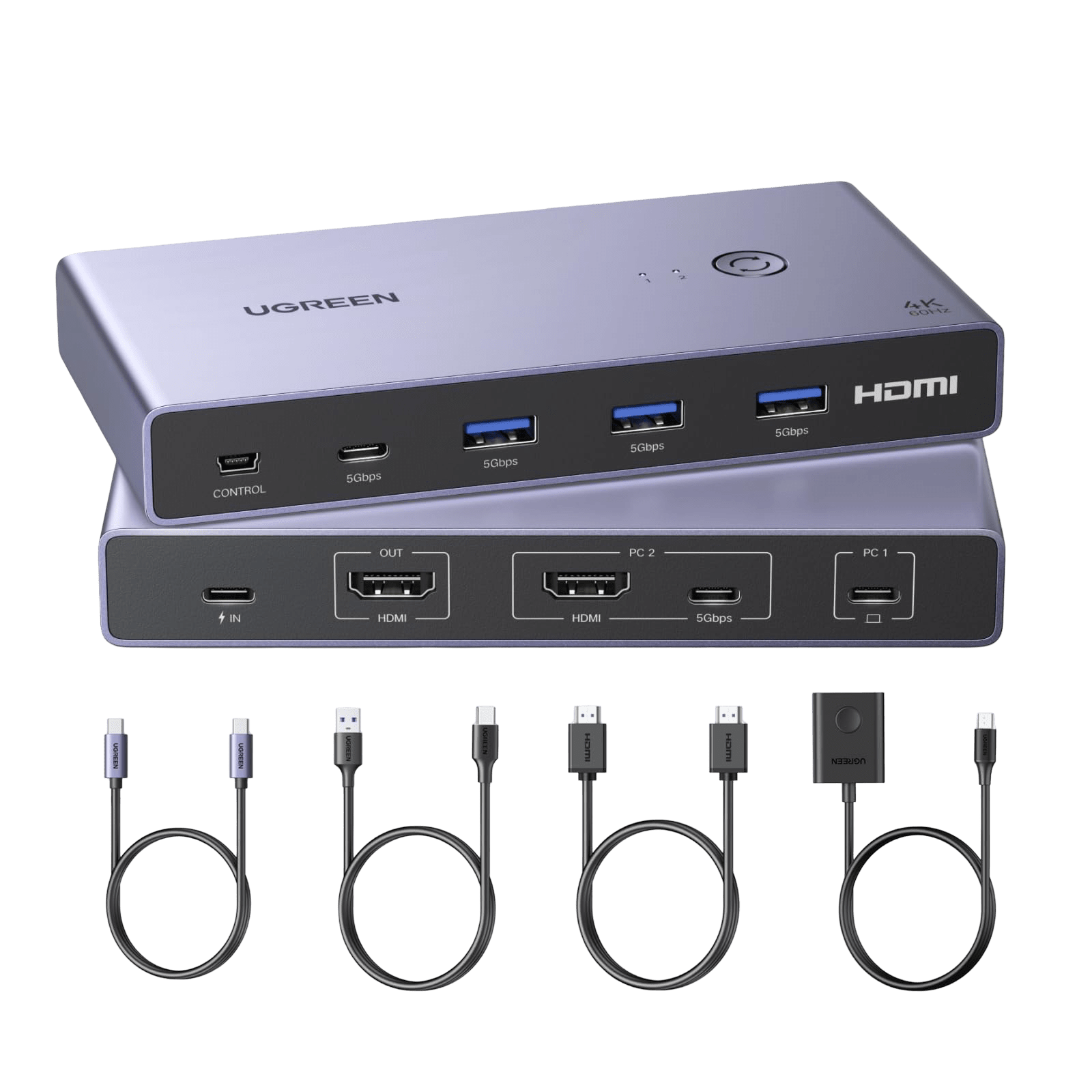
Best for: One USB-C DP Alt Mode computer and one HDMI computer sharing one 4K60 display.
The regional manufacturer page specifies four shared USB ports and switching by a desktop controller or button, without hotkey switching. The HDMI computer also needs a USB cable for peripheral data; the USB-C computer must support DisplayPort Alt Mode. UGREEN advises against using this model with a docking station.
The same page contains inconsistent transfer-rate wording, so we do not present a verified USB throughput figure. Confirm SKU 25960, the supplied cables, and your intended setup with the seller. Verify the precise seller SKU because similar UGREEN KVM models use different connection maps.
Source: UGREEN SKU 25960 regional specifications. Browse UGREEN 25960 listings on Amazon.
Pros
Mixed USB-C and HDMI inputs address an asymmetric two-computer desk; four shared USB connections are documented.
Cons and trade-offs
USB-C video requires DP Alt Mode; the HDMI computer needs a separate USB link; UGREEN advises against a dock in this route.
Choose another if: You need verified laptop charging, hotkey switching, or a dual-display output.
Our recommendation
Use SKU 25960 only when the USB-C laptop capability and seller SKU are verified; do not infer PD charging from the connector.
StarTech SV231USB: a legacy VGA setup
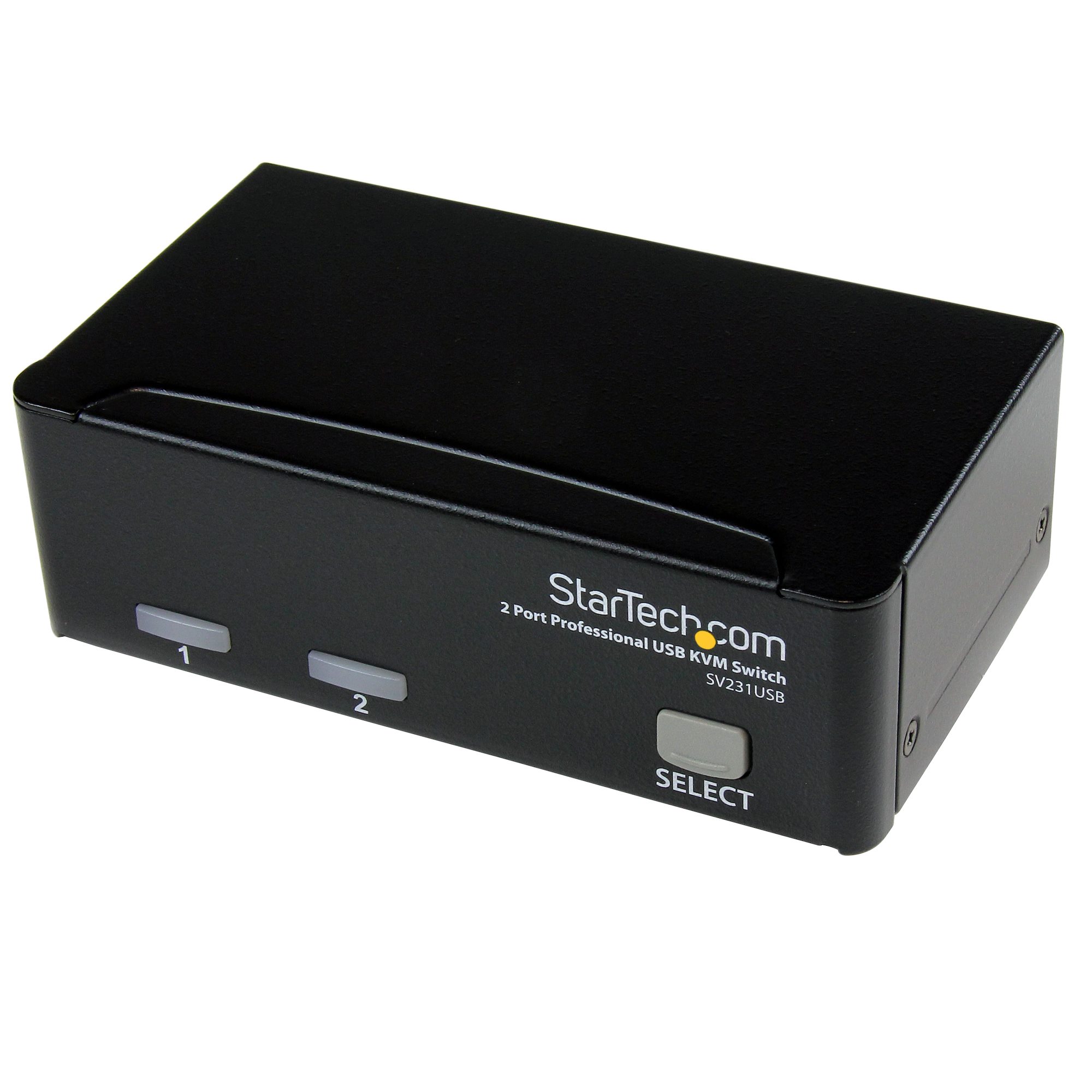
Best for: Two legacy VGA computers and one VGA display.
StarTech documents a two-computer VGA KVM kit with cables, three shared USB peripheral connections, and front-panel selection. Consider it when the computers and display already use VGA. It is not a direct HDMI or USB-C solution, and this guide makes no adapter-compatibility guarantee.
Check the SV231USB product ID and included cables on the retailer listing; StarTech also sells KVM models with similar names.
Source: StarTech SV231USB specifications. Browse SV231USB listings on Amazon.
Pros
Included KVM cables and three peripheral USB connections serve a simple older workstation.
Cons and trade-offs
VGA does not satisfy modern digital display requirements; adapters introduce unverified compatibility and image-quality variables.
Choose another if: Your monitor and computers already use HDMI, DisplayPort or USB-C video.
Our recommendation
Choose SV231USB for an existing VGA desk, not as a low-cost path into a new digital display setup.
Make a connection plan before choosing
- List each computer and display. Record the exact model, available outputs, target resolution and refresh rate, and how many independent screens you need.
- Draw every cable. Include USB upstream connections as well as video. Check the documentation for any dock or adapter in the route instead of assuming that matching plugs guarantee compatibility.
- List shared peripherals. Include receivers, storage, webcams, audio devices, and any unusual keyboard requirements. Confirm support for your exact devices.
- Price the complete setup. Count missing cables, adapters, power supplies, and delivery costs. A cheaper switch may not produce a cheaper working setup.
- Check the return terms. Keep time to verify your own resolution, display layout, wake behavior, and peripherals after installation.
Common questions
Which KVM is best for gaming?
We cannot rank gaming performance without measurements. Ask for explicit support for your resolution, refresh rate, and required display features. Switching between computers and input lag while playing are different measurements; the previous guide’s switching-time figures did not establish gaming latency.
Will any USB-C KVM charge a laptop?
Do not assume that from the connector name. Verify video input requirements and explicit charging support in the exact model documentation. This guide does not claim laptop charging for UGREEN 25960 or CKLau-922HUA-M.
Are these links for a single verified Amazon listing?
The UGREEN 25960 and StarTech SV231USB conditional offer cards use matched Amazon product identifiers. Links labelled Search or Browse open model searches that may include other variants or accessories. Check the exact model, condition, seller, included items and current price.
Research method, sources and limits
We checked the manufacturer pages linked beside each model on September 27, 2026. Specifications are attributed claims; suitability advice is our editorial interpretation. Read our research policy or browse related computer peripheral guides.
Model names and regional configurations can change. Verify the exact suffix, package contents, and return terms before ordering; the comparison is based on manufacturer documentation rather than our own performance testing.
Amazon price cards, when available, apply only to the named model and configuration. Check the displayed update time, seller, condition and included items. Search links may return other variants. Customer star ratings are not shown when verified API data is unavailable.
Affiliate disclosure
As an Amazon Associate, The Gear Audit earns from qualifying purchases. We may earn an affiliate commission when you buy through our links, at no extra cost to you. Read our full affiliate disclosure.