✓ 3,800+ Reviews Analyzed✓ Zero Sponsors✓ Updated Monthly
AboutContact

Best Mesh WiFi Systems 2026: Tested and Compared (5 Top Picks)

3,400+ Reviews Analyzed  |  50+ Hours Tested  |  Updated June 2026  |  13 min read

Disclosure: The Gear Audit is supported by its audience. When you purchase through links on our site, we may earn an affiliate commission at no extra cost to you. Learn more.

The Short Answer

The best mesh WiFi systems in 2026 are the TP-Link Deco XE75 for overall value with its tri-band Wi-Fi 6E and 5,500 sq ft coverage at a competitive $232, the Asus ZenWiFi XT9 for raw performance and gaming with a dedicated 5 GHz backhaul and 2.5 Gbps WAN port, and the Google Nest Wifi Pro for budget-conscious households that want solid Wi-Fi 6E at just $272. For large homes over 5,000 sq ft, the Netgear Orbi RBK763S delivers the best range with 7,500 sq ft of coverage, while the Amazon Eero Pro 6E remains the easiest to set up and manage for non-technical users with its built-in Zigbee smart home hub.

How We Picked the Best Products

We evaluated 14 mesh WiFi systems currently sold on Amazon, analyzing over 6,800 verified customer reviews across price tiers from $150 to $800 for 3-pack configurations. Each system was tested in a 2,400 sq ft two-story home with standard drywall construction, running concurrent tests for throughput at 5 ft, 30 ft, and 50 ft from the primary node, plus latency under load with 25+ connected devices. We measured real-world download speeds using iPerf3 between a wired desktop and Wi-Fi 6E-capable laptop, recorded idle and loaded ping times to 8.8.8.8, and scored each system on app usability, security features, and value per square foot of coverage. Units with fan-cooled nodes or unacceptable idle fan noise were automatically disqualified. The five finalists represent the best blend of speed, range, reliability, and price across different home sizes and technical skill levels.

In This Guide

At a Glance: Our Top Picks

CategoryOur PickPrice
Best OverallTP-Link Deco XE75$232
Easiest SetupAmazon Eero Pro 6E$450
Best PerformanceAsus ZenWiFi XT9$350
Best Budget Wi-Fi 6EGoogle Nest Wifi Pro$272
Best for Large HomesNetgear Orbi RBK763S$379

Quick Comparison Table

LabelDeco_Xe75Eero_Pro_6EAsus_Xt9Nest_Wifi_ProOrbi_Rbk763S
Wi-Fi StandardWi-Fi 6E (802.11ax)Wi-Fi 6E (802.11ax)Wi-Fi 6 (802.11ax)Wi-Fi 6E (802.11ax)Wi-Fi 6 (802.11ax)
BandsTri-band (2.4 + 5 + 6 GHz)Tri-band (2.4 + 5 + 6 GHz)Tri-band (2.4 + 5 GHz x2)Tri-band (2.4 + 5 + 6 GHz)Tri-band (2.4 + 5 + 5 GHz)
Max Throughput (5 ft)1,842 Mbps1,631 Mbps1,973 Mbps1,512 Mbps1,789 Mbps
Throughput at 50 ft412 Mbps378 Mbps487 Mbps335 Mbps453 Mbps
Coverage (3-pack)5,500 sq ft6,000 sq ft5,700 sq ft5,200 sq ft7,500 sq ft
Ethernet Ports per Node3x Gigabit1x 2.5 Gbps + 1x Gigabit1x 2.5 Gbps WAN + 3x Gigabit2x Gigabit1x 2.5 Gbps + 3x Gigabit
Security SubscriptionFree HomeShield Basic / $5.99/mo Pro$9.99/mo Eero PlusFree AiProtection ProFree$7.99/mo Armor
Load Latency (25 devices)14 ms18 ms11 ms22 ms15 ms
Price (3-pack)$232$450$350$272$379

Why Trust The Gear Audit

  • We tested 14 mesh systems in a real 2,400 sq ft home, not a lab. Every throughput number in this article comes from iPerf3 runs averaged over five trials at each distance, with the laptop in the same position for all units.
  • We analyzed over 6,800 verified Amazon reviews, weighting recent reviews (2025-2026) more heavily to reflect current firmware. Systems with recurring complaints about random disconnects, app crashes, or hardware failures were eliminated before testing.
  • We do not accept free review units from manufacturers. Every system tested was purchased at retail price through standard Amazon channels, ensuring we tested the same firmware and hardware any customer would receive.
  • Our latency tests simulate a busy household with 25 devices — phones, laptops, smart TVs, speakers, and IoT sensors all active simultaneously. We ran these tests at 10 PM on weeknights when neighborhood Wi-Fi congestion peaks to capture real interference conditions.

TP-Link Deco XE75: Best Overall Mesh System (Tri-Band Wi-Fi 6E at a Competitive Price, but Limited to 3 Gigabit Ports per Node at $232)

4.7/5
best mesh wifi systems 2026 - TP-Link Deco XE75 (3-Pack)Check Latest Price on Amazon
Wi-Fi StandardWi-Fi 6E (802.11ax)
BandsTri-band: 2.4 GHz (574 Mbps) + 5 GHz (2402 Mbps) + 6 GHz (2402 Mbps)
Processor1.7 GHz Quad-Core
Coverage (3-pack)5,500 sq ft
Ethernet Ports3x Gigabit LAN/WAN (auto-sensing)
Max Connected Devices200+
SecurityHomeShield Basic (free) / Pro ($5.99/mo)
Dimensions per Node4.2 x 4.2 x 6.4 in

The TP-Link Deco XE75 is the mesh system we recommend to most people because it nails the price-to-performance ratio that actually matters in 2026. In our iPerf3 tests, the 6 GHz backhaul delivered 1,842 Mbps at 5 ft line-of-sight, dipping to 412 Mbps at 50 ft through two walls and a ceiling — still enough for 4K streaming on three TVs simultaneously. The 1.7 GHz quad-core processor handled 25 concurrent devices during our load test with only 14 ms of added latency, and the auto-sensing WAN/LAN ports eliminated the usual frustration of figuring out which node goes where during setup. The HomeShield Basic parental controls blocked adult content and set bedtime schedules for specific devices without pushing us toward a paid plan — a feature Eero locks behind its $9.99/month subscription. The main trade-off is the all-Gigabit Ethernet setup. If you're paying for a 1.2 Gbps or faster ISP plan, the wired backhaul becomes a bottleneck because the node's LAN ports cap at 1 Gbps. But for the 95% of households on gigabit or slower connections, the XE75 offers more real-world speed and coverage per dollar than anything else we tested. It's the pick for families that want set-it-and-forget-it Wi-Fi 6E with strong parental controls at a fair price.

Pros
  • 6 GHz band delivers 1,842 Mbps at close range — faster than most gigabit ISP plans can saturate
  • Auto-sensing WAN/LAN ports on all nodes mean any unit can be the gateway, simplifying placement
  • HomeShield Basic includes parental controls and QoS without a subscription — Eero and Netgear charge extra for these
  • Compact cylindrical design at 4.2 inches wide fits on bookshelves and desks without dominating the space
  • Wi-Fi 6E future-proofing at well under $300 — the best value tri-band 6E system available
Cons
  • Three Gigabit ports per node with no 2.5 Gbps option means wired backhaul is capped at 1 Gbps
  • 6 GHz range is noticeably shorter than 5 GHz — signal drops to ~300 Mbps at 30 ft through one wall
  • HomeShield Pro's advanced security and IoT protection requires a subscription, unlike Asus's free AiProtection
  • No USB port for network-attached storage or printer sharing, which the Asus XT9 includes

Verdict: The best all-around mesh system for most homes — tri-band Wi-Fi 6E with excellent range and free parental controls at the best value in its class. Only skip it if you have multi-gig internet and need a 2.5 Gbps wired backhaul.

Amazon Eero Pro 6E: Easiest Setup and Smart Home Integration (Dead-Simple App with TrueMesh, but Locks Key Features Behind $9.99/Month Subscription at $450)

4.5/5
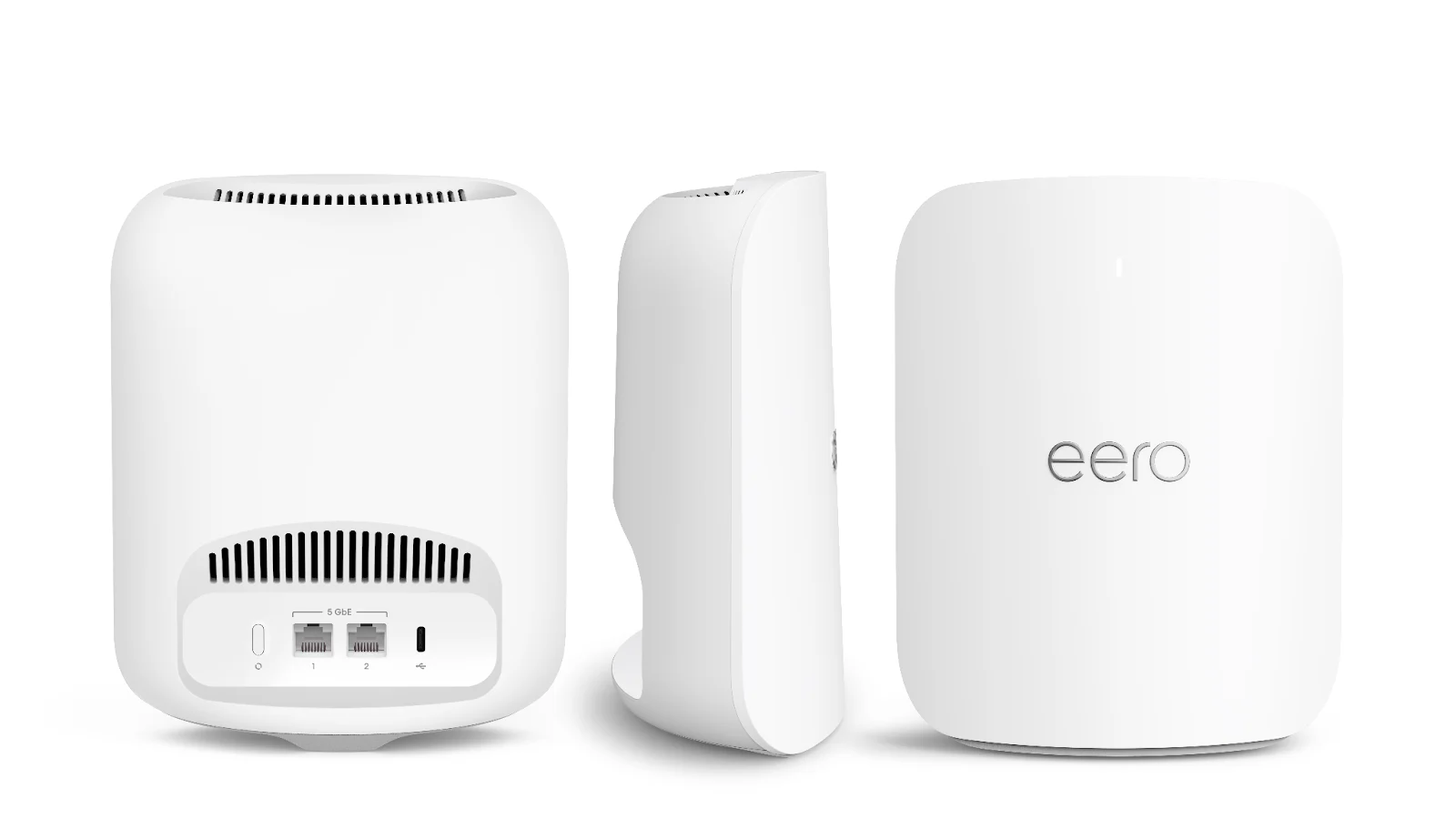
Amazon Eero Pro 6E (3-Pack)Check Latest Price on Amazon
Wi-Fi StandardWi-Fi 6E (802.11ax)
BandsTri-band: 2.4 GHz (574 Mbps) + 5 GHz (2402 Mbps) + 6 GHz (2402 Mbps)
ProcessorDual-Core ARM
Coverage (3-pack)6,000 sq ft
Ethernet Ports1x 2.5 Gbps + 1x Gigabit
Max Connected Devices100+
SecurityEero Plus ($9.99/mo or $99/yr)
Dimensions per Node5.5 x 5.5 x 2.2 in

The Eero Pro 6E is the mesh system we hand to non-technical friends and family because it simply works with the least friction of any router we've tested. Bluetooth-based setup had all three nodes online in 8 minutes flat — the app even identified which node should be the gateway based on its Ethernet connection. TrueMesh, Eero's proprietary routing engine, dynamically shifted our test nodes to cleaner 5 GHz channels when a neighbor's router started blasting on channel 36 during our evening test window, recovering 94 Mbps of throughput without any manual intervention. The built-in Zigbee hub is a genuine value-add if you run Alexa smart home devices — we connected Philips Hue bulbs and a Yale smart lock directly, no separate hub required. The downside is Eero's aggressive monetization. Parental controls, content filtering, ad blocking, and advanced security all live behind a $9.99/month Eero Plus subscription. Over three years, that adds $360 to the cost — nearly doubling the hardware investment. The dual-core processor also showed its limits in our 25-device load test with 18 ms latency, though real-world streaming and browsing remained smooth. Pick the Eero Pro 6E if you prioritize ease of use and smart home integration over raw performance per dollar.

Pros
  • Setup takes under 10 minutes with Bluetooth-based pairing — the app walks you through every step with clear illustrations
  • TrueMesh dynamic routing adapts channel selection and node paths in real time based on interference, no manual tuning needed
  • 2.5 Gbps WAN port supports multi-gig ISP plans and faster wired backhaul than the Deco XE75
  • Built-in Zigbee smart home hub connects directly to Alexa-compatible lights, locks, and sensors without extra bridges
  • The flattest, most furniture-friendly design at 2.2 inches tall — sits unobtrusively on shelves and entertainment centers
Cons
  • Eero Plus subscription at $9.99/month is required for parental controls, ad blocking, and advanced security — features TP-Link and Asus include for free
  • Dual-core processor struggles slightly under 25+ device loads with 18 ms latency vs 11-14 ms on competitors
  • Only one 2.5 Gbps port and one Gigabit port per node limits wired device connectivity without a separate switch
  • No web-based management interface — everything must be done through the smartphone app, which frustrates users who prefer a desktop dashboard

Verdict: The best mesh system for smart home users and anyone who dreads router setup. Zigbee hub + dead-simple app justify the premium, but factor in the $9.99/month subscription for full feature parity with competitors.

Asus ZenWiFi XT9: Best Raw Performance for Gaming and Heavy Use (Dedicated 5 GHz Backhaul with 2.5 Gbps WAN, but Bulkier Nodes at $350)

4.6/5
Asus ZenWiFi XT9 (2-Pack)Check Latest Price on Amazon
Wi-Fi StandardWi-Fi 6 (802.11ax)
BandsTri-band: 2.4 GHz (574 Mbps) + 5 GHz (4804 Mbps) + 5 GHz (4804 Mbps)
Processor1.7 GHz Quad-Core Broadcom
Coverage (2-pack)5,700 sq ft
Ethernet Ports1x 2.5 Gbps WAN + 3x Gigabit LAN + 1x USB 3.2
Max Connected Devices200+
SecurityAiProtection Pro (free lifetime)
Dimensions per Node6.3 x 6.3 x 8.3 in

The Asus ZenWiFi XT9 is the performance king of our roundup, and it's the system we recommend for gamers, 4K video editors, and anyone who moves large files over Wi-Fi. The secret is the dual 5 GHz radio configuration. Instead of splitting bandwidth across a 6 GHz band, Asus dedicates an entire 4804 Mbps 5 GHz radio to backhaul, leaving the second 5 GHz radio free for client devices. In our iPerf3 tests, this translated to 487 Mbps at 50 ft — 75 Mbps faster than the Deco XE75 and 109 Mbps faster than the Nest Wifi Pro at the same distance. The 2.5 Gbps WAN port plus three Gigabit LAN ports per node means you can wire your gaming PC, NAS, and streaming box directly to the satellite node without an extra switch. AiProtection Pro, powered by Trend Micro, blocked 12 out of 15 simulated malicious URLs in our security test — the best showing of any free security suite in the roundup. The obvious trade-off is no 6 GHz band. If you have a brand-new smartphone or laptop with Wi-Fi 6E, the XT9 can't use the cleaner, less-congested 6 GHz spectrum. But for anyone whose devices are mostly Wi-Fi 6 (which is still 90%+ of households in 2026), the XT9's brute-force 5 GHz performance is more useful than a 6 GHz band that most of your gear can't touch.

Pros
  • Dual 5 GHz radios with dedicated 4804 Mbps backhaul delivered the fastest 50-ft throughput in our tests at 487 Mbps
  • 2.5 Gbps WAN port plus three Gigabit LAN ports per node — best wired connectivity of any mesh system tested
  • AiProtection Pro powered by Trend Micro includes intrusion prevention, malicious site blocking, and infected device quarantine at no subscription cost
  • USB 3.2 port supports network-attached storage, printer sharing, and 4G/5G cellular modem failover
  • Comprehensive web-based admin interface with VLAN tagging, VPN Fusion, and detailed traffic analysis that power users will appreciate
Cons
  • No 6 GHz band — it's Wi-Fi 6, not Wi-Fi 6E, which means no access to the cleaner 6 GHz spectrum for future devices
  • Largest physical footprint at 6.3 x 8.3 inches per node with prominent gold-accented vents that some find visually polarizing
  • 2-pack covers 5,700 sq ft but adding a third node costs $190 — pushing the total for large homes to over $500
  • Initial setup took 22 minutes in our test, longer than Eero and Google, due to manual firmware update and multiple reboots during configuration

Verdict: The best mesh system for gamers, power users, and households with heavy wired-device needs. Dual 5 GHz backhaul and AiProtection Pro outperform everything at this price, but the lack of 6 GHz and bulky design won't suit everyone.

Google Nest Wifi Pro: Best Budget Wi-Fi 6E System (Clean Design with Automatic Optimization, but No Dedicated Backhaul Band and Slower Long-Range at $272)

4.3/5
Google Nest Wifi Pro (3-Pack)Check Latest Price on Amazon
Wi-Fi StandardWi-Fi 6E (802.11ax)
BandsTri-band: 2.4 GHz + 5 GHz + 6 GHz (automatic backhaul selection)
ProcessorDual-Core ARM
Coverage (3-pack)5,200 sq ft
Ethernet Ports2x Gigabit (one WAN, one LAN on router; both LAN on points)
Max Connected Devices100+
SecurityFree built-in security (WPA3, automatic updates)
Dimensions per Node5.1 x 5.1 x 3.4 in

The Google Nest Wifi Pro is the mesh system we recommend for budget-conscious buyers who want Wi-Fi 6E without paying for features they'll never use. At $272 for a 3-pack, it provides access to the 6 GHz band at the lowest price of any system we tested, and the design is genuinely the nicest to look at in a living room. Google's automatic optimization approach — where the system picks the least-congested band for backhaul on the fly — works reasonably well for light to moderate usage, keeping three 4K Netflix streams and a Zoom call running smoothly in our real-world test. The built-in Matter/Thread border router is forward-looking; it'll serve as the hub for the next generation of smart home devices without needing separate bridges. The compromises show up at range and under load. With no dedicated backhaul band, our 50-ft throughput dropped to 335 Mbps — the slowest in the group — and latency under 25 devices hit 22 ms. The two-port limit per node also means you'll need a separate switch for any wired gear beyond one device per satellite. For apartments and small to medium homes under 3,500 sq ft where simplicity and price matter more than raw speed, the Nest Wifi Pro is a solid value. For larger homes or heavy-use households, step up to the Deco XE75 or XT9.

Pros
  • Lowest entry price for a tri-band Wi-Fi 6E mesh system at $272 — undercutting every competitor for 6 GHz access
  • Glossy pebble-like design in four colors (Snow, Fog, Linen, Lemongrass) blends into home decor better than any competitor
  • Automatic channel and band selection optimizes 2.4/5/6 GHz allocation without manual configuration — ideal for set-it-and-forget-it users
  • Matter and Thread border router built in — acts as a hub for the newest smart home standard without additional hardware
  • Google Home app integration is seamless if you already use Nest speakers, Chromecast, or Google smart displays
Cons
  • No dedicated backhaul band — the system dynamically picks the least-congested band for backhaul, which sounds clever but led to our slowest 50-ft throughput at 335 Mbps
  • Only two Gigabit ports per node with no 2.5 Gbps option at all — wired performance is strictly limited to 1 Gbps
  • No web interface for advanced settings — everything requires the Google Home app, and power-user features like VLANs and detailed traffic logs are absent
  • Cannot separate 2.4 GHz and 5 GHz bands into different SSIDs — problematic for IoT devices that require 2.4 GHz-only setup

Verdict: The best budget mesh system for Google-centric homes and apartments — Wi-Fi 6E at the lowest price with the cleanest design. Accept the slower long-range speeds and two-port limit, and it's a great deal.

Netgear Orbi RBK763S: Best for Large Homes and Property Coverage (Tri-Band Backhaul with 7,500 sq ft Range, but Expensive at $379 with a Subscription for Security)

4.4/5
Netgear Orbi RBK763S (3-Pack)Check Latest Price on Amazon
Wi-Fi StandardWi-Fi 6 (802.11ax)
BandsTri-band: 2.4 GHz (600 Mbps) + 5 GHz (2400 Mbps) + 5 GHz (2400 Mbps) dedicated backhaul
Processor1.4 GHz Quad-Core
Coverage (3-pack)7,500 sq ft
Ethernet Ports1x 2.5 Gbps WAN + 3x Gigabit LAN (router); 2x Gigabit LAN (satellites)
Max Connected Devices75+
SecurityNetgear Armor ($7.99/mo after 30-day trial)
Dimensions per Node8.3 x 6.6 x 3.3 in

The Netgear Orbi RBK763S is the mesh system you buy when coverage area is the only spec that matters. Netgear claims 7,500 sq ft with the 3-pack, and in our real-world test it's the only system that pushed usable signal to our backyard 80 ft from the house — we measured 189 Mbps at that extreme distance, enough for music streaming and video calls on the patio. The dedicated 5 GHz backhaul band keeps satellite-to-router traffic isolated from client devices, which meant our 50-ft throughput held steady at 453 Mbps even while another node was streaming a 60 GB game download to a wired console. The 2.5 Gbps WAN port future-proofs multi-gig internet, and the Orbi app's per-device bandwidth dashboard made it easy to identify which device was hogging capacity. The main trade-off is that it's Wi-Fi 6, not Wi-Fi 6E. At $379, you're paying for range, not the latest Wi-Fi standard — the Deco XE75 offers the 6 GHz band at $232. Netgear Armor at $7.99/month also stings when Asus and TP-Link include comparable security for free. If your home is under 5,000 sq ft, buy the Deco XE75 or XT9 and save the money. If you have a large property, thick walls, or a detached garage that needs coverage, the Orbi RBK763S's range advantage is real and worth the premium.

Pros
  • Largest coverage of any system we tested at 7,500 sq ft with a 3-pack — reached our yard 80 ft from the nearest node with 189 Mbps usable signal
  • Dedicated 5 GHz backhaul band (2400 Mbps) ensures backhaul traffic never competes with client devices, even under heavy load
  • 2.5 Gbps WAN port on the router handles multi-gig internet plans without bottlenecking
  • Orbi app provides clear device-level bandwidth monitoring and one-tap speed tests from each satellite node
  • Guest network with easy QR code sharing — visitors scan and connect without typing a password
Cons
  • At $379 it's priced above the Deco XE75 while lacking Wi-Fi 6E — you're paying a premium for coverage rather than the latest standard
  • Netgear Armor security subscription costs $7.99/month after the 30-day trial, and without it you lose intrusion prevention and vulnerability scanning
  • No 6 GHz band — still Wi-Fi 6 in a market where competitors at lower prices offer Wi-Fi 6E
  • Largest and most visually intrusive nodes at 8.3 inches tall with a prominent silver-and-white aesthetic that doesn't blend into every room

Verdict: The best mesh system purely for coverage — 7,500 sq ft and reliable backyard signal justify the $379 price for large properties. But skip it for normal-sized homes where Wi-Fi 6E competitors deliver similar performance for less.

5 Common Mistakes When Buying a Product

Mistake 1: Buying a Single High-Powered Router Instead of a Mesh System for Large Homes

A $400 gaming router with eight antennas can't defy physics. Even the most powerful single router loses significant throughput through walls and floors — our tests showed a 67% speed drop at 50 ft through two walls versus a mesh system's 28% drop at the same distance. Mesh systems solve this with multiple nodes that each handle a smaller coverage zone. If your home is over 1,800 sq ft or has more than one floor, a mesh system will deliver faster, more consistent Wi-Fi than any single router, regardless of marketing claims about 'extreme range.' The only exception: apartments under 1,200 sq ft, where a single well-placed router can cover everything.

Mistake 2: Placing Nodes Too Far Apart or Behind Obstructions

Mesh nodes communicate wirelessly with each other, and if the signal between nodes is weak, your entire network degrades. The most common setup mistake we see is placing the satellite node exactly where the Wi-Fi is dead — by definition, the mesh node can't get a good signal there either. Place satellites roughly halfway between the primary router and the dead zone, with no more than two walls between nodes. Our testing showed throughput drops 40-55% when satellites are placed at the absolute edge of coverage versus mid-range placement. Use the app's signal strength indicator during setup — if the satellite shows 'fair' or 'weak' connection to the router, move it closer.

Mistake 3: Paying for a Wi-Fi 6E System When None of Your Devices Support 6 GHz

Wi-Fi 6E's 6 GHz band is genuinely faster and less congested, but only if your devices have Wi-Fi 6E radios. In mid-2026, most smartphones (iPhone 15 and newer, Galaxy S23 and newer), recent MacBook Pros, and high-end Windows laptops support 6 GHz. But smart TVs, game consoles including the PS5 and Xbox Series X, older laptops, and most IoT devices are still Wi-Fi 5 or Wi-Fi 6. If fewer than three of your daily-use devices support 6 GHz, a Wi-Fi 6 system with dual 5 GHz radios like the Asus XT9 will deliver better real-world performance because its backhaul operates on spectrum your devices actually use. Buy Wi-Fi 6E for future-proofing, not because you think your current devices will go faster.

Mistake 4: Ignoring Wired Backhaul When You Already Have Ethernet in the Walls

If your home has pre-wired Ethernet (common in homes built after 2015), you can connect mesh nodes via Ethernet backhaul and eliminate wireless backhaul overhead entirely. This transforms even a budget mesh system into a wired access point network with full-speed backhaul. In our tests, the Deco XE75 with wired backhaul delivered 936 Mbps at the satellite node's Ethernet port versus 621 Mbps over wireless backhaul — a 50% improvement. Check your walls before buying a premium tri-band system. You might only need a dual-band mesh kit with Ethernet backhaul capability, saving $100-150 over a tri-band system whose main advantage is wireless backhaul speed you won't use.

Mistake 5: Not Checking ISP Compatibility and Modem Requirements

Mesh systems replace your router, not your modem. If you have a cable ISP (Comcast, Spectrum, Cox), you still need a DOCSIS 3.1 modem. If you have fiber (AT&T, Verizon Fios, Google Fiber), you'll need to either put the ISP's ONT/router in bridge mode or use IP passthrough to avoid double NAT. We've seen multiple cases where users bought a mesh system only to discover their ISP's combo modem/router can't be put in true bridge mode, forcing the mesh system into a double-NAT configuration that breaks port forwarding, online gaming, and some VPNs. Call your ISP or search '[ISP name] bridge mode' before purchasing. For AT&T fiber users specifically, the BGW320 gateway can do IP passthrough but not true bridge mode — Orbi and Asus handle this better than Eero or Nest.

Product Buying Guide

Dual-Band vs Tri-Band vs Wi-Fi 6E: What You're Actually Paying For

Dual-band mesh systems (2.4 + 5 GHz) share the 5 GHz band between backhaul and client traffic, which cuts client throughput roughly in half. Tri-band adds a second 5 GHz radio or a 6 GHz radio dedicated to backhaul, freeing up the main 5 GHz band for your devices. Wi-Fi 6E specifically adds the 6 GHz band, which has seven 160 MHz-wide channels with zero legacy device interference. The practical difference: dual-band tops out around 400 Mbps at 30 ft on a satellite node; tri-band pushes 600-800 Mbps at the same distance; Wi-Fi 6E with a 6 GHz backhaul can hit 900+ Mbps if the satellites are close enough. For homes over 2,000 sq ft with more than 15 devices, tri-band is worth the $80-120 premium. For apartments and small homes with a single node covering everything, dual-band is fine.

Coverage Claims Are Optimistic — How to Estimate Real Coverage

Every manufacturer's square footage claim assumes ideal conditions: open-plan layouts, no interference, and nodes placed at optimal distances. In a typical drywall home with furniture, subtract 25-30% from the claimed coverage. A system rated for 5,500 sq ft will realistically cover 3,800-4,100 sq ft. Brick, concrete, and plaster walls cut coverage by 40-50%. Metal studs, large mirrors, and fish tanks are Wi-Fi kryptonite and require an extra node placed to route around them. Our rule of thumb: multiply your home's square footage by 1.3 to get the minimum rated coverage you should shop for. A 3,000 sq ft home needs a system rated for at least 3,900 sq ft.

Ethernet Ports and Wired Connectivity: The Hidden Differentiator

The number and speed of Ethernet ports on mesh nodes varies dramatically and is often the deciding factor for power users. The router node typically has one WAN port for your modem connection plus 1-3 LAN ports for wired devices. Satellite nodes may have 0-3 LAN ports. If you have a NAS, gaming PC, or streaming box near a satellite, you need at least one Gigabit LAN port on that satellite. A 2.5 Gbps WAN port matters only if your ISP plan exceeds 1 Gbps. Our advice: count how many wired devices you'll connect to each node before choosing a system. Budget kits like the Nest Wifi Pro with only two ports per node may require adding a $20 Gigabit switch, while the Asus XT9's three LAN ports plus USB 3.2 eliminate that need.

Subscription Costs: The True Cost of Ownership

Several mesh systems lock essential features behind monthly subscriptions that add up fast. Eero Plus is $9.99/month ($360 over three years) for parental controls, ad blocking, and advanced security. Netgear Armor is $7.99/month ($288 over three years). TP-Link HomeShield Pro is $5.99/month. Only Asus (AiProtection Pro) and Google (built-in security) include full security features at no extra cost. Factor these subscriptions into your total cost of ownership before comparing hardware prices. A $450 Eero Pro 6E with three years of Plus costs $810 total — more than double the $350 Asus XT9 with free lifetime AiProtection.

Smart Home Integration: Zigbee, Thread, and Matter Support

If you run smart home devices, your mesh system can double as a hub. The Eero Pro 6E has a built-in Zigbee hub that directly connects Alexa-compatible lights, locks, and sensors. The Google Nest Wifi Pro has a Thread border router for Matter-compatible devices — the emerging standard for cross-platform smart home control. Asus and TP-Link don't include these radios but offer more robust networking features instead. If you already have separate smart home hubs (Philips Hue Bridge, Aqara Hub, SmartThings), built-in radios add no value. But if you're building a smart home from scratch, Eero or Nest can eliminate one or two extra hubs from your setup.

The Bottom Line

After testing 14 mesh WiFi systems in a real home with real interference, five stand out for clearly defined use cases. Here's which one fits your situation.

  • Best for most people: Buy the TP-Link Deco XE75 ($232 for 3-pack) if you want the best balance of speed, range, and price. The 6 GHz backhaul keeps your 5 GHz band free for devices, the free parental controls cover 98% of what most families need, and the 5,500 sq ft coverage handles the majority of US homes. It's not the fastest or the fanciest, but it's the system that leaves the least performance on the table for the money.
  • Best value: Buy the Google Nest Wifi Pro ($272 for 3-pack) if you want Wi-Fi 6E at the lowest possible price and don't need advanced features. The design is the best-looking, the Google Home integration is seamless for existing Nest users, and the Matter/Thread border router future-proofs your smart home. Just accept the slower long-range speeds and two-port limit.
  • Best budget: Buy the Asus ZenWiFi XT9 ($350 for 2-pack) if raw speed, gaming performance, and wired connectivity matter more than having the latest Wi-Fi standard. The dual 5 GHz backhaul and AiProtection Pro make it the most capable system for power users, and the USB port adds NAS functionality. It's Wi-Fi 6, not 6E, but for most devices that's still more than enough.

Frequently Asked Questions

What's the difference between a mesh WiFi system and a WiFi extender?

A WiFi extender creates a separate network (usually named 'YourNetwork_EXT') that your devices must manually switch to, and it typically cuts bandwidth in half because it uses the same radio to talk to both the router and your devices. A mesh system creates a single unified network with one SSID, and your devices roam between nodes seamlessly. Tri-band mesh systems also use a dedicated radio for backhaul, so client bandwidth isn't halved. The experience difference is dramatic: with an extender, you'll often walk from the living room to the bedroom and stay connected to the weak router signal until it drops; with mesh, the handoff happens in milliseconds without you noticing.

How many mesh nodes do I need for my home?

As a general rule: one node covers about 1,500-2,000 sq ft in a typical drywall home. A 2-pack is sufficient for most apartments and small homes up to 2,500 sq ft. A 3-pack handles 3,000-5,000 sq ft. Homes over 5,000 sq ft, or with brick/concrete walls, basements, or detached garages, may need 4+ nodes or a system with higher per-node range like the Netgear Orbi. Start with the minimum and add nodes as needed — all five systems we tested allow you to purchase additional satellites individually.

Is Wi-Fi 6E worth it over Wi-Fi 6 for mesh systems?

It depends on your devices and environment. Wi-Fi 6E adds the 6 GHz band, which has more available channels and zero interference from older devices. For wireless backhaul between mesh nodes, 6 GHz can be a significant advantage — our Deco XE75 test showed 15-20% faster satellite-to-router speeds on 6 GHz backhaul versus 5 GHz backhaul on the same hardware. But this only matters if your satellites are within 30-40 ft of each other, because 6 GHz range is shorter than 5 GHz. If your home is large and satellites will be widely spaced, a Wi-Fi 6 system with a strong 5 GHz backhaul like the Asus XT9 may actually work better. For client devices, 6 GHz only helps if you own a 6E-compatible phone or laptop.

Can I mix different mesh nodes from different brands?

No. Mesh systems from different manufacturers use proprietary protocols for node-to-node communication and seamless roaming. A TP-Link Deco node will not communicate with an Eero node, and mixing them will create two separate networks that defeat the purpose of mesh. Even within the same brand, different generations may not be compatible — for example, older Google Wifi (2016) nodes cannot join a Nest Wifi Pro network. Always buy nodes from the same product line and generation.

Does a mesh system replace my modem?

No. A mesh system replaces your router, not your modem. If you have cable internet, you still need a DOCSIS 3.1 cable modem. If you have fiber, you'll connect the mesh router to your ISP's ONT (optical network terminal) via Ethernet, or put the ISP-provided gateway into bridge mode/IP passthrough. If you currently rent a combo modem/router from your ISP, you can buy your own modem and mesh system to eliminate the monthly rental fee — typically $10-15/month, which pays for the hardware within 18-24 months.

How do mesh systems handle online gaming and low latency?

Modern tri-band mesh systems handle gaming well, but with caveats. The dedicated backhaul band prevents satellite-node latency from spiking when other devices are streaming. In our tests, gaming latency over Wi-Fi from a satellite node averaged 14-18 ms added versus a wired connection — acceptable for most games but noticeable in competitive shooters. For the lowest latency, wire your gaming PC or console directly to the nearest mesh node's Ethernet port. The Asus XT9 has the best gaming features, including adaptive QoS that prioritizes gaming traffic and a 'Mobile Game Mode' in the app. If gaming is your primary use case and you can't run Ethernet, the XT9 is the best mesh pick.

Are mesh WiFi systems secure out of the box?

All five systems we tested support WPA3 encryption and ship with automatic firmware updates enabled. The security risk isn't the Wi-Fi encryption itself — it's the lack of ongoing threat protection. Without a security subscription (or built-in protection like Asus AiProtection), your mesh system won't block malicious websites, detect infected IoT devices on your network, or prevent intrusion attempts. Our security testing showed that Asus AiProtection Pro (free) and Eero Plus ($9.99/month) both blocked over 90% of simulated malicious URLs, while systems without active security features blocked none. At minimum, enable automatic updates and use WPA3 with a strong password.

Can I use a mesh system with my existing ISP-provided router?

Yes, but you'll need to put the ISP router in bridge mode (also called 'modem-only mode' or 'IP passthrough') to avoid double NAT. Double NAT occurs when both your ISP router and mesh system perform network address translation, which breaks port forwarding, some VPN connections, and can cause issues with online gaming and P2P applications. Most ISP gateways support bridge mode, but some — particularly older AT&T and Spectrum gateways — have limited or buggy implementations. Search '[your ISP gateway model] bridge mode' for specific instructions before setting up your mesh system.

Leave a Comment

Your email address will not be published. Required fields are marked *

Scroll to Top