External SSD for iPhone ProRes: Speed, Power and Buying Checks
By The Gear Audit Team · Apple and Samsung sources checked November 11, 2026
Quick answer
Choose sustained writes of at least 220 MB/s for 4K60 ProRes or 440 MB/s for 4K120, within Apple’s 4.5 W drive-power limit. Match the phone, cable and format requirements below. A drive advertised at 1,000 MB/s is a candidate to investigate, not proof that your complete recording setup works.
Our starting choice is a documented USB 10Gbps SSD with enough capacity for the shoot and a separate backup plan. The black Samsung T7 Shield below illustrates the tradeoffs. We have not verified its iPhone power draw or recorded ProRes with it, so our recommendation remains conditional on checking and validating the actual setup.
Start with the phone and recording format
Apple’s current ProRes guidance names iPhone 15 Pro, 16 Pro, 17 Pro and 18 Pro models, including their Pro Max versions, for direct USB-C external ProRes recording. Do not infer that capability from a USB-C connector alone.
| Check | 4K at 60 fps | 4K at 120 fps |
|---|---|---|
| Named Pro model generations | iPhone 15, 16, 17 and 18 Pro / Pro Max | iPhone 16, 17 and 18 Pro / Pro Max |
| Minimum write speed | 220 MB/s | 440 MB/s |
| Maximum drive power draw | 4.5 W | 4.5 W |
| Cable | USB 3, at least 10Gbps | |
| Drive format and security | exFAT; password-encrypted drives are unsupported | |
| Before each recording session | Check free space and the complete recording setup. | Apple additionally requires reformatting before each 4K120 session. Back up first. |
Format boundary: this guide addresses ordinary Apple ProRes recording in Camera. ProRes RAW in Final Cut Camera or another app is a separate workflow; do not apply this table as a RAW compatibility promise.
Why the speed printed on the box is insufficient
In section 17.2 of its Accessory Design Guidelines, Apple defines the write requirement using incompressible data, measured every second across the entire storage capacity. That is a much more useful purchasing question than whether a drive briefly reaches its advertised maximum.
A benchmark headline may describe a favorable computer, a short run or a different capacity. Ask the maker for sustained write evidence for the exact capacity you plan to buy. Check the conditions, the amount written and whether the result covers the drive as it fills. A brief successful clip is useful setup evidence, but it does not establish performance across an entire drive.
Keep the units straight: MB/s measures megabytes per second; Gbps measures gigabits per second. Dividing 10Gbps by eight gives a theoretical 1,250 MB/s before protocol overhead. It does not give you a measured recording speed. The phone, drive, cable and any hub all participate in the connection.
Apple lists the supported Pro phones’ USB connection at up to 10Gbps in its USB-C connection guide. Buying a 20Gbps drive does not turn that port into a 20Gbps port. A faster drive may still make sense for later transfers to a suitably equipped computer; treat that as a separate benefit.
Choose the workflow you will actually use
| Your situation | Our starting recommendation | When to choose another approach |
|---|---|---|
| You already own a portable SSD | Check its exact capacity, sustained write documentation, power requirement and cable before replacing it. | Buy a different drive if the relevant requirements cannot be established or the complete setup fails your rehearsal. |
| You need a new drive for recurring ProRes shoots | Favor clear documentation and a repeatable offload routine over the largest maximum-speed number. | Look for another supplier or model if you cannot resolve sustained performance and power suitability. |
| You mostly transfer completed photos and clips | Choose for file transfer and backup needs; direct capture requirements need not drive the purchase. | Use this recording checklist when you actually intend to capture directly to the drive. |
| You shoot longer takes or unrepeatable events | Plan drive capacity, cable support, power and a realistic recording rehearsal together. | A smaller, simpler kit may suit you better if external recording adds handling you cannot manage. |
For general storage instead of direct capture, our portable SSD and hard drive comparison covers carry drives and archive roles.
Samsung T7 Shield: a conditional field-storage candidate
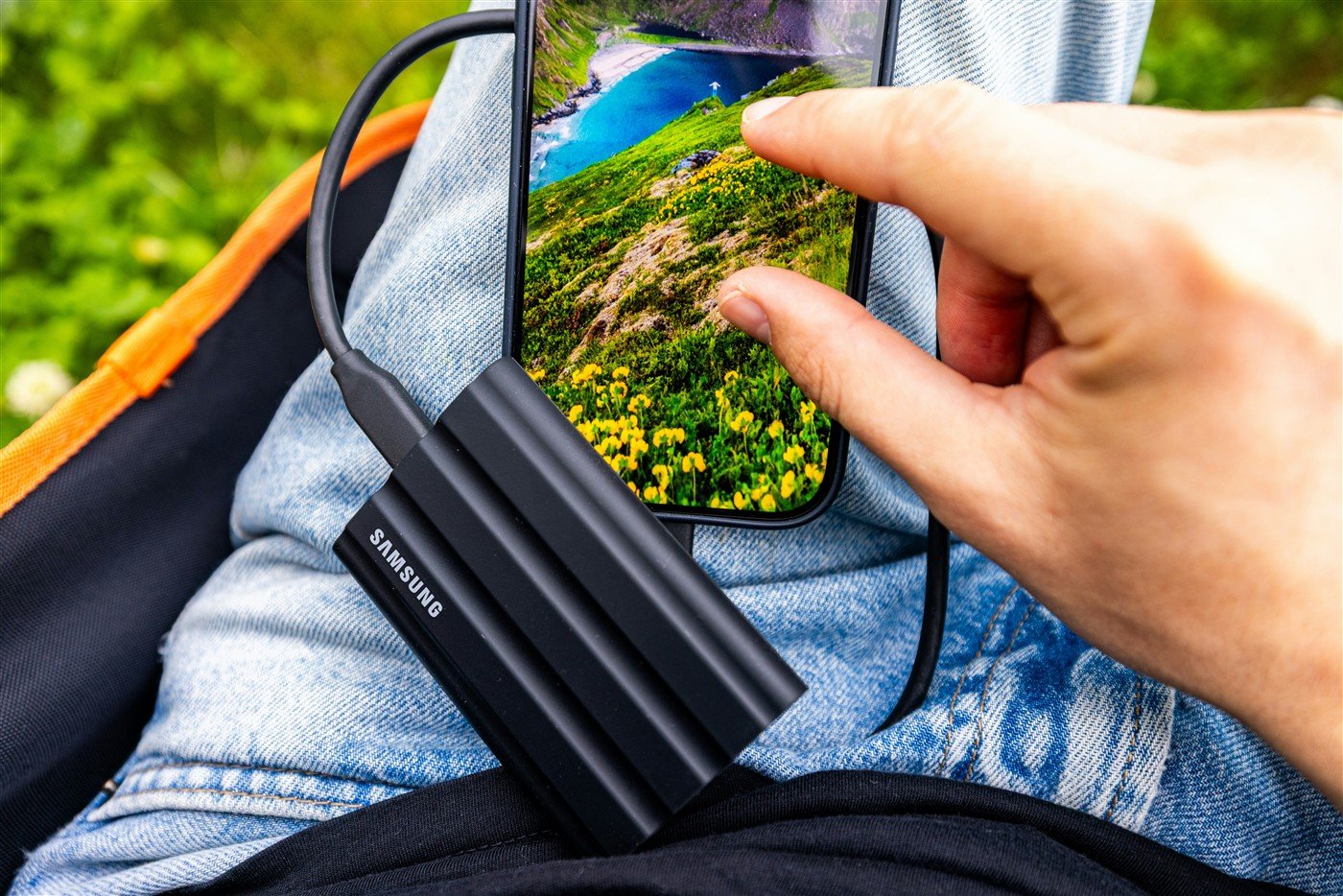
The purchase example is the black U.S. 2TB T7 Shield, MU-PE2T0S/AM, identified on Samsung’s exact product page. Samsung rates the family for USB 3.2 Gen 2 at 10Gbps and sequential speeds up to 1,050 MB/s reading and 1,000 MB/s writing. These are manufacturer maxima under its conditions, not our sustained iPhone measurements.
We would consider it when the same drive will carry files between a phone kit and a computer, especially when its protected body is useful. Its advertised write number alone does not close the recording decision: the sources checked here do not establish the exact unit’s compliance with Apple’s power ceiling and full-capacity write requirement.
Reasons to shortlist it
- The 10Gbps interface fits the phone connection class without relying on a 20Gbps link for its advertised class of performance.
- Samsung documents IP65 dust and water resistance for the drive body, useful context for choosing field storage.
- The data sheet lists a compact 59 × 88 × 13 mm body and approximately 98 g weight, making it practical to evaluate as part of a handheld kit.
Ownership tradeoffs
- Its 10Gbps interface also limits later computer transfers; a faster computer port does not upgrade the drive.
- The IP65 claim is based on controlled tests. Samsung excludes liquid and dust damage from warranty coverage, so the rating is no substitute for protecting the kit or backing up footage.
Choose or avoid: shortlist this exact 2TB configuration for a combined field-storage and potential phone-recording role if you can verify the missing recording requirements before relying on it. Choose another documented setup when direct capture is the sole purpose and you need a clear compatibility answer before buying. We do not label the T7 Shield an Apple-certified or tested recording solution.
Search Amazon for T7 Shield 2TB Black
This is a model search, not a verified listing. Check the exact capacity, SKU, seller, return terms and current stock. No current retail price or availability is verified here.
If a 20Gbps drive is also on your list for computer work, see our T7 Shield versus T9 comparison. That comparison does not establish either drive’s iPhone recording compatibility.
Check the complete kit before a real shoot
- Write down the intended mode. Record your phone model, app, resolution, frame rate and encoding. Check the applicable Apple guidance rather than buying for an unspecified future mode.
- Confirm the cable specification. Apple says the supplied iPhone charge cable supports USB 2 speeds. Choose a compliant cable with the required data rating, and confirm its length and connectors suit your mounting arrangement.
- Resolve power and mounting. Ask for the drive’s maximum power requirement. Support the drive and cable independently so the phone socket is not carrying their weight. A hub adds another device to validate; it is not an automatic compatibility fix.
- Prepare the drive deliberately. Copy existing files elsewhere before formatting. Apple’s Files guide describes selecting a connected storage device under Locations, then choosing Erase and the required format. Check the selected drive carefully: erasing removes its contents.
- Rehearse a representative take. Use the intended app, mode, cable, mounting and power arrangement for a realistic duration. Watch for warnings and disconnects, then play the resulting file on the editing system you will use. This checks your kit; it is not a certification or a substitute for full-capacity evidence.
- Offload and verify before reuse. Keep a separate copy of important footage, confirm the files open and avoid making the recording drive the only archive. Leave enough time for backup before the next session.
Our capacity advice: measure the size of a representative clip from your actual mode, estimate the day’s recording time and add working space. Do not convert a minimum write-speed requirement into a promised number of recording minutes. Capacity planning and sustained performance answer different questions.
iPhone recording SSD FAQs
Does an advertised 1,000 MB/s write speed prove the drive is suitable?
No. It does not establish sustained performance across the capacity, maximum power demand or the behavior of your complete kit. Ask for the conditions behind the number and validate the intended setup.
Should I pay more for a 20Gbps SSD?
Only when another part of your workflow can use it and the other buying requirements are satisfied. It does not increase a 10Gbps phone port’s speed. Consider computer offloads separately from recording.
Can I keep my only backup on the recording SSD?
That leaves your footage dependent on one device. Our recommendation is a separate verified copy before erasing or repurposing the recording drive. A rugged enclosure does not replace a backup.
Is the smartphone photograph proof that the T7 Shield records ProRes?
No. It is a licensed model illustration, not our recording evidence or an identification of a particular iPhone. Use documentation and your actual kit checks to make that decision.
Research method and primary sources
We checked Apple’s recording and connection guidance, its accessory requirements, Samsung’s U.S. product page and technical data sheet, and the photo’s public license on November 11, 2026. This is document-based buying advice. We did not benchmark drives, measure power, record clips or test cables, heat behavior or durability. Recommendations and the rehearsal checklist are editorial judgments. No drive in this article has been independently accepted by us for a specific iPhone recording mode.
- Apple: About Apple ProRes on iPhone — named models, mode requirements, formatting and recording limits.
- Apple Accessory Design Guidelines, section 17.2 — sustained full-capacity write requirement in the June 8, 2026 edition.
- Apple: Charge and connect with USB-C — phone USB speeds and supplied cable limitation.
- Apple iPhone guide: transfer files and format an external device — Files app controls; labels depend on the installed software.
- Samsung U.S.: black 2TB T7 Shield MU-PE2T0S/AM — exact purchase-example identity.
- Samsung T7 Shield data sheet, revision 2.0 — dimensions, interface, maximum speed claims and protection limitations.