Best Wireless Productivity Keyboards (2026): MX Keys S vs MX Mechanical
By The Gear Audit Team · Specification research September 10, 2026; buying-advice layout update September 13, 2026.
Quick answer: scissor keys or low-profile mechanical switches?
Choose the Logitech MX Keys S if you want a full-size, laptop-like scissor keyboard with a numpad, smart backlighting, and Easy-Switch for up to three devices. Choose the full-size Logitech MX Mechanical if you want the same broad multi-device workflow with a mechanical switch choice. Both use Bluetooth Low Energy or an included Logi Bolt receiver; key mechanism is the useful dividing line.
Its Perfect Stroke scissor keys and full-size layout suit buyers who want a numpad and do not want to select among mechanical switch types.
The full-size model offers Tactile Quiet, Clicky, or Linear low-profile switches while retaining Easy-Switch and a numpad.
Compare the documented differences
| Published attribute | Logitech MX Keys S | Logitech MX Mechanical |
|---|---|---|
| Exact source configuration | Official US specification page: Black part 920-011406. Other color or retail variants can use different part numbers. | Full-size US product page 920-010547; do not confuse it with MX Mechanical Mini. |
| Key system | Perfect Stroke low-profile scissor keys. | Low-profile mechanical switches: Tactile Quiet, Clicky, or Linear. |
| Layout | Full-size with integrated numpad. | Full-size with integrated numpad. |
| Connection | Bluetooth Low Energy or included Logi Bolt USB receiver; Easy-Switch for up to three devices. | Bluetooth Low Energy or included Logi Bolt USB receiver; Easy-Switch for up to three devices. |
| Manufacturer battery estimate | Up to 10 days with predefined lighting settings or up to five months with backlighting off. | Up to 15 days on a full charge or up to ten months with backlighting off. |
| Main purchase check | OS support, receiver port, layout/color/part number, and preference for scissor keys. | Full-size rather than Mini, switch selection, OS support, and receiver port. |
Logitech MX Keys S: full-size scissor keys for multi-device work
Best for: A desk shared by as many as three compatible devices where a numpad, familiar low-profile key action, and receiver-or-Bluetooth choice matter more than mechanical switches.
Logitech describes MX Keys S as a full-size keyboard with Perfect Stroke scissor keys. It connects through Bluetooth Low Energy or the included Logi Bolt USB receiver and can use Easy-Switch across up to three devices. Logitech’s US documentation lists Windows, macOS, ChromeOS, Linux, and iPadOS, while noting that systems other than Windows and macOS receive basic functions.
The integrated numpad makes the board useful for numeric entry without a separate accessory. The trade-off is width: this is a full-size desk keyboard, not the compact choice for someone trying to create more mouse space. Logitech’s battery figures are estimates tied to lighting use and should be treated as charging-plan guidance rather than a guaranteed interval.
Pros
- Scissor keys provide a familiar route from laptop keyboards. Buyers who already like a short, low-profile action can stay with that mechanism without choosing among mechanical switch types.
- Easy-Switch supports up to three devices. A work computer, personal computer, and compatible tablet can share one keyboard without repeatedly moving a cable.
- Bluetooth and Logi Bolt offer two wireless paths. The receiver can serve a fixed desktop while Bluetooth remains available for a device with no free USB-A port.
Cons and trade-offs
- It is not a mechanical keyboard. Buyers who want a tactile, clicky, or linear mechanical option should choose MX Mechanical rather than expecting a switch change later.
- The full-size body occupies more desk width. The numpad is useful only when the workflow justifies the space it takes beside the mouse.
- The Bolt receiver needs a compatible USB port and is receiver-specific. Logitech says the keyboard is not compatible with other Logitech USB receivers, so an existing Unifying receiver should not be assumed to work.
Choose something else if: You actively want a mechanical switch choice, need a smaller board without a numpad, or cannot accommodate Bluetooth Low Energy or the included Logi Bolt receiver.
Our recommendation
We recommend MX Keys S for a general productivity desk when the user prefers laptop-like scissor keys and regularly uses a numpad. Its value in this comparison comes from the key mechanism; connection and three-device switching are shared with MX Mechanical.
Source: Logitech MX Keys S Black US specifications, part 920-011406. The recommendation is editorial interpretation of documented features.
Search Amazon US for Logitech MX Keys S listings
Logitech MX Mechanical: switch choice in a full-size MX layout
Best for: Buyers who want a full-size wireless work keyboard and can choose deliberately among Logitech’s Tactile Quiet, Clicky, and Linear low-profile mechanical switches.
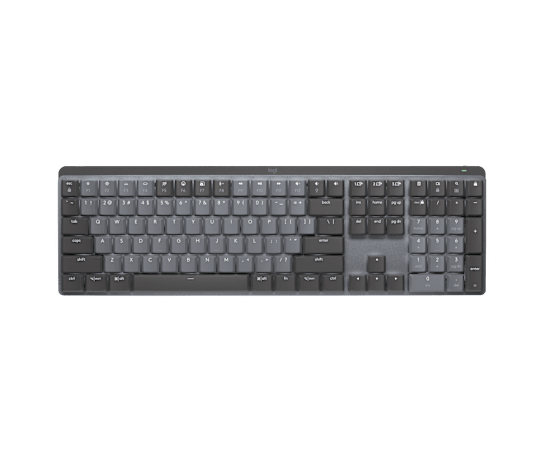
The full-size MX Mechanical retains a numpad while changing the key system to low-profile mechanical switches. Logitech lists three choices: Tactile Quiet, Clicky, and Linear. Its connection options mirror the broad workflow of MX Keys S: Bluetooth Low Energy, the included Logi Bolt receiver, and Easy-Switch across up to three devices.
The switch labels describe options rather than a universal quality ranking. A buyer should choose based on whether a bump, audible click, or smoother linear travel is wanted, and verify that the listing is the full-size model instead of MX Mechanical Mini. Logitech’s stated battery estimates vary with backlighting and remain manufacturer claims.
Pros
- Three switch options make the key mechanism an explicit choice. Buyers can select Tactile Quiet, Clicky, or Linear instead of accepting a single scissor-key design.
- The full-size version keeps an integrated numpad. It suits number-heavy work without adding a separate keypad.
- Its connection workflow matches the MX family. Bluetooth Low Energy, Logi Bolt, and three-device Easy-Switch support can fit a desk shared across systems.
Cons and trade-offs
- The switch choice must be made before checkout. A buyer who treats every MX Mechanical listing as the same can receive a different key feel from the one intended.
- The full-size model takes more lateral desk space. Buyers who do not need a numpad may prefer MX Mechanical Mini or another compact layout.
- The USB-C cable is for charging only. Logitech’s setup guide says it does not carry keyboard input, so the computer still needs a Bluetooth Low Energy or Logi Bolt wireless connection while the board is charging.
Choose something else if: You prefer laptop-style scissor keys, do not want to decide among switch types, or need a compact board. MX Keys S is the simpler full-size choice within this pair.
Our recommendation
We recommend the full-size MX Mechanical when mechanical switch selection is a positive requirement and the numpad will be used. Confirm both the full-size body and the named switch option; those choices are more important than small differences in manufacturer battery estimates.
Sources: Logitech MX Mechanical US product page, 920-010547 and Logitech MX Mechanical setup guide. The recommendation is editorial interpretation of documented features.
Price listing: Logitech MX Mechanical — Tactile Quiet, Graphite, US.
How to choose for a productivity desk
- Decide whether the numpad earns its space. Both compared models are full-size. If the numpad is rarely used, a smaller board may provide more practical mouse room.
- Name the preferred key mechanism. Choose scissor keys for MX Keys S or select a specific low-profile mechanical option for MX Mechanical.
- Check the receiver plan. Both include Logi Bolt and support Bluetooth Low Energy; verify the host’s available port and do not assume another Logitech receiver is interchangeable.
- Confirm operating-system functions. Logitech documents broad compatibility, but some systems receive basic functions rather than the complete Windows/macOS feature set.
Wireless productivity keyboard FAQ
Do both keyboards switch among three devices?
Logitech documents Easy-Switch for up to three devices on both product pages. Each connected device still needs a compatible Bluetooth or Logi Bolt path.
Is MX Keys S mechanical?
No. Logitech identifies its Perfect Stroke keys as a scissor system. MX Mechanical is the model in this comparison with low-profile mechanical switch choices.
Is MX Mechanical Mini the same keyboard?
No. The comparison covers the full-size MX Mechanical with an integrated numpad. Confirm the listing title and layout before ordering.
Can MX Mechanical send input over its USB-C cable?
No. Logitech’s setup guide says the supplied USB cable is for charging only. Keyboard input still uses Bluetooth Low Energy or the Logi Bolt receiver.
How should I check the buying links?
Read the button or card label: a search can mix colors and configurations, while an exact-offer card applies only to its named variant and current availability. Confirm the full-size model, part number, color, switch, condition, seller, included receiver, and final checkout price.
Amazon price check: Cards use the named US variant and show a qualifying current USD offer with its check time. Prices expire within one hour; unavailable offers fall back to a labelled Amazon search. Confirm the exact variant, condition, accessories and final checkout price. No numerical Amazon rating is shown because the API did not return usable review data. Price checks do not change the specification-research date.
Research method, primary sources and limitations
We compared Logitech’s US documentation for exact full-size product configurations, including key mechanisms, layout, connection, device switching, operating-system notes, and battery estimates. The advice is editorial interpretation of those manufacturer claims.
We did not test typing feel, sound, latency, Bluetooth or Bolt reliability, battery life, software behavior, or durability. Battery figures vary with lighting, settings, and use.
Correction: The previous version claimed testing, ratings, review analysis, and fixed performance or price conclusions without retained supporting records. Those claims have been removed.
Buying-advice layout update: September 13, 2026. Original specification research: September 10, 2026.
Primary sources: Logitech MX Keys S Black US, 920-011406; Logitech MX Mechanical full-size US, 920-010547; Logitech MX Mechanical setup guide. Read our research methodology and Computer Peripherals guides.
CERTAIN CONTENT THAT APPEARS ON THIS SITE COMES FROM AMAZON. THIS CONTENT IS PROVIDED “AS IS” AND IS SUBJECT TO CHANGE OR REMOVAL AT ANY TIME.
Affiliate disclosure
As an Amazon Associate, The Gear Audit earns from qualifying purchases. We may earn an affiliate commission when you buy through our links, at no extra cost to you. Read our full affiliate disclosure.