How to Calibrate a Coffee Grinder with a Setting Log
By The Gear Audit Team · Original specification research September 9, 2026; manufacturer-source and instructional check September 20, 2026.
Quick answer: make each grinder setting recoverable
Write down the exact grinder, its reference point, dial position or full turns plus clicks, beans, dose, brewer, beverage yield or batch size, time and your observed result. Change one variable before the next brew. A setting log helps you repeat and revise your own recipe; it is not a universal calibration number or a substitute for the manufacturer’s safety and cleaning directions.
For Encore ESP, record the printed number, brew method and whether you are in the 1–20 espresso or 21–40 filter range.
For OXO 8722600, record both the primary/micro grind position and timer duration; seconds do not guarantee grounds mass.
For K6, gently establish the maker’s zero, then note full turns and clicks opened from that reference.
Copy this setting-log template
| Field | What to record | Why it matters next time |
|---|---|---|
| Hardware | Exact model, color/revision and any changed burr/shim | Settings from another grinder or adjustment range do not transfer directly |
| Reference and setting | Dial number; primary plus micro mark; or K6 full turns and clicks from zero | Makes the position recoverable after switching beans or methods |
| Coffee and recipe | Beans and roast date if known; dose; brewer; beverage yield or batch water | Explains what was held steady |
| Result | Observed flow, time and taste in your own words | Connects the next adjustment to a real outcome |
| Next change | One grind move or one other chosen variable | Prevents several simultaneous changes from hiding the cause |
Leave an unknown measurement blank. A useful personal record is more valuable than precision you did not actually measure.
Build one repeatable adjustment loop
- Identify the exact controls. Use the manual for your model; do not copy another owner’s number across grinders.
- Set a safe reference. For K6, follow the maker’s instruction to turn the adjustment nut gently clockwise to zero and then open anti-clockwise. Do not force the burrs.
- Hold the recipe steady. Record beans, dose, brewer and beverage target before judging a setting.
- Observe the result. Note flow, brew time and your own taste without treating one run as a reliability or quality test.
- Change one thing. Move one dial mark or a modest, explicitly recorded click count, then repeat with the same recipe.
- Save the usable range. Keep separate notes for espresso and filter or for different beans; revisit after cleaning, shimming or reassembly.
Two worked log examples
Illustrative espresso adjustment, not a reported test: A Baratza owner writes “Encore ESP Black ZCG495; espresso; dial 18; Bean A; 18 g dose; 36 g beverage target; observed flow faster than desired.” The next entry keeps beans, dose and target the same and tries dial 17, then records the actual result. This shows one-variable reasoning; it does not predict that 17 will fix a particular bean or basket.
Illustrative hand-grinder reset, not a reported test: A K6 owner gently reaches the manufacturer’s zero and writes “1 full turn plus 10 clicks open; Bean B; one pour-over dose; observed taste.” After switching to a coarser recipe, that owner can return to the recorded count from zero. The numeral printed at zero may differ from the click count, as KINGrinder warns; never log only the numeral.
For OXO, a comparable entry needs both grind position and timer setting, followed by weighed output if dose mass matters. Timer duration is a control setting, not a measured amount of coffee.
Three control systems to log differently
| Model | Maker-described control | Write in your log | Common notation mistake |
|---|---|---|---|
| Baratza Encore ESP ZCG495 Black | 40 positions, split espresso 1–20 / filter 21–40 | Printed number, brew method, changed shims if any | Using a filter-range step as if it has espresso-range resolution |
| OXO Brew 8722600 Matte Black | 15 primary settings plus micro marks; remembered timer | Primary/micro mark and timer duration | Calling timer seconds a weighed dose |
| KINGrinder K6 | External adjustment, 60 clicks per turn | Full turns plus clicks from a gently reached zero | Equating the printed zero numeral to actual clicks |
Baratza Encore ESP ZCG495 Black: log the dial and brew method
Best for: Someone switching between espresso and filter and willing to keep distinct setting notes.

The manufacturer documents 40 dial positions with finer adjustment from 1–20 for espresso and coarser changes from 21–40 for filter. Its manual describes cleaning and possible shims. A log should include the brew method and any changed shim configuration, since the same printed number after hardware changes may not represent the same position.
Pros
- Numbered positions are quick to record. A printed setting can anchor a repeat recipe.
- The split range keeps espresso notes separate. Marking brew method prevents confusing coarse and fine steps.
Cons and trade-offs
- A dial number is not transferable across beans. Expect to revise it when roast, basket or dose changes.
- Shimming or reassembly can shift the usable range. Log the hardware change before comparing old and new entries.
Choose something else if: You need a remembered timer for regular filter batches or a portable grinder.
Our recommendation
Use the Encore ESP Black log when espresso adjustment is central. Keep the model name, method and hardware state with every saved position.
Sources: Baratza ZCG495 Black page and manual. Recommendations are editorial interpretations of documented features.
Price listing: Baratza Encore ESP — Black ZCG495BLK1AUC1A.
OXO Brew 8722600 Matte Black: log grind and time separately
Best for: A person repeating timed batches who wants a traceable setting and dose check.

OXO describes 15 primary settings plus micro-adjustments and a timer that recalls its last setting. Record both controls. If you need the same grounds mass, weigh the output; a remembered number of seconds by itself does not establish equal coffee mass after changing beans or hopper level.
Pros
- Two visible controls can be written together. Primary/micro mark plus time makes a repeated routine understandable.
- Remembered time saves daily resetting. This helps when one bean and batch are used regularly.
Cons and trade-offs
- Timer duration is not dose weight. Add a scale reading when mass matters to the recipe.
- Micro marks need unambiguous notation. Write the adjacent primary mark and direction rather than a vague “medium.”
Choose something else if: Espresso fine adjustment or manual portability matters more than timed countertop batches.
Our recommendation
For an OXO 8722600 log, pair grind mark and time with the observed dose or brew result; do not interpret seconds as grams.
Sources: OXO Matte Black 8722600 controls. Recommendations are editorial interpretations of documented features.
Price listing: OXO Brew Conical Burr Grinder — Matte Black 8722600.
KINGrinder K6: log full turns and clicks from zero
Best for: A hand-grinder owner who changes brew methods and needs to return to a prior position.
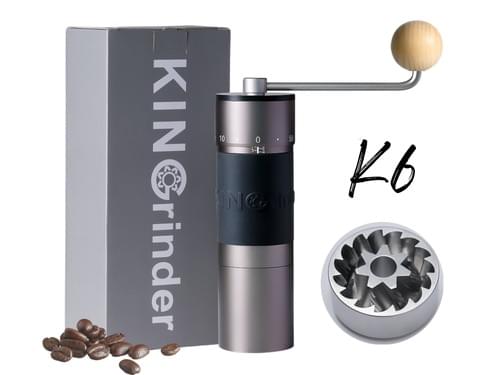
KINGrinder documents an external adjuster with 60 clicks per turn and a gentle clockwise zero-reference procedure. The printed numeral at zero can differ from the number of clicks; record full turns plus clicks opened counterclockwise, not only the number facing the marker.
Pros
- External adjustment is easy to inspect. You need not remove the receiver to change and log a setting.
- Full-turn notation supports wide changes. Counting rotations plus clicks is clearer than a large click total when switching brew methods.
Cons and trade-offs
- Zero must be approached gently and consistently. Forcing the adjustment can harm the grinder and invalidates a useful reference.
- Hand effort remains part of every dose. A log cannot remove the work of grinding several servings.
Choose something else if: A timed electric batch grinder better fits the number of cups you regularly make.
Our recommendation
Use K6’s manufacturer zero as the reference, then log full turns and clicks. Recheck after disassembly or cleaning rather than assuming old positions stay exact.
Sources: KINGrinder K6 adjustment page and zero-reference procedure. Recommendations are editorial interpretations of documented features.
Search KINGrinder K6 on Amazon
Buying FAQ
Is one grinder’s setting number useful on another model?
No. Dial geometry, burr position, bean and recipe differ. Copy the method for logging, not a supposed universal number.
Does cleaning mean I must start from zero?
Recheck your saved result after cleaning or reassembly. For K6, use the maker’s gentle zero-reference procedure when you need a fresh count; do not force the mechanism.
Do OXO timer seconds tell me the mass of coffee?
No. Record weighed grounds if dose mass matters.
Does 16 μm per click on K6 describe coffee-particle size?
No. KINGrinder states an adjustment increment; resulting particle distribution was not measured here.
Amazon prices: Cards show the named US configuration and an eligible current new USD offer when available, with its check time. Unavailable or expired offers use a labelled search link. Confirm the model, included parts and final checkout price. Numerical Amazon ratings are omitted when usable review data is unavailable.
Research method, sources and limitations
Manufacturer material establishes the control layout for original Encore ESP ZCG495 Black, OXO Brew 8722600 Matte Black and KINGrinder K6. The logging sequence and hypothetical examples are editorial instruction, not our own brewing results. We did not grind, brew, measure particles, compare taste or recommend a universal setting. Follow exact manuals for operation and cleaning.
Original specification research: September 9, 2026. Control/source and instructional check: September 20, 2026. Earlier unsupported tests and scores were removed.
Primary sources: Baratza Encore ESP manual and Black variant; OXO 8722600 controls; KINGrinder K6 adjustment and zero procedure. See our grinder comparison and methodology.
CERTAIN CONTENT THAT APPEARS ON THIS SITE COMES FROM AMAZON. THIS CONTENT IS PROVIDED “AS IS” AND IS SUBJECT TO CHANGE OR REMOVAL AT ANY TIME.
Affiliate disclosure
As an Amazon Associate, The Gear Audit earns from qualifying purchases. We may earn an affiliate commission when you buy through our links, at no extra cost to you. Read our full affiliate disclosure.