Robot Vacuums in Pet Homes: Floor Preparation and Scheduling
By The Gear Audit Team · Specification research September 9, 2026; manufacturer source and buying-advice check September 20, 2026.
Quick answer: inspect the route before each run
A robot’s object recognition can help with some pet-home clutter, but it cannot certify the floor safe from an unpredictable accident. Pick up waste, wet food, cords and loose toys; move bowls out of the route or establish keep-out zones; then schedule runs when someone can inspect the floor first. If accidents are unpredictable, use a manually started run after inspection instead of an unattended timer.
Clear and inspect the route, then use a regular schedule and revisit it when pets, furniture or bowls move.
Start a supervised or freshly inspected run. A camera cannot guarantee that every waste or spill will be recognized.
Walk the planned route: the pet-home checklist
| Area | Before the run | Why it matters |
|---|---|---|
| Waste, spills, wet food | Inspect and remove before starting | Brushes, wheels and mop pads could spread wet material |
| Bowls and fountains | Move outside the route or use a suitable keep-out zone | A robot may contact, shift or spill them |
| Cords and pet toys | Pick up trailing cables, thin toys and strings | Recognition depends on visibility, shape and position |
| Bedding, fringe and rugs | Secure loose fabric and edges | It can bunch or catch in moving parts |
| Litter corner | Remove wet clumps or unsuitable large debris; block the area if needed | Wet material and loose litter present different cleanup tasks |
Do the walk-through at the time of cleaning, even if the map was correct yesterday. Check below low furniture and around the feeding area. Place physical barriers where a software zone may be difficult to define reliably.
Build a schedule you can inspect
- Watch initial mapping and runs. Note where a robot stops, catches fringe, approaches water or encounters pet toys.
- Define zones around fixed hazards. Use the exact model’s supported keep-out controls for bowls or litter, then verify that the boundary behaves as intended.
- Schedule after a human floor check. A routine shortly after someone clears the route is more controllable than a run while everyone is away.
- Revisit when the home changes. Moved furniture, a new feeding spot, a puppy or seasonal shedding can change the route. Check the app’s obstacle images and privacy settings under the maker’s instructions.
Object recognition is an aid, not an excuse to leave potentially spreadable material. Our robot vacuum types guide explains how basic mapping, self-emptying and mop stations change other chores; the mop care guide covers wet-system upkeep.
Worked example: Roomba Plus 505 Combo with AutoWash Dock
Best for: A household that wants mapped vacuuming and mopping with a dock that takes on debris disposal and pad care, while accepting careful route preparation and water-system upkeep.
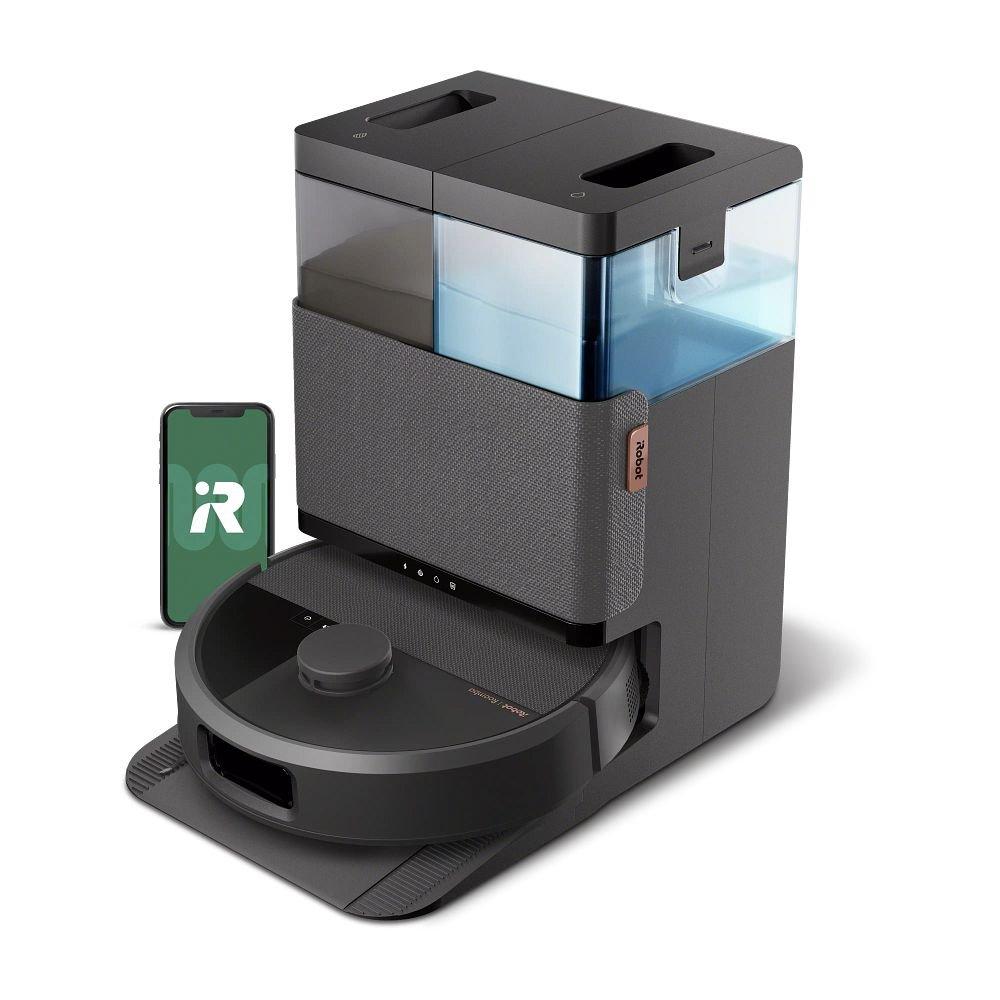
iRobot lists ClearView Pro LiDAR mapping and PrecisionVision AI object recognition on this exact black N185020 bundle. Its camera and obstacle-image guidance names the Plus 505 family and explains recognizing certain common objects, such as cords, toys and pet waste, with optional image review. That establishes intended functions, not an independent avoidance rate or a guarantee for every mess. The AutoWash Dock empties debris and washes and dries mop pads; owners still handle bags, tanks, basin and brush care.
Pros
- LiDAR mapping supports room and zone planning. Mark fixed bowl and litter locations, then verify the actual route.
- Vision-based object recognition provides another cue. Listed objects can prompt avoidance and image review, which can help refine a prepared schedule.
- The dock takes on recurring debris and pad chores. Auto-emptying, washing and heated drying reduce handling immediately after mixed cleaning runs.
Cons and trade-offs
- No recognition system covers every accident. A pet mess can appear after mapping or outside documented object categories; inspect before unattended runs.
- The wet dock creates an ongoing care routine. Bags, tanks, the wash basin and pads require attention, especially with pet hair and tracked dirt.
- Combo functions add water decisions. Keep wet cleaning away from unsuitable rugs and use only compatible solutions under iRobot’s guidance.
Choose something else if: You need only dry vacuuming and do not want a water-and-pad dock. Compare a vacuum-only model and its actual bundle; it will still need floor preparation.
Our recommendation
Consider N185020 if you will use both the mapped zones and its mop-and-dock workflow. Buy it for the documented chores it takes on, while keeping a human route check in the schedule; do not buy any robot on an absolute pet-waste avoidance promise.
Price listing: iRobot Roomba Plus 505 Combo with AutoWash Dock — N185020.
Turn the checklist into a buying decision
If your pet has unpredictable accidents, no obstacle feature should be the sole reason to schedule cleaning unattended. If the challenge is dry fur rather than wet mess, compare brush access, compatible replacement brushes and bag cost. If you want mopping, consider how tanks and pads will be serviced and where the dock can sit. Look at current seller condition, warranty and included dock before paying for a specific family name.
The Roomba Plus 505 versus Qrevo Curv comparison explores two full-service mop systems. Neither system eliminates route checks around pets.
Pet-home robot vacuum FAQ
Can I leave a robot running if my pet might have an accident?
We would inspect the route and remove waste first. Documented object recognition is not a guarantee for every shape, lighting condition or newly appeared mess.
Will a keep-out zone replace moving a water bowl?
A zone can help around a fixed location when the model supports it, but test its actual boundary. A movable bowl or spill can still require a physical change and floor check.
Does a self-washing dock eliminate pet-hair maintenance?
No. Debris bags, brushes, filters, pads, tanks and wash basins remain service items; consult the exact manufacturer’s care schedule.
Should I schedule daily cleaning?
Choose a frequency around observed debris and when someone can clear the floor. A daily timer is less helpful if the route cannot be safely inspected.
Amazon prices: Cards show the named US configuration and an eligible current new USD offer when available, with its check time. Unavailable or expired offers use a labelled search link. Confirm the model, included parts and final checkout price. Numerical Amazon ratings are omitted when usable review data is unavailable.
Research method, primary sources and limits
Original specification research was September 9, 2026; we checked the cited manufacturer material and guidance September 20, 2026. This is a preparation and scheduling guide. We did not run obstacle, waste, navigation or cleaning tests. iRobot’s object-recognition descriptions are manufacturer claims about intended functions, and our route checklist is editorial risk planning. The example is the black Roomba Plus 505 Combo plus AutoWash Dock N185020; its features should not be transferred to every Roomba or vacuum-only model.
Primary sources: iRobot camera and obstacle-image guidance; iRobot N185020 bundle; Plus 500 dock care schedule. Read our methodology.
Unsupported tests, review counts, scores, prices and universal avoidance guarantees in the earlier article were removed.
CERTAIN CONTENT THAT APPEARS ON THIS SITE COMES FROM AMAZON. THIS CONTENT IS PROVIDED “AS IS” AND IS SUBJECT TO CHANGE OR REMOVAL AT ANY TIME.
Affiliate disclosure
As an Amazon Associate, The Gear Audit earns from qualifying purchases. We may earn an affiliate commission when you buy through our links, at no extra cost to you. Read our full affiliate disclosure.