How to Choose an Office Chair: Complete Buying Guide (2026)
Choose an office chair by checking three things in order: whether the seat fits you, whether the configured chair works at your desk, and whether you can return it after a useful trial. Start with seat height and depth, then check the arms, back support and recline. A longer feature list cannot rescue a seat that is too deep or arms that keep you away from the keyboard.
This guide turns those checks into a buying record. The three manufacturer-documented examples below show different ways to solve fit; they are not a ranking of comfort.
Start with your measurements and working position
Bring a tape measure, your usual work shoes and a note of your desk setup to a showroom. If buying online, use a chair you already have to record what works and what needs to change. Treat its measurements as a starting point, not proof that another seat will feel identical.
- Find a usable seat height. Sit back with your feet supported and check the keyboard with relaxed shoulders. Record the floor-to-seat height that works. Compare it with the offered chair’s actual cylinder range. If a fixed desk requires a higher seat, assess a stable footrest as part of the setup.
- Check effective seat depth while sitting back. Your back should reach the backrest while the front edge leaves room behind your knees. Record the depth that achieves both. A slider changes this relationship; a fixed seat requires you to fit the seat or choose a different size. Do not substitute overall chair depth for seat depth.
- Check usable width and arm spacing. Sit between the arms, move your legs and practise getting up. A weight rating does not establish seat width or arm clearance. Ask for these dimensions if the listing only gives an overall width.
- Test support and movement. Adjust the back support and recline resistance, then type, use the mouse and lean back as you normally would. Check that you can reach and operate the controls. A support that pushes you away from the backrest fails your fit check, regardless of its name.
These checks follow the principles in OSHA’s workstation evaluation checklist and CCOHS guidance on choosing a chair: fit depends on the person, task and workstation. Neither an “ergonomic” label nor a height recommendation establishes individual fit.
Measure the desk separately
Record the lowest obstruction under the desk, the clear opening between its legs or cabinets, and the floor-to-arm-pad height at your working seat position. Include drawers, keyboard trays and cable baskets. Then check space for the base, entry, turning and the full recline you intend to use.
A simple clearance example: if an arm pad is 27 inches above the floor at your working setting and a drawer’s underside is 26 inches high, that arm cannot pass beneath the drawer. Lowering the whole chair may change your keyboard position, so check the complete setup rather than solving storage clearance alone.
Our compact-desk fit and clearance guide provides a more detailed room-measurement record. OSHA’s desk guidance also stresses usable leg space and access to work equipment.
Decide which controls you will actually use
Prioritize seat depth when a fixed seat does not fit or several people will share the chair. Prioritize arm movement when fixed arms prevent close keyboard access. Check back-support position and recline resistance on the actual chair. “4D arms” and “synchro tilt” are starting points for questions: ask which directions move and which positions lock, rather than assuming a universal mechanism or tilt ratio.
Seat material is another trial question. Inspect where the foam cushion or mesh perimeter meets your thighs, how the surface feels in your usual clothing, and the manufacturer’s cleaning instructions. We do not assign mesh a temperature advantage or either material a guaranteed lifespan. For more detail on controls, see our office-chair adjustment comparison.
Three configurations that make the fit decision concrete
Use these examples to choose a fit strategy: a fixed-depth chair if its geometry already suits you, a sliding seat if you need to change effective depth, or a sized mesh chair if you can select and trial the appropriate size. Published specifications describe adjustment possibilities; our recommendations below are editorial judgments about how to use them.
| Example | Seat and arms | Useful when | Main check before ordering |
|---|---|---|---|
| IKEA MARKUS Vissle dark gray, 902.891.72 | Fixed 18½-inch seat depth; fixed arms | The fixed geometry fits and you want fewer adjustments | Minimum seat height, knee clearance and arm-to-desk fit |
| Steelcase Leap Upholstered work chair, fully adjustable arms | Sliding seat; height, width, depth and pivot arm movement | Seat depth and arm placement need adjustment | Specify this arm package and test the slider’s full range |
| Herman Miller Aeron Size B, Nightfall example below | Sized suspension seat; height-adjustable arms in this configuration | You prefer suspension seating and Size B fits | Size, arm option, back support and tilt selection |
IKEA MARKUS: check fixed geometry before buying features

Best fit scenario: you have tried this fixed-depth chair and its seat, back and arms already align with you and your desk.
IKEA lists an 18½-inch seat depth and an 18⅛–22½-inch seat-height range for this US article. That minimum height deserves attention if you need a lower seat. Its assembly and adjustment instructions show fixed arms and the chair’s controls; do not expect a seat-depth slider.
Pros
- The mesh back and padded seat offer a distinct alternative to all-mesh seating.
- Height, tilt resistance and tilt-lock controls allow adjustment without a large set of separate fit controls.
Cons and trade-offs
- Fixed seat depth leaves no slider to correct a mismatch in knee clearance.
- Fixed arms cannot be lowered independently for your desk opening.
Choose something else if: the seat is too deep, the minimum height is too high, or the arms block your working position.
Our recommendation
Consider MARKUS after a successful sit and desk-fit check. Its simpler geometry is useful only when that geometry fits.
Check this MARKUS configuration at IKEA · Search Amazon US for MARKUS 902.891.72 listings
Steelcase Leap: use a slider to tune effective seat depth
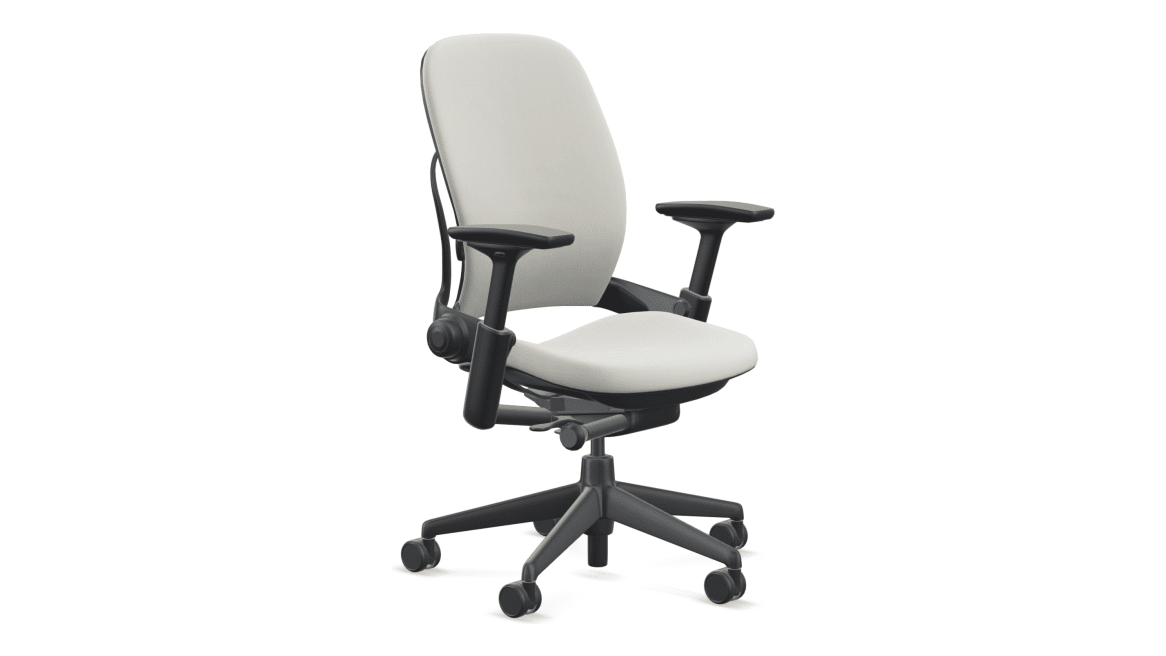
Best fit scenario: you need to change effective seat depth or position your forearm support in several directions.
Steelcase’s published Leap brochure lists 15¾–18¾ inches of seat-depth adjustment for the standard work chair. Its product page describes height-adjustable lumbar support, lower-back firmness adjustment and fully adjustable arms. That page also lists alternative arm packages: specify height, width, depth and pivot movement if you need all four.
Pros
- The sliding seat lets you change depth while retaining contact with the backrest.
- Separate lumbar-height and firmness controls give you more than one way to set back support.
- The fully adjustable arm option lets you tune forearm placement independently of seat height.
Cons and trade-offs
- This upholstered configuration does not offer Aeron’s open suspension seat and back.
- Several manual controls require a deliberate setup, especially when users share the chair.
Choose something else if: you prefer an all-mesh seat, or the slider’s range still does not achieve your fit.
Our recommendation
Shortlist this Leap configuration when adjustable depth and arm placement solve an identified problem. Test the useful settings rather than buying by the number of controls.
Search Amazon US for Leap work-chair configurations
Herman Miller Aeron: choose the seat size and options explicitly
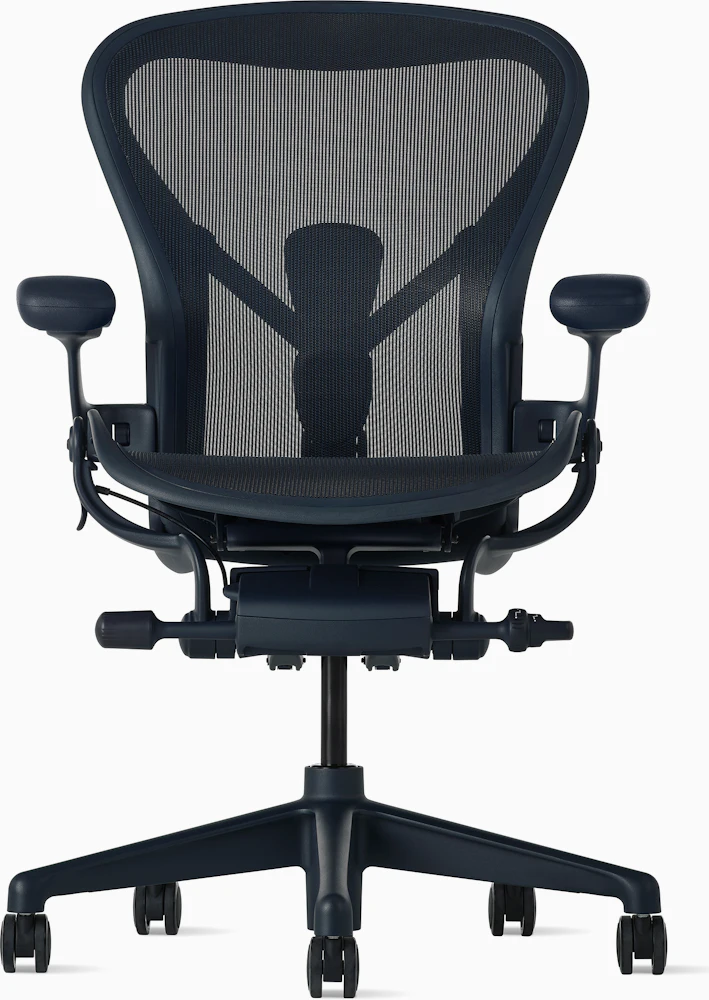
Best fit scenario: you prefer suspension seating, have tried the appropriate Aeron size and can confirm its complete options.
Our documented example is the current US-store Size B selection with Nightfall frame/base, adjustable PostureFit SL, height-adjustable arms, and Tilt Limiter and Seat Angle. These are selected options, not features of every Aeron. Herman Miller’s specifications distinguish A, B and C sizes and arm packages. Seat depth is fixed within the selected size rather than adjusted with a slider.
Pros
- The suspension seat and back suit a buyer specifically seeking an alternative to a foam seat.
- Three size choices let you compare different seat geometries before selecting your chair.
- This configuration includes selectable back support and tilt controls rather than leaving those options unspecified.
Cons and trade-offs
- A Size B seat cannot slide to a different depth. If it does not fit, another size or chair is the next comparison.
- The selected height-adjustable arms do not provide the depth and angle adjustments of the fully adjustable arm option.
Choose something else if: you need a sliding seat, a padded sitting surface, or arm movements absent from this configuration.
Our recommendation
Choose Aeron through a size-and-options trial. Do not select Size B because it is called “medium,” or accept a used Classic Aeron as equivalent to this current-store example.
Search Amazon US for Aeron Size B configurations
About the Amazon links: these are search fallbacks, not verified ASINs, exact offers or stock confirmations. Results may include other sizes, revisions, upholstery, arm packages and conditions. Match the seller’s actual chair to your buying record before checking out.
Make the trial, return cost and warranty part of the purchase
Try the chair during the activities you will use it for: typing, mousing, reading, reclining and getting up. Use your own desk if the seller’s return terms permit an at-home trial. Record the adjustment settings and any fit problem while there is still time to return it. OSHA’s purchasing checklist recommends trying chairs for fit and comfort over an extended period before purchase; a brief showroom impression leaves questions for a longer trial.
Read the opened-product rule. A return window is not automatically a free home trial. Check when the window starts, whether assembly and use are allowed, the required packaging, collection or shipping costs, and any deductions. As a concrete US example, IKEA distinguishes 365 days for unopened products from 180 days for opened products, with proof of purchase. Read its full conditions; do not apply those terms to another seller, marketplace or country.
Separate warranty cover from comfort and lifespan. Save the applicable warranty before paying. Check the frame, lift, mechanism, upholstery, mesh, arm pads and casters separately, plus labor and transport. Establish the warranty provider, authorized-seller requirements, original-purchaser rules and country of coverage. A warranty length is neither a promise that the chair will suit you nor a measured service-life estimate.
For a used or refurbished chair, establish which parts were replaced and who covers them. A seller’s warranty and a manufacturer’s original warranty are different promises. Use our used and refurbished chair inspection checklist before treating a listing as equivalent to a new chair.
Your before-you-order record
Save these details with the offer, then check them again against the delivered chair:
- Identity: manufacturer, model, revision, size, upholstery and condition.
- Seat fit: selected cylinder range, fixed or adjustable depth, and usable width.
- Controls: arm movements, back-support options, recline resistance and lock positions.
- Desk fit: working-height arm clearance, base footprint, entry and recline space.
- Use limits: the exact configuration’s stated load and intended-use limits; appropriate casters for the floor.
- Trial and returns: opened/assembled eligibility, deadline, packaging and your total return cost.
- Service: warranty provider, covered components and replacement-part availability.
Buying rule: if a measurement determines whether you can use the chair and the seller cannot supply it, keep that purchase unresolved. A discount does not fill in the missing dimension.
Office-chair buying FAQ
Can I choose a chair from my height alone?
Height can narrow a search, but people of the same height can have different leg and torso proportions. Check seat height, effective depth, arm position and your workstation together. CCOHS specifically warns that an ergonomic chair may still fail to fit an individual or task.
Will a footrest fix a chair that is too big?
It can support your feet when a higher chair position is needed for a fixed desk. It does not shorten an over-deep seat, narrow the arm spacing or create desk clearance. Check those separately.
Should a headrest decide the purchase?
Try it in the upright and reclined positions you use. Make sure it suits your head position without forcing you forward. Treat a headrest as an additional fit choice after the seat, back and desk checks, rather than evidence that the whole chair fits.
Does a longer warranty mean the chair lasts longer?
It establishes specified coverage subject to conditions, not an individual chair’s future service life. Compare what is covered, who handles a claim, and whether parts and repair are practical in your location.
Can I use one comfortable position all day?
Allow for movement. OSHA’s working-position guidance recommends frequent changes of position, small chair adjustments and periodic movement. Fit is a starting point for a usable workstation, not a reason to remain still.
Research method, sources and limits
We checked manufacturer pages, the cited chair documents, OSHA guidance and CCOHS guidance on October 18, 2026. Model dimensions and controls are manufacturer-reported facts; the measurement record, priorities and recommendations are editorial guidance. We have not hands-on tested these chairs for comfort, temperature, durability or medical outcomes, and we do not use customer-review counts or numerical ratings here.
Photos come from the linked manufacturer product pages. The MARKUS image belongs to article 902.891.72; Leap illustrates the upholstered work chair, without establishing a reseller’s arm package or textile SKU; Aeron illustrates the documented current US-store Nightfall configuration. A photo or shared model name does not establish an Amazon listing’s configuration. Manufacturer contract sheets, local stores and sellers may describe different options or dimensions: obtain the selected chair’s measurements rather than combining ranges across sources.
Primary references: IKEA MARKUS specifications; Steelcase Leap controls and options; Leap dimensional brochure; Aeron US configurator; Aeron size and option specifications; OSHA chair guidance; CCOHS ergonomic-chair guidance. Return terms are linked in the buying section. Read our research methodology.
Affiliate disclosure
As an Amazon Associate, The Gear Audit earns from qualifying purchases. We may earn an affiliate commission when you buy through our links, at no extra cost to you. Read our full affiliate disclosure.