LG C4 OLED vs Samsung S90D OLED: 65-Inch Model Comparison
Quick answer
Choose LG OLED65C4PUA when Dolby Vision and webOS match your viewing setup. Choose Samsung QN65S90DAFXZA when HDR10+, Tizen or a compatible Samsung soundbar ecosystem matter more. Both exact 65-inch models list 144Hz-class PC gaming features under specified conditions. We have not measured picture quality; choose the format and software chain first, then inspect a current offer’s condition and full model code.
Choose between these exact OLED televisions by the formats, software and source devices you intend to use. A lower offer on an older model may reflect condition, seller or remaining stock; we have not verified current prices or availability.
Format and platform differences
| Decision | LG C4 OLED65C4PUA | Samsung S90D QN65S90DAFXZA |
|---|---|---|
| HDR features | LG documents Dolby Vision and Filmmaker Mode | Samsung documents HDR10+ Adaptive/Gaming; Dolby Vision is not listed on the exact page |
| Smart platform | webOS | Tizen |
| PC gaming | Up to 144Hz; NVIDIA G-SYNC compatibility and AMD FreeSync Premium | Up to 4K 144Hz on HDMI 1/2/3/4 in Samsung’s specifications |
| Audio features | Dolby Atmos and features for compatible LG soundbars | Dolby Atmos and Q-Symphony for compatible Samsung audio products |
| Model to match | OLED65C4PUA | QN65S90DAFXZA |
Sources: LG C4 OLED65C4PUA and Samsung S90D QN65S90DAFXZA. Manufacturer feature lists establish supported functions, not which TV produces the better picture.
LG C4 OLED65C4PUA: Dolby Vision and webOS
Best for: A 65-inch system with known Dolby Vision sources and a preference for LG’s webOS.
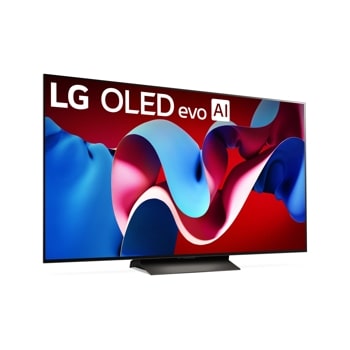
LG lists Dolby Vision, Filmmaker Mode, Dolby Atmos, webOS and up-to-144Hz gaming features for this exact page. Dolby Vision matters only when the content, subscription, app and playback device deliver that format. A gaming feature also requires the right source hardware, cable, input settings and game. We cannot infer brightness, motion quality or latency from the feature list.
Pros
- Dolby Vision is explicitly documented for compatible films and streaming chains.
- webOS and LG audio features may fit an existing LG household.
- G-SYNC compatibility and FreeSync Premium are listed for suitable PC gaming setups.
Cons and trade-offs
- Format support does not ensure a service or device actually provides Dolby Vision.
- 144Hz capability does not make every console or game output 144 frames per second.
- A 2024 offer needs close condition, return and warranty checks.
Choose another if: HDR10+ or Tizen is an explicit requirement for your source and household.
Our recommendation
Choose OLED65C4PUA for a known Dolby Vision and webOS fit, then verify the exact model and seller condition.
Samsung S90D QN65S90DAFXZA: HDR10+ and Tizen
Best for: A 65-inch setup built around HDR10+, Tizen apps or a compatible Q-Symphony soundbar.

Samsung’s exact US page identifies QN65S90DAFXZA. It documents HDR10+ Adaptive/Gaming, Tizen and Motion Xcelerator 144Hz support. Dolby Vision is not listed there, so a specific Dolby Vision requirement points toward the LG. Samsung’s Q-Symphony footnote requires compatible TV and soundbar hardware; a Samsung badge on another audio product is insufficient proof.
Pros
- HDR10+ support is documented for compatible sources.
- Tizen may suit an existing Samsung account and app setup.
- Samsung lists 4K 144Hz on HDMI 1–4 with the necessary PC conditions.
Cons and trade-offs
- Dolby Vision is not listed on the exact US page.
- Q-Symphony depends on a compatible soundbar model.
- As an older-model offer, listings can mix new, renewed and used units.
Choose another if: Dolby Vision is necessary or you prefer LG’s webOS environment.
Our recommendation
Choose QN65S90DAFXZA for documented HDR10+ and platform fit. Use independent measurements or an in-person view if picture quality is the deciding factor.
Match formats to your content
Check the HDR formats used by your discs, streaming services and source devices. A specific format requirement is more useful than a broad “cinematic” claim. Verify the full playback chain: service subscription, app, player, cable and TV settings can all affect what reaches the screen.
Check the software you will actually use
Compare app availability, accounts and privacy settings on webOS and Tizen for your own services. Do not assume that every app or feature remains identical across model years. If you already own a soundbar, verify the exact TV-and-soundbar pairing needed for an ecosystem feature.
Plan the gaming connection
A 144Hz specification does not mean every console or game outputs 144 frames per second. Check the intended resolution, graphics hardware, cable, HDMI input settings and variable-refresh support together. Use reliable independent measurements for input lag, motion and picture behavior; our source review does not measure them.
Inspect an older-model offer carefully
Match all letters in the model identifier and confirm screen size, condition, seller, warranty, stand, remote and return terms. Nearby sizes or regional versions may differ. Include mounting and cable costs in the comparison, and follow the manufacturer’s care guidance for static content.
Unsupported legacy tests, scores, review totals and prices have been removed. See our methodology and The Frame versus C4 comparison for a different room-design decision.
Checks before ordering a 2024 OLED
- Trace the HDR chain. Check content, app, player and TV format support together.
- Map the gaming source. Identify resolution, refresh capability, cable and HDMI settings.
- Check app and audio needs. Verify the particular soundbar and streaming apps, not just a platform name.
- Inspect the offer. Match every character of the 65-inch model, condition, included stand and remote, warranty and return terms.
- Measure the room. Confirm stand width, wall mount, viewing distance and delivery route for a 65-inch panel.
OLED buying FAQ
Is S90D listed with Dolby Vision?
It is not listed on Samsung’s exact US model page. Check the formats your content uses.
Does 144Hz matter for every console?
No. The source game and device must output the corresponding signal.
Can specs tell us which looks better?
No. Brightness, color, motion and reflections need controlled measurements or viewing.
Research method and sources
We checked LG and Samsung US pages for exact 65-inch model identifiers on September 27, 2026. Feature support is a manufacturer claim. Recommendations are editorial. We did not measure picture quality, input lag, sound or panel wear, and prices are not fixed here.
Primary sources: LG OLED65C4PUA and Samsung QN65S90DAFXZA. Read our methodology.
Affiliate disclosure
As an Amazon Associate, The Gear Audit earns from qualifying purchases. We may earn an affiliate commission when you buy through our links, at no extra cost to you. Read our full affiliate disclosure.