Steam Deck USB-C Charger: 45W, 65W or 100W?
By The Gear Audit Team · Manufacturer and support sources checked November 15, 2026
Quick answer
Keep the supplied 45W charger if it works and you only need to charge your Steam Deck. Valve specifies a 45W USB-C PD3.0 supply for both LCD and OLED models. A compatible 65W or 100W charger can be useful for a shared travel bag or additional devices, but the larger rating alone does not promise faster Steam Deck charging.
For a replacement, check USB Power Delivery, the available output profiles and the power reserved for the Deck’s port when other devices are connected. A documented 15V/3A output is a useful 45W specification to look for. Buy extra capacity to solve a stated charging need: a second location, a shared charger, or a dock’s documented requirements.
Choose for the job the charger must do
The first decision is whether you need new hardware at all. A working supplied charger already matches Valve’s specified supply. Keeping it at the place where you play most often, and using another appropriate charger elsewhere, may be more convenient than replacing it with a larger multiport unit.
| Your situation | What we would choose | Check before purchasing |
|---|---|---|
| Deck alone; supplied charger works | Keep the 45W supply. | Only buy a spare if cable reach or moving it between rooms is a problem. |
| Replacement or dedicated spare | A suitable 45W USB-C PD supply, or a higher-rated compatible alternative. | Published profiles, exact plug version, cable reach and package contents. |
| Deck plus a USB-C phone | A multiport charger with a documented 45W allowance for the Deck alongside the phone. | The exact two-port state; a 65W total is not 65W per socket. |
| One charger shared with a laptop | Choose 65W or 100W around the laptop’s documented requirement. | Whether devices charge in turns or together, including the laptop’s required profiles and cable. |
| Deck through a dock or hub | Follow the dock maker’s power-input and compatibility guidance. | Power delivered to the host, peripheral demand and any included supply. |
These are purchase recommendations, not measured charge times. Read Valve’s LCD specifications and OLED specifications for the original 45W PD3.0 baseline.
Read the output profiles, not just the largest wattage
A charger can offer different power at different voltages. In the real Lenovo ADLX65YLC3D label below, 20V at 3.25A corresponds to its 65W maximum, while 15V at 3A corresponds to 45W. Those are alternative output profiles; you do not add them together. This photograph is a label-reading example, not a Steam Deck compatibility recommendation for that Lenovo model.

For the Deck, look for USB PD and a suitable 15V output rather than relying on a phone-brand “fast charging” badge. Anker’s Steam Deck charging support note specifically discusses 15V negotiation. Valve says the Deck uses USB Power Delivery and does not support the Fast Charging or Quick Charge specifications referenced in its guide. That wording does not mean a charger carrying those features is automatically unsuitable; it still needs the appropriate USB PD support.
The USB-IF explains that PD devices negotiate the power they require. A compliant higher-capacity charger does not simply force its maximum wattage into every connected device. Compatibility still depends on the device, charger, cable and active port arrangement.
Deck and phone together: inspect the exact port pair
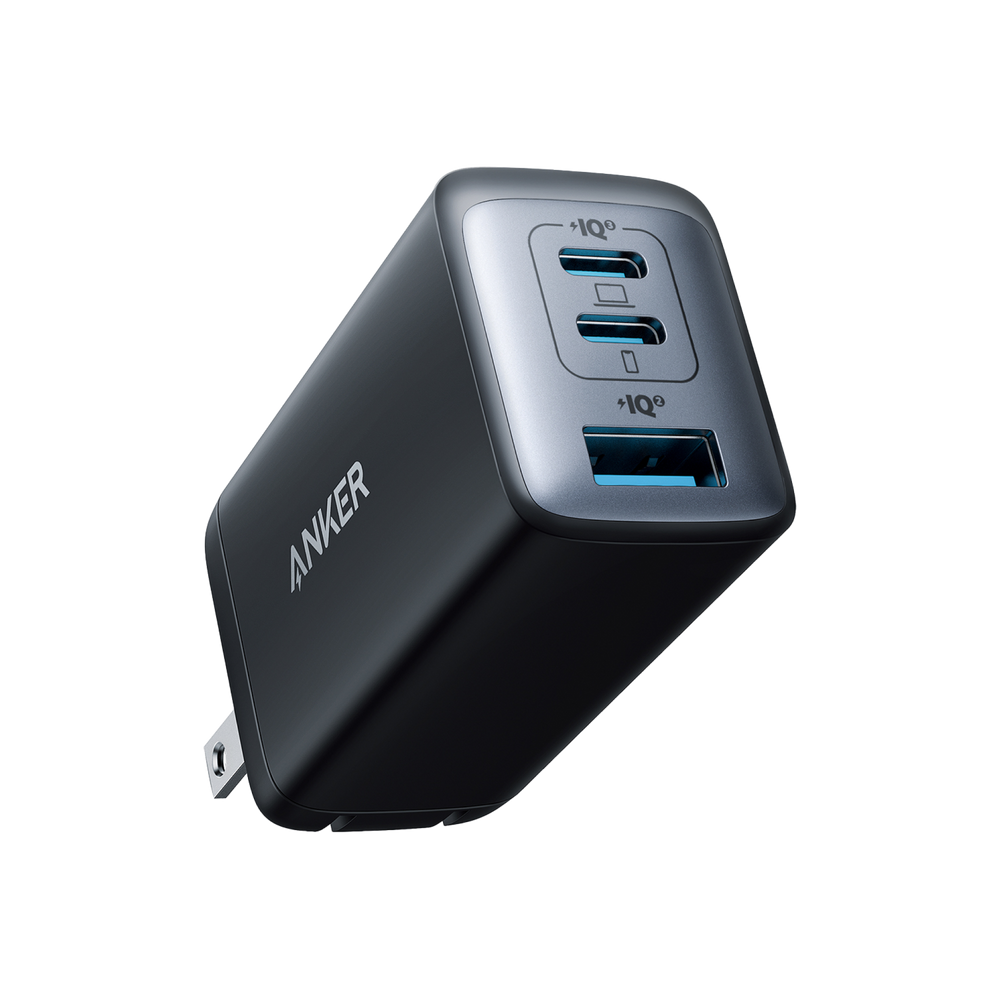
A 65W charger can make sense for a Deck and phone if its two-port allocation preserves the required output. Anker’s 735 Nano II 65W, model A2667, provides a concrete example: Anker specifies 45W maximum on USB-C1 plus 20W maximum on USB-C2 when those two ports are used. Its official manual lists 15V/3A among USB-C1’s profiles in that state.
Our recommendation is to consider that exact two-USB-C arrangement when you need a shared Deck-and-phone supply and the phone’s requirement fits the second port. Anker lists Steam Deck compatibility. This is a specification-based option, with no charge-time or sustained-output measurement from us.
Useful advantages of this arrangement
- Two USB-C devices can share one wall outlet with a published 45W + 20W budget.
- Either USB-C port has a higher single-device ceiling when you use the charger for a compatible laptop alone.
- The manual identifies the relevant voltage profiles instead of leaving you to infer compatibility from the 65W name.
Limits that change the purchase
- The 45W + 20W split applies to C1 + C2. Anker gives different limits for combinations involving USB-A.
- With all three ports occupied, Anker specifies 40W on C1 and 12W on each remaining port. That no longer preserves a 45W allowance.
- A single shared charger cannot stay at your desk while also travelling with your Deck. Separate supplies may fit two fixed locations better.
Search Amazon for Anker 735 Nano II A2667
This is an exact-model search, not a verified offer. Confirm A2667, the wall-plug version, seller and included cable. Other chargers called “735” have different model numbers and behavior.
Choose something else if you want to occupy three ports while reserving 45W for the Deck, or if your laptop needs more power than this model can supply. Our 65W versus 100W charger guide covers the laptop budget in more detail.
Dedicated 45W supply or higher-capacity shared charger?
Why keep a dedicated 45W supply?
It matches Valve’s specified supply and avoids shared-port allocation decisions. A second dedicated unit also lets you leave one at your usual seat. For a genuine replacement, Valve’s official repair partner iFixit identifies its US 45W adapter as genuine; choose the appropriate regional version.
When another arrangement is more useful
A dedicated charger does not consolidate a phone and laptop into the same wall outlet. Check reach carefully: Valve lists a 1.5m supply cable for the LCD specification and a 2.5m cable with the current OLED package. Do not assume every replacement sold under “Steam Deck charger” has the same cable length.
We would choose a higher-capacity shared charger when it replaces hardware you otherwise need to pack. We would keep separate chargers when the devices normally live in different rooms, or when the required simultaneous output is poorly documented.
A dock adds another power check
A “100W PD” label on a hub does not promise 100W charging for the Steam Deck. Identify what the dock accepts, what it can deliver to its host and what its manufacturer recommends for the connected peripherals. Do not assume a higher-rated wall charger fixes an incompatible dock or a negotiation problem.
If charging works directly but changes through the dock, compare those two connection paths before replacing the wall charger. For pass-through terminology and input-versus-output examples, read our USB-C hub charging guide. Follow the instructions for your exact dock rather than applying another model’s power reservation.
Before buying a replacement
- Identify the problem: missing charger, inconvenient reach, shared outlet or charging trouble through a dock.
- Check the exact model’s USB PD profiles and applicable port table. For a 45W profile, 15V × 3A = 45W.
- For a detachable cable, choose a suitable USB-C-to-USB-C charging cable. A compliant 60W cable is sufficient for a 45W path; it does not need to carry the charger’s larger headline output unless another device will use that power.
- Match the wall plug and AC input to where you will use it. Confirm whether a cable is included.
- Keep a known-working original supply available when evaluating a new setup. Use the seller’s return terms if the documented combination does not work as expected.
USB-IF’s current USB-C cable certification guidance uses 60W and 240W power markings. Charging power and data speed are separate; our charging-versus-data cable guide explains the distinction.
Steam Deck charger FAQs
Will a 100W charger charge my Deck faster than the supplied 45W unit?
Do not buy it on that assumption. Valve specifies a 45W supply for LCD and OLED. Extra capacity may help serve other devices, but the charger rating alone cannot establish a shorter Deck charge time.
Is a 45W phone charger automatically suitable?
No. Check USB PD and the published profiles, plus the cable and any shared-port limits. A phone’s charging-mode name or total wattage is insufficient evidence.
Does a slow-charger warning prove I need more watts?
No. Check the port, cable and dock path first. Anker documents a model-family-specific case involving 15V negotiation; that explanation is not a diagnosis for every charger or SteamOS version. Compare with the supplied adapter and consult support if the issue persists.
Why does the Deck stop short of 100% after staying plugged in?
Valve says the battery may slowly discharge after long periods connected to power to support long-term battery health. That behavior alone is not a reason to replace the charger. See Valve’s basic-use and troubleshooting guide.
Sources and method
We checked Valve specifications and support guidance, Anker product and manual information, USB-IF guidance and iFixit’s genuine-part listing on November 15, 2026. This is document-based buying advice. Output ratings are published capabilities; purchase recommendations are editorial judgments. We did not test charging speed, temperature, sustained output or any Deck-and-charger combination. No current price or exact Amazon listing is verified. The Lenovo photograph illustrates a manufacturer’s output label; its use restriction is retained above. See our research methodology.