IQAir AirVisual Pro vs Airthings View Plus (2026)
By The Gear Audit Team · Specification research September 9, 2026; manufacturer source and image check September 13, 2026.
Quick answer: a large colour display or radon-focused long-term placement?
Choose the IQAir AirVisual Pro Indoor Monitor when a 5-inch colour display, app and web dashboard, and its published core PM2.5, CO2, temperature and humidity readings fit the question you want answered. IQAir’s current technical-specification block also lists TVOCs, while another summary on the same page presents a different five-parameter description; confirm the supplied hardware revision if TVOCs are essential. Choose the Airthings View Plus (model 2960) when radon, air pressure, a battery-powered placement, or a wall-mounted display are central to the plan. Their shared measurements do not establish which monitor is more accurate; decide first which readings and power arrangement you will actually use.
Its 5-inch colour LCD shows current and recent indoor conditions, with historic data in IQAir’s app and web dashboard. Plan a nearby power route for regular use, and confirm the hardware revision if TVOCs matter.
It combines radon, PM2.5, CO2, VOC, temperature, humidity and pressure sensors with six AA batteries or USB power. Confirm your Wi-Fi band and placement before ordering.
Compare the documented differences
| Published attribute | IQAir AirVisual Pro Indoor Monitor | Airthings View Plus, model 2960 |
|---|---|---|
| Measurements described by the manufacturer | PM2.5, CO2, temperature and relative humidity; AQI is displayed as an index. IQAir’s current technical-specification block also lists TVOCs, but another product-page summary differs, so confirm the supplied revision if that channel is essential. | Radon, PM2.5, CO2, VOCs, temperature, humidity and pressure. |
| On-device display | 5-inch full-colour LCD; current readings and recent indoor trends. | 2.9-inch E Ink display with up to four selected values, plus a motion-activated status light. |
| Power and placement | USB supply and internal rechargeable battery; IQAir states up to four hours of battery use. Intended for indoor desktop or portable use. | Six AA batteries or included USB cable; Airthings states up to two years on batteries. It can stand or be wall-mounted. |
| Connectivity | 2.4 GHz Wi-Fi, AirVisual mobile app and web dashboard; offline buffering is listed. | 2.4 GHz Wi-Fi, Bluetooth Low Energy for app onboarding and Airthings SmartLink when plugged in. It is not compatible with 5 GHz Wi-Fi. |
| Long-term data | IQAir lists internal buffering during offline periods and one-year internal measurement-data logging capacity for registered devices. | Airthings lists mobile-app and web-dashboard access; its sheet also documents sensor intervals that change when USB power is connected. |
| What this comparison cannot answer | Manufacturer specifications do not provide a controlled accuracy comparison for their shared PM2.5, CO2, temperature or humidity readings. | |
IQAir AirVisual Pro Indoor Monitor: a larger display for its published set of readings
Best for: A desk, counter or other indoor spot where a larger colour display and IQAir’s app/web history are the main priorities, and a nearby power route is practical.

IQAir lists the AirVisual Pro’s PM2.5, CO2, temperature and relative-humidity readings alongside a 5-inch colour LCD, its AirVisual mobile app and web dashboard. The screen can make a single indoor station easier to check without opening a phone; the app and dashboard supply the historic view when a pattern matters more than a momentary number. IQAir’s current technical-specification block also lists TVOCs, but its top summary describes five parameters with AQI instead; confirm the specific supplied hardware revision with IQAir if TVOCs are a buying requirement.
Pros
- A 5-inch colour display for a shared room. IQAir says the screen shows current readings and recent indoor trends, which can make the monitor useful where several people need to see the same status at a glance.
- App and web-dashboard access are both documented. A buyer can check the same indoor station from the screen or use IQAir’s app and browser dashboard to examine a pattern over time.
- Local buffering supports an interrupted connection. IQAir lists internal buffering and a one-year internal data-logging capacity for registered devices, so a short Wi-Fi outage need not erase the monitor’s history.
Cons and trade-offs
- The stated battery time is short for a permanent cordless location. IQAir claims up to four hours from the internal battery, so a kitchen counter or desk setup normally needs a convenient USB power plan.
- It needs a compatible 2.4 GHz Wi-Fi network for the documented connection path. Check router settings before relying on the app or web dashboard from the intended room.
- It is an indoor monitor. IQAir says the enclosure is not weatherproof, so an outdoor, porch or damp-location plan needs a product designed for that environment.
Choose something else if: Radon is part of the decision, or if a monitor must sit for months on batteries or mount to a wall. View Plus documents a radon sensor, six-AA power and wall-mounting options.
Our recommendation
We recommend AirVisual Pro for an indoor desk or central counter where the larger colour display will actually be seen and its documented core PM2.5, CO2 and climate readings answer the question. Give it a stable indoor position and nearby power; choose View Plus if radon or long battery placement is the reason for buying a monitor. Confirm the supplied revision before buying specifically for TVOC monitoring.
Source: IQAir AirVisual Pro Indoor Monitor specifications. The recommendation is editorial interpretation of documented features.
Search Amazon for IQAir AirVisual Pro
Airthings View Plus (model 2960): radon and long-placement planning
Best for: A room where radon belongs in the monitoring plan, where a wall-mounted or battery-powered placement helps, or where pressure and VOC readings are useful alongside PM2.5 and CO2.
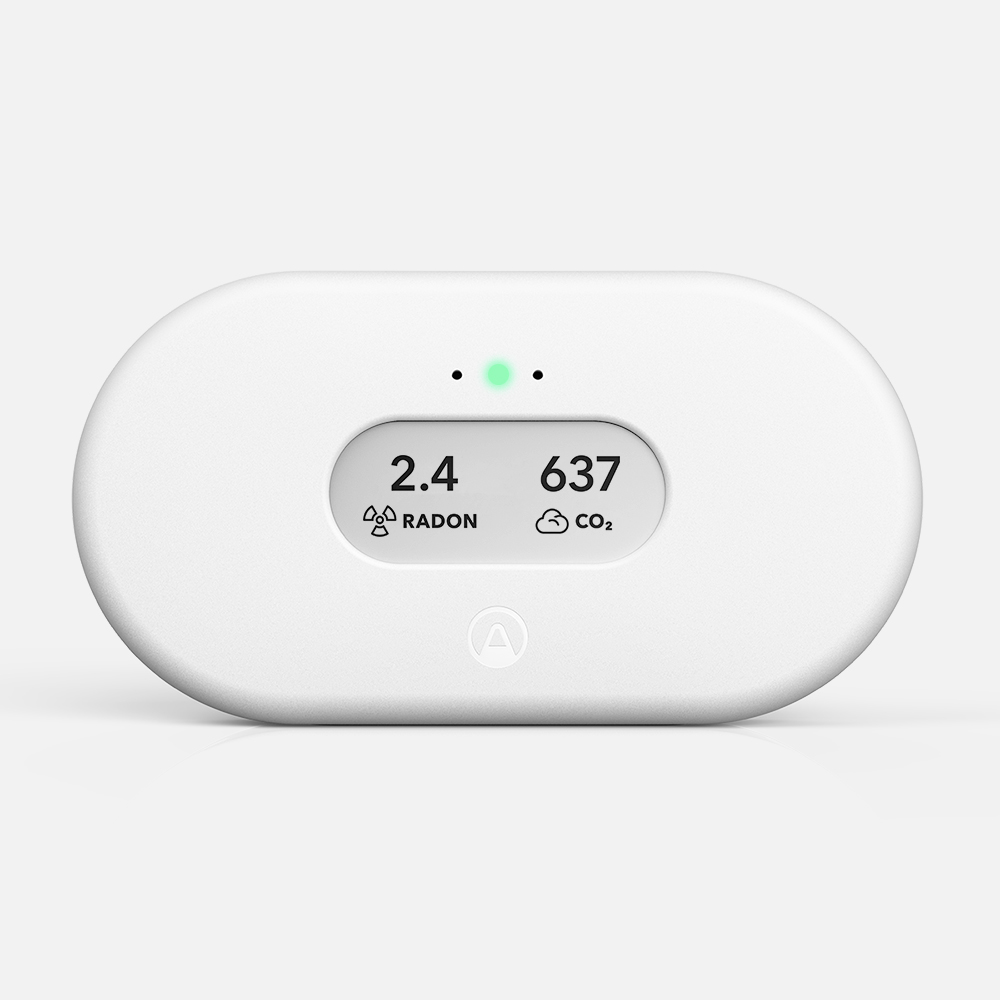
Airthings’ product sheet identifies View Plus as model 2960 and lists radon, PM2.5, CO2, VOC, temperature, humidity and pressure sensors. The product can stand on a flat surface or be wall-mounted, and its E Ink display can show up to four chosen values. Those choices make it a better fit when measurement location is as important as a larger always-on screen.
Pros
- Radon is a documented channel. A buyer who needs a longer-running radon trend has a named sensor to plan around instead of treating a general air-quality score as a radon result.
- Battery placement can last longer between changes. Airthings states up to two years on six AA batteries, which can suit a spot without a convenient outlet. Actual life depends on conditions and settings.
- Placement is not limited to a countertop. The sheet describes standing and wall-mounting arrangements, letting a room plan use approximate breathing height rather than the nearest desk.
Cons and trade-offs
- Its display shows up to four selected values. Choose the readings for the room’s question before mounting it, because not every available channel is visible on the E Ink display at once.
- 5 GHz-only Wi-Fi will not connect. Airthings specifies 2.4 GHz Wi-Fi and explicitly says View Plus is not compatible with 5 GHz Wi-Fi, so network compatibility is a pre-purchase check.
- Some SmartLink use depends on USB power. Airthings says SmartLink is enabled when the monitor is plugged in; a battery-only placement should not assume that hub role is available.
Choose something else if: You want a larger colour screen for a frequently viewed counter or desk. IQAir documents a 5-inch colour LCD and app/web dashboard, while View Plus presents up to four selected values on a 2.9-inch E Ink display.
Our recommendation
We recommend View Plus when radon and deliberate room placement are part of the job. Use the battery option for a position that needs freedom from an outlet, but confirm 2.4 GHz Wi-Fi and plug it in if SmartLink is part of the intended Airthings setup. Choose AirVisual Pro when an at-a-glance colour display is more useful than those additional measurement and placement options.
Source: Airthings View Plus product sheet and Airthings View Plus product page. The recommendation is editorial interpretation of documented features.
Price listing: Airthings View Plus 2960.
Set up the right question before comparing readings
- Name the condition you are trying to observe. Cooking particles, ventilation patterns, humidity, VOC changes and radon are different questions. Buy the monitor with the documented channel that matches the question.
- Choose one consistent location. A room-level monitor describes conditions at its placement point, not every room. Follow the maker’s placement guidance, keep the location consistent and compare trends under similar conditions.
- Check power and network before mounting. AirVisual Pro’s published battery claim is up to four hours; View Plus uses six AAs or USB and requires 2.4 GHz Wi-Fi. These details determine whether the intended location will stay useful.
- Treat a reading as a prompt to investigate. A consumer monitor does not identify the source of a pollutant or diagnose illness. Ventilation, a product used in the room and outdoor conditions can all affect a pattern.
Indoor air monitor FAQ
Which one monitors radon?
Airthings lists radon among the View Plus model 2960 sensors. Its product sheet states that the radon sensor samples every 60 minutes and gives accuracy information for specified continuous-measurement periods. This is not a controlled comparison with another monitor.
Does IQAir AirVisual Pro include TVOC monitoring?
IQAir’s current technical-specification block lists a TVOC sensor, but another summary on the same product page presents five parameters with AQI and does not name TVOCs. Because those descriptions do not fully align, confirm the hardware revision with IQAir before buying specifically for TVOC monitoring.
Can View Plus run without an outlet?
Airthings lists six AA batteries and states up to two years of battery life. The figure is a manufacturer claim, so plan a check interval rather than assuming every placement will reach it. SmartLink is documented when the monitor is plugged in.
Do either set of specifications prove better accuracy?
No. Each manufacturer publishes sensor details, but those pages do not provide a shared controlled test that ranks the monitors’ PM2.5, CO2, temperature or humidity measurements. This guide chooses between documented measurements, display and placement options instead.
Are the Amazon buttons exact listings?
The price cards request exact variants checked through Amazon’s product API. When a qualifying current offer is available, the card shows its USD price, check time and direct product link. If no current offer can be shown, the button is explicitly labelled as an Amazon search. Other model-search buttons remain searches. Confirm the exact model, condition, accessories and final checkout price.
Research method, primary sources and limitations
Amazon price check: Price cards use the named US listing, with a check time and a validity window under one hour. No numerical Amazon rating is shown because the current API responses did not supply usable review data. Pricing checks do not change the specification-research date.
We checked current manufacturer documentation for the named AirVisual Pro Indoor Monitor and View Plus model 2960: sensor lists, display, power, connectivity, placement and the official product-gallery images. The buying advice is our editorial interpretation of those published differences.
We did not calibrate the monitors against a reference instrument or test measurement accuracy, battery life, Wi-Fi range, app reliability, wall mounting or the effect of a room’s layout. A manufacturer sensor list does not establish which monitor is more accurate for their shared readings.
Buying-advice update: September 13, 2026. Original specification research: September 9, 2026. This update records an inconsistency between IQAir’s current top-level sensor summary and its current TVOC technical-specification block, and adds exact manufacturer image provenance.
Primary sources: IQAir AirVisual Pro Indoor Monitor; Airthings View Plus product sheet; Airthings View Plus product page. Read our research methodology and Smart Home guides.
CERTAIN CONTENT THAT APPEARS ON THIS SITE COMES FROM AMAZON. THIS CONTENT IS PROVIDED “AS IS” AND IS SUBJECT TO CHANGE OR REMOVAL AT ANY TIME.
Affiliate disclosure
As an Amazon Associate, The Gear Audit earns from qualifying purchases. We may earn an affiliate commission when you buy through our links, at no extra cost to you. Read our full affiliate disclosure.