Retractable USB-C Car Chargers: Anker Nano vs Belkin BoostCharge
By The Gear Audit Team | Manufacturer specification research checked October 12, 2026.
Quick answer: plan around a 45W laptop ceiling
Both chargers offer a documented 45W retractable USB-C connection plus a 30W USB-C port when those two outputs are used together. Choose Anker Nano A2738 for a simple two-device setup; consider Belkin BoostCharge CCC001fqBK if you also need USB-A or its conditional higher single-cable output.
The 75W name is a combined rating. Neither supplies 75W to one laptop. If your laptop needs 65W or 100W while a phone charges, choose a different charger with that exact simultaneous allocation and suitable vehicle input. These models suit buyers who value cable convenience and have verified that a 45W-class supply meets their needs.
When does a retractable charger make sense?
A built-in cable earns its place when you repeatedly connect the same nearby USB-C device and want to store the lead between journeys. It earns less when the socket is far from the passenger seat, your device uses Lightning, or you prefer replacing an ordinary cable independently.
Phone and modest-power laptop
Put the laptop on the retractable connection and the phone on a separate cable from the USB-C port. First confirm that the laptop accepts the available USB Power Delivery profile and that 45W fits your planned use.
Phone plus a legacy accessory
Belkin adds USB-A for an existing cable or accessory. Adding a third device changes the available power; it does not preserve the two-USB-C allocation.
Choose another format for rear-seat reach, a higher laptop requirement, or a laptop that does not accept USB-C PD charging. For power away from the vehicle, see our USB-C laptop power-bank guide.
Exact-model comparison: the allocation matters
| Buying detail | Anker Nano A2738 | Belkin BoostCharge CCC001fqBK |
|---|---|---|
| Outputs | Retractable USB-C cable and one USB-C port | Retractable USB-C cable, one USB-C port and one USB-A port |
| Two USB-C devices | Up to 45W cable + 30W port | Up to 45W cable + 30W port |
| Cable used alone | 45W maximum | Up to 60W claimed; qualification below |
| Separate USB-C port | 30W; fixed PD profiles through 15V, plus PPS | 30W; PD and PPS supported |
| Retractable reach | Up to 75cm in the A2738 manual | 75cm |
| Vehicle input | 12V / 8A or 24V / 4A, per manual | 12-24V DC, up to 9A, per support specification |
| Main purchase reason | Two USB-C devices with one cable stored in the charger | The same paired USB-C allocation, plus a USB-A option |
Ratings are ceilings each device must negotiate, not wattage forced into it. A phone may draw less; a laptop may charge slowly or lose battery under a workload above the supplied power. Check the laptop’s specification rather than a generic compatibility list. Our 65W vs 100W charger guide explains why the total rating is not the whole decision.
Belkin’s single-cable qualification: Its product and support descriptions advertise up to 60W, and its FAQ says continuous 60W may step down to 45W after roughly 20 minutes for heat management. The FAQ allocation table also lists 45W for a single cable. We do not treat sustained 60W as established or recommend it to solve a continuous 60W requirement. The two-USB-C 45W + 30W split is consistent across its support pages; these are still manufacturer limits, not a guarantee of sustained delivered power.
Anker Nano A2738: the straightforward two-device option
Best for: A nearby USB-C phone or laptop and a second USB-C device, when the 45W/30W limits fit your routine.

This is convenient if both devices use USB-C and the socket sits within reach. With the laptop on the built-in cable, the separate port remains available for the phone. Anker’s support specification confirms the cable and port limits; its manual establishes the matching A2738 identity and vehicle input.
Pros
- The retractable lead stays with the charger, reducing the need to find a loose cable for the first device.
- Its documented 45W + 30W arrangement makes the intended two-device connection straightforward.
- The second device uses an ordinary USB-C cable, so you can select a suitable length for that connection.
Cons and trade-offs
- The built-in connection stops at 45W even with the other port empty; it cannot meet a higher required input.
- The separate port has no listed fixed 20V PD profile. A laptop needing that profile belongs on the built-in cable, subject to its 45W limit.
- The integrated lead has finite reach and cannot be swapped as readily as a separate plug-in cable.
Choose another if: Your laptop requires more power, you need USB-A for accessories, or you want a long cable to another seat.
Our recommendation
Choose A2738 when a tidy two-USB-C setup is the priority and you have checked both devices’ requirements. A higher headline number is unnecessary if these exact output limits solve the task. Keep the laptop on the built-in lead when it needs a 20V PD profile.
Search Amazon for Anker Nano A2738
Anker’s direct US store showed sold out on October 12, 2026. The Amazon button is a model search, not a verified in-stock offer.
Belkin BoostCharge CCC001fqBK: extra connection flexibility
Best for: The same nearby phone-and-laptop setup, with occasional need for a USB-A accessory or conditional single-cable output above 45W.
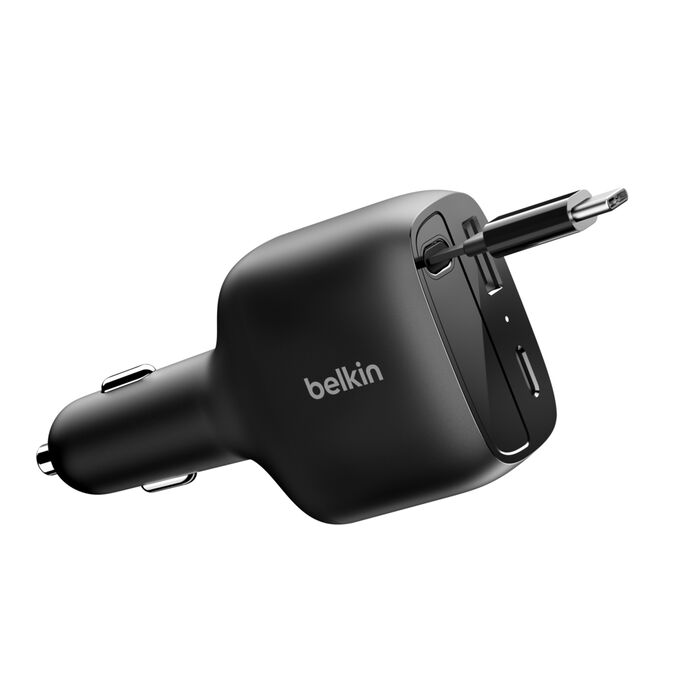
The extra USB-A port is a reason to consider this model when your car kit includes an older cable or small accessory. It does not make the two-USB-C setup faster than Anker’s: Belkin documents the same allocation. Its single-cable claim is conditional, with the source inconsistency and heat step-down described above.
Pros
- USB-A accepts an existing accessory cable without occupying the separate USB-C port.
- The manufacturer advertises a higher single-cable peak than Anker, potentially useful for a short solo session where the device can use it.
- The retractable lead and separate USB-C port support the same convenient nearby two-device arrangement.
Cons and trade-offs
- A laptop and phone on USB-C still face the same 45W/30W limits; the higher solo claim does not carry into that pair.
- Adding USB-A changes the split. It is unsuitable if you need an unchanged 45W + 30W allocation while a third device charges.
- The integrated 75cm lead constrains placement and cannot be replaced like an ordinary loose charging cable.
Choose another if: You require sustained 60W or more, a fully specified three-device allocation, or long cable reach.
Our recommendation
Choose Belkin when you will use USB-A. For phone and laptop together, judge it on convenience and the documented split. We would not pay more solely for the 60W claim without accepting its thermal qualification and confirming the exact requirement with Belkin.
Search Amazon for Belkin CCC001fqBK
Check the vehicle, placement and second cable
- Read the vehicle accessory-socket rating. Both models specify 12V/24V operation, but voltage compatibility alone does not establish the permitted load. Compare the vehicle manual’s power/current allowance with the charger’s input specification, including any other devices sharing the circuit. Do not change the vehicle fuse to accommodate a charger.
- Check physical clearance. Both bodies are approximately 10cm long and 5cm wide in manufacturer descriptions. Measure around recessed sockets, console lids and controls. Those dimensions are the product envelope, not the guaranteed amount protruding from your socket.
- Measure the cable route. A nominal 75cm lead may not reach a mount after bends around the console. An external cable on the second port lets you change that route, but is a separate purchase.
- Match device and cable. Lightning phones need a suitable separate cable. Check the laptop’s charging port and PD requirements. Our charging cable vs data cable guide covers a separate issue: these chargers supply power, not a wired CarPlay or Android Auto data connection. Plugable explains the separate data requirement.
Position devices before driving. If the socket stays powered when the vehicle is off, follow the vehicle manual’s accessory and battery guidance. A car charger does not store energy like a portable power bank.
Retractable car charger FAQ
Will either give my laptop 75W?
No. Both use a combined rating. Their documented two-USB-C setup allocates up to 45W to the built-in cable and 30W to the port. Actual device draw may be lower.
Can Belkin maintain 60W on a long drive?
Do not assume so. Its FAQ says continuous 60W may step down to 45W after about 20 minutes, and the single-cable allocation table is inconsistent with the peak claim.
Can I put a phone on the built-in cable instead?
Yes, if its connector and requirements match. The output limit does not require the phone to draw 45W. The other device must then fit the separate port’s profiles and power ceiling.
Does a 24V truck socket increase USB output?
The cited specifications list supported vehicle inputs and separate USB ceilings. They do not establish a higher USB rating merely because the input is 24V. Check the charger label and socket allowance.
Is Belkin automatically the better buy?
No. USB-A is useful if you will use it. For two USB-C devices, the documented allocation matches Anker’s. Compare the complete purchase, reach, seller and exact model.
Research method, limitations and sources
We checked manufacturer product pages, support specifications and Anker’s A2738 manual on October 12, 2026. This is specification-based buying advice, not an original vehicle, speed, thermal or cable-cycle test. Recommendations are editorial judgments about the documented design and limits.
Belkin’s FAQ and overview disagree on the single-cable allocation and three-output total: one table lists 45W + 10W + 10W, while prose states 69W shared. We do not select a three-device total or promise sustained 60W. Both pages agree on the two-USB-C split used here. Photos show the manufacturer model and finish; they do not validate a retailer’s bundle, stock or price.
- Anker US A2738 product and availability page
- Anker Nano 75W output specification
- Anker A2738 quick-start manual, English pages 1-3: identity, 75cm reach, input and output
- Anker A2738 dimensions
- Belkin US CCC001fqBK product page
- Belkin CCC001 overview and specification
- Belkin FAQ and thermal qualification
Amazon buttons are labelled searches because an exact current retail offer has not been verified. Check model, finish, bundle and seller before ordering. Stock and prices can change.
Affiliate disclosure: As an Amazon Associate, The Gear Audit earns from qualifying purchases. If you buy through our affiliate links, we may earn an affiliate commission at no additional cost to you. See our affiliate disclosure.