Will a 4K 60Hz USB-C HDMI Hub Fix a Monitor Stuck at 30Hz?
By The Gear Audit Team · Manufacturer and support sources checked November 14, 2026
Quick answer
A 4K 60Hz hub can help only if your laptop’s video output, HDMI cable and monitor input support the required mode. Check the hub’s host requirements before replacing it. Anker’s 555 A8383 is a useful example: Anker specifies up to 4K at 60Hz with a DP 1.4 laptop, but up to 4K at 30Hz with a DP 1.2 laptop. Buying that hub for a documented DP 1.2 connection would leave the same 30Hz ceiling.
For a desk used for scrolling, spreadsheets and moving windows, we would target a verified 4K 60Hz connection. Keep a working hub if selecting the right display setting or replacing an unsuitable HDMI cable resolves the problem. Buy a different hub only after identifying the part that limits your setup.
Read “4K” and “60Hz” as one requirement
Resolution describes the image dimensions. Refresh rate describes how many times the screen updates per second. A display running at 60Hz updates twice as often as one running at 30Hz; this does not double its resolution. Microsoft’s refresh-rate guidance explains that a higher rate can make scrolling more fluid.
Write down the mode you want, such as 3840 × 2160 at 60Hz on one external monitor. A product description that says “4K,” “USB-C” or “10Gbps” without the display conditions does not confirm that result. The A8383 itself has 10Gbps USB data ports while its published HDMI limit still depends on the host’s DP version.
This guide concerns one HDMI monitor through a native-video USB-C hub. Two external screens, a gaming target above 60Hz, HDR combinations and DisplayLink docks need their own compatibility checks. A single-screen 4K 60Hz specification cannot establish those capabilities.
What your current setup tells you to buy
| What you have verified | What A8383 documentation establishes | Our buying advice |
|---|---|---|
| Laptop port supports DP 1.4 video | Up to 4K at 60Hz through HDMI, with a suitable remaining connection | Consider this hub if its other ports fit. Verify the cable and monitor input first. |
| Laptop port supports DP 1.2 video | Up to 4K at 30Hz with this hub | Do not buy A8383 to obtain 4K 60Hz from that port. Seek a different explicitly supported route. |
| USB-C port does not provide the required video output | The connector shape alone cannot meet the hub’s display requirements | Use a documented video output or a separately verified dock approach. |
| Host video specification is unknown | No defensible 60Hz prediction | Find the exact laptop and port specification before ordering. |
| Same screen and cable work at 4K 60Hz through another supported output | A useful comparison, but not proof that the hub’s USB-C host path supports 60Hz | Check that host path and the hub’s limit before replacing the cable or screen. |
The DP 1.2 and DP 1.4 rows are specific to A8383. Do not use them as universal limits for every adapter. A direct display cable and a hub with several functions can have different documented requirements. Our USB-C to HDMI versus DisplayPort cable guide covers the separate decision of connecting a screen directly.
Check these four parts before replacing the hub
1. The exact laptop port
Use the laptop maker’s technical specifications for your model and configuration. Look for video output over USB-C and the supported display mode. For A8383, confirm DP 1.4 support for the 4K 60Hz target. If a laptop has several USB-C ports, check the one you plan to use. A charging symbol or USB data-rate figure does not answer that video question.
2. The hub’s conditions
Find the host requirement next to the maximum display claim. Record how many displays the specification covers and which output it uses. Do not extend a one-HDMI-output rating to a two-screen arrangement, or assume a USB-C data port on the hub carries video.
3. The monitor’s selected input and HDMI cable
Check the monitor manual for 3840 × 2160 at 60Hz through the particular HDMI input. If its documented setup requires a menu change for that mode, follow those instructions. A panel’s maximum refresh rate does not establish what every input accepts.
For the HDMI cable, look for a documented 4K 60Hz capability. HDMI Licensing Administrator lists Premium High Speed HDMI cables as certified for up to 18Gbps and features including 4K60. Its basic High Speed category covers up to 10.2Gbps, including 4K at 30Hz. A certified Premium High Speed cable is a useful purchase criterion here. A more expensive cable cannot raise a hub’s or host’s stated ceiling.
4. The mode the computer is using
In Windows 11, open Settings → System → Display → Advanced display, choose the external monitor and inspect its resolution and refresh rate. Select a supported 60Hz mode if offered. Microsoft’s guidance notes that available rates depend on the display and resolution; some rate choices also change resolution. Check both figures after applying a change.
Use the equivalent display controls on another operating system and check the monitor’s information screen if available. Record the result for your normal arrangement. Looking at a sharp desktop or seeing “4K” in a menu does not verify 60Hz.
Anker 555 A8383: consider it for one compatible HDMI screen
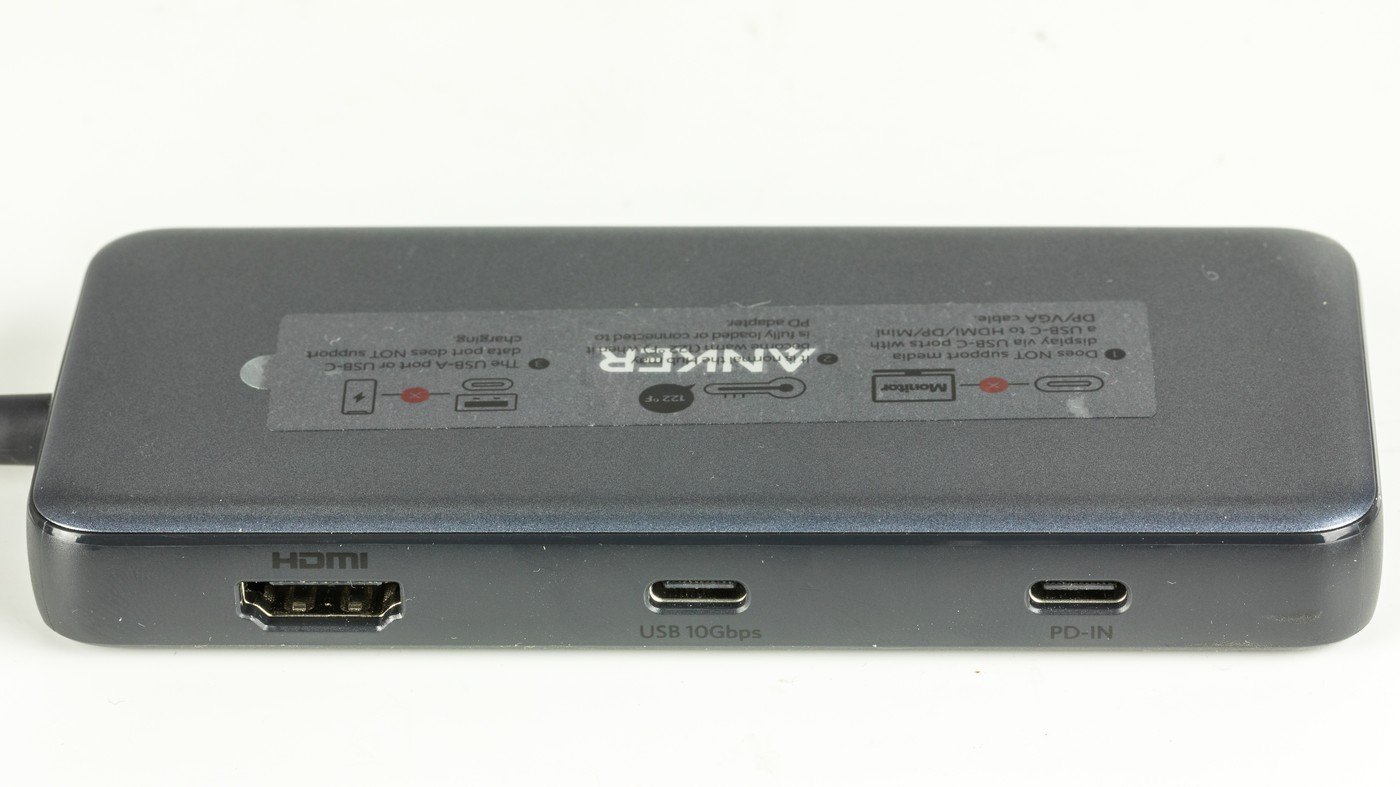
The exact model matters. Anker’s A8383 product page specifies one HDMI output, Ethernet, SD and microSD slots, two USB-A data ports and a USB-C data port. Its USB-C data connection does not output video. Use the HDMI socket for the screen.
Reasons to consider it
- It combines one HDMI screen connection with wired networking, card slots and USB data ports for a portable desk setup.
- Its documented 4K 60Hz capability suits a compatible host and monitor when you need those extra connections.
Reasons to choose something else
- Its DP 1.2 host limit makes it unsuitable for upgrading that connection from 4K 30Hz to 60Hz.
- One HDMI output does not provide a two-monitor hub arrangement.
- The downstream USB-C data port cannot serve a USB-C monitor or a second video adapter.
Our recommendation: shortlist A8383 when your documented host connection meets its display requirements and you will use its extra ports. If you only need a screen, compare a suitable direct cable before paying for a hub. For two monitors, choose equipment documented for your computer and both required modes.
Search Amazon for Anker 555 A8383
This is a model search. Check A8383, seller, package contents, current price, stock and return terms. We have not verified a current Amazon listing or ASIN.
Choose the next purchase from the failed check
Keep the hub if a supported display setting gives you the required mode. If you have identified an unsuitable HDMI cable, replace that cable with one documented for your target before replacing otherwise suitable equipment.
Replace the hub when its own specification limits a host connection that can otherwise meet your target. Read the replacement’s exact host conditions. A second product carrying the same “4K 60Hz” headline can require the same missing capability.
Use another supported display route when your laptop cannot meet the chosen hub’s requirements. A direct HDMI, DisplayPort or USB-C display connection may be an option if the laptop and screen documentation supports your target. Verify that route independently; this article does not promise a workaround for a particular laptop.
For a permanent desk with more displays and peripherals, compare the full connection plan in our hub versus docking station guide. If the screen works but charging does not meet your needs, our pass-through charging guide explains the separate host-power limit.
Frequently asked questions
Does a 4K 60Hz label guarantee 60Hz on my laptop?
No. Match the exact hub’s host requirement, monitor input, cable and selected mode. A8383 illustrates why: its published result differs between DP 1.2 and DP 1.4 hosts.
Can I connect a USB-C to HDMI adapter to A8383’s USB-C data port?
Anker says that port does not support video output. Use the hub’s HDMI output, or choose a separately supported display connection.
Does 10Gbps USB mean the hub can run my monitor at 60Hz?
No. A USB data-rate claim does not replace the product’s display specification. Check its resolution, refresh rate and host conditions together.
Should I buy a 4K 120Hz hub for a 4K 60Hz monitor?
Only if another documented requirement justifies it. For this single-screen job, we would buy a connection explicitly supported at 4K 60Hz by the whole setup. A higher advertised ceiling alone does not establish compatibility or improve the monitor’s maximum rate.
Does 60Hz mean every game will run at 60 frames per second?
No. Refresh rate describes the screen’s updates. It does not establish a game’s rendered frame rate. We have not benchmarked gaming performance or latency.
Sources and method
We checked the primary sources below on November 14, 2026. This is document-based buying advice for one HDMI display. Manufacturer specifications are published capabilities; the purchase sequence and recommendations are editorial judgments. We did not test the hub, measure motion or latency, verify a laptop-and-monitor combination, or check a current retail offer. Read our research methodology.
- Anker US: 555 USB-C Hub, model A8383: exact model, HDMI output and USB-C data-port limitations.
- Anker Germany: A8383 display conditions: the stated DP 1.4 / 4K 60Hz and DP 1.2 / 4K 30Hz pairing. These are model-specific conditions.
- HDMI Licensing Administrator: cable types and certification: High Speed and Premium High Speed capabilities.
- Microsoft: change a monitor’s refresh rate: definition, Windows controls and resolution-dependent options.